Please tell me how to use ReadBase64.

This Q&A forum allows users to post and respond to "How Do I Do ....." questions. Please do not use to report (suspected) errors - you must use your regional help desk for this. The information contained in this forum has not been validated by LANSA and, as such, LANSA cannot guarantee the accuracy of the information.
Post Reply
User avatar
Take4
Posts: 5
Joined: Thu Feb 16, 2017 7:04 pm

Please tell me how to use ReadBase64.

Post by Take4 »

I'm trying to use XPRIM_RandomAccessJsonReader to assign a base64 JSON to a BLOB type.

But it doesn't work

The following JSON.

Code: Select all

{
  "err":false,
  "state":100,
  "Messages":"Sucess",
  "detailMessages":"",
  "data":{
    "filename":"scan00007",
    "filetype":"TIF",
     "fileobject":[73,73,42,0,8,0,0,0,19,0,254,0,4,0,1,0,0,0,2,0,0,0,0,1,...........
This code won't succeed

Code: Select all

#STD_BLOB := #Reader.ReadBase64StringWithPathIntoFile( 'data/fileobject' )
Other values can be obtained without any problem.

Please help me
| | -- Take4 --
V -- LANSA Japan --
User avatar
Dino
Posts: 477
Joined: Fri Jul 19, 2019 7:49 am
Location: Robbinsville, NC
Contact:

Re: Please tell me how to use ReadBase64.

Post by Dino »

I would attack that as an array, either with BeginArrayWithName or ReadArrayWithPath, then work the conversion of types.

Code: Select all

#Reader.SetSourceHttpResponse Httpresponse(#Request.Response) Errorinfo(#ErrorInfo)
If (#ErrorInfo.OK.IsFalse)
Return
Endif

#err := #Reader.ReadStringWithPath( "err" )
#state := #Reader.ReadNumberWithPath( "state" )
#Reader.BeginObjectWithPath( "data" )
#filename := #Reader.ReadStringWithPath( "filename" )

#Reader.BeginArrayWithName Name("fileobject") Found(#Found)

* or

For Each(#Item) In(#Reader.ReadArrayWithPath( 'fileobject' ))
* ...
Endfor
Also check this other post viewtopic.php?t=1772 for handling of the Array in it
User avatar
Dino
Posts: 477
Joined: Fri Jul 19, 2019 7:49 am
Location: Robbinsville, NC
Contact:

Re: Please tell me how to use ReadBase64.

Post by Dino »

I am pretty sure i am missing somewhere to find the array to base64.... but in the meantime as a temporary solution simple routine can do it... a better solution maybe a widget, but most likely it should be already somewhere in the json properties.
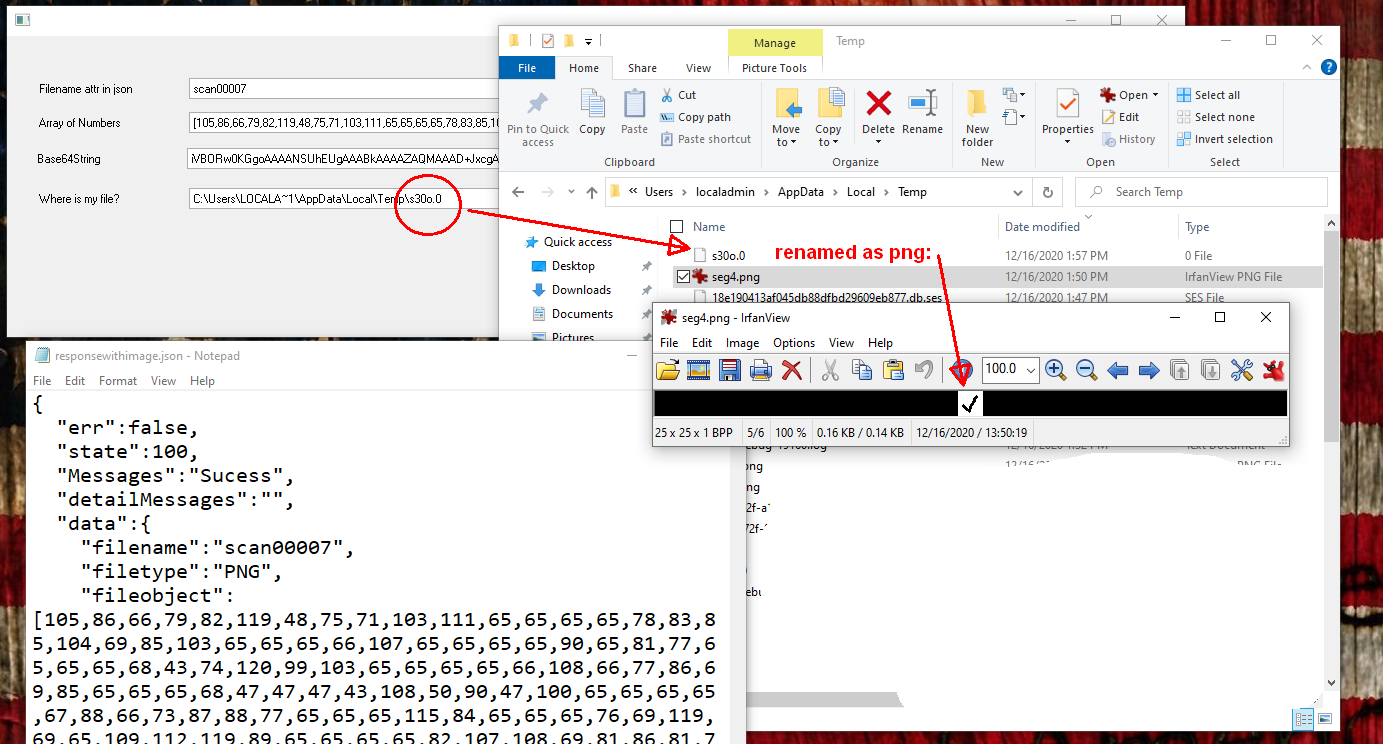
jsonarray.png
jsonarray.png (218.78 KiB) Viewed 9641 times
I am using this .json file, which i called responsewithimage.json and placed in my images/temp folder in the webserver:

Code: Select all

{
  "err":false,
  "state":100,
  "Messages":"Sucess",
  "detailMessages":"",
  "data":{
    "filename":"scan00007",
    "filetype":"PNG",
    "fileobject":[105,86,66,79,82,119,48,75,71,103,111,65,65,65,65,78,83,85,104,69,85,103,65,65,65,66,107,65,65,65,65,90,65,81,77,65,65,65,68,43,74,120,99,103,65,65,65,65,66,108,66,77,86,69,85,65,65,65,68,47,47,47,43,108,50,90,47,100,65,65,65,65,67,88,66,73,87,88,77,65,65,65,115,84,65,65,65,76,69,119,69,65,109,112,119,89,65,65,65,65,82,107,108,69,81,86,81,73,109,87,80,52,47,47,57,47,65,119,77,71,99,82,57,69,57,73,77,73,102,105,68,120,84,120,53,69,50,77,79,73,80,50,67,105,72,107,106,56,65,67,114,43,47,81,70,73,102,80,119,73,74,68,52,56,66,104,73,47,107,111,72,69,72,50,85,103,56,89,56,100,90,66,83,89,79,65,52,105,51,109,78,89,66,65,65,104,121,107,51,120,86,79,100,74,80,119,65,65,65,65,66,74,82,85,53,69,114,107,74,103,103,103,61,61]
       }
}
In this json file, I placed a PNG file as an array of numbers (using the website https://www.browserling.com/tools/file-to-base64 ). The image is just a very small check image. You may need to use longer strings than the default std_strng for these kind of program, this is just an example. I used a defined in the repository #longstring and #longstring2 string fields of 65535 length.

This is my form:

Code: Select all

Function Options(*DIRECT)
Begin_Com Role(*EXTENDS #PRIM_FORM) Clientwidth(1178) Clientheight(301) Componentversion(2) Left(698) Top(230)

Define_Com Class(#STD_NAME.Visual) Name(#STD_NAME) Componentversion(1) Displayposition(1) Height(21) Left(32) Parent(#COM_OWNER) Tabposition(1) Top(42) Usepicklist(False) Width(566) Caption('Filename attr in json') Labeltype(Caption)
Define_Com Class(#longstring.Visual) Name(#longstring) Componentversion(1) Displayposition(2) Left(32) Parent(#COM_OWNER) Tabposition(2) Top(76) Width(1081) Height(21) Usepicklist(False) Caption('Array of Numbers') Labeltype(Caption)
Define_Com Class(#STD_QSEL.Visual) Name(#STD_QSEL) Componentversion(1) Displayposition(3) Height(21) Left(32) Parent(#COM_OWNER) Tabposition(3) Top(152) Usepicklist(False) Width(951) Caption('Where is my file?') Labeltype(Caption)
Define_Com Class(#longstring2.Visual) Name(#longstring2) Componentversion(1) Displayposition(4) Left(30) Parent(#COM_OWNER) Tabposition(4) Top(112) Width(995) Height(21) Usepicklist(False) Caption('Base64String') Labeltype(Caption)

Evtroutine Handling(#com_owner.CreateInstance)

Define_Com Class(#XPRIM_HttpRequest) Name(#Request)
Define_Com Class(#XPRIM_UriBuilder) Name(#URL)
Define_Com Class(#XPRIM_RandomAccessJsonReader) Name(#Reader)
Define_Com Class(#XPRIM_ErrorInfo) Name(#ErrorInfo)
Define_Com Class(#XPRIM_Binary) Name(#File)

#Url.SetScheme( 'http' )
#Url.SetHost( 'localhost:8080' )
#Url.SetPath( '/images/temp/responsewithimage.json' )
#Request.DoGet Url(#Url)

* Start constructing the object
If (#Request.Response.IsSuccessfulRequest)
#Reader.SetSourceHttpResponse Httpresponse(#Request.Response) Errorinfo(#ErrorInfo)
If (#ErrorInfo.OK.IsFalse)
Return
Endif

* get state, filename
* #state := #Reader.ReadNumberWithPath( "state" )
#std_name := #Reader.ReadStringWithPath( "data/filename" ).AsNativeString

* get the array at fileobject and places it in an string
#longstring += #Reader.ReadArrayWithPath( 'data/fileobject' ).AsArray.AsString.AsNativeString

* Convert the array of numbers in a Base64String
#COM_OWNER.ArrayToBase64String Stringwitharray(#longstring) Base64string(#longstring2)

* Convert the 64basestring in a file... I cant find a #File.FromArray which will be the easier.
#File.FromBase64String String(#longstring2)

* This is just the route to the resultant file or the assignation to a blob #STD_BLOB
#STD_BLOB := #File.AsFile
#STD_QSEL := #STD_BLOB
Endif

Endroutine

Mthroutine Name(ArrayToBase64String)
Define_Map For(*INPUT) Class(#longstring) Name(#StringwithArray)
Define_Map For(*OUTPUT) Class(#longstring) Name(#Base64String)
* reads longstring which contains numbers separated by commas and put together as a base64string, removing the []
#std_count := 2
#Base64String := ''
#std_amnt := #longstring.trim.CurChars - 1
Dowhile (#std_count < #std_amnt)
#std_numl := #StringWithArray.PositionOf( ',' #std_count )
If (#std_numl = 0)
#std_num := #StringWithArray.Substring( #Std_count (#std_amnt - #std_count + 1) ).AsNumber
#Base64String += #std_num.AsChar
Leave
Else
#std_num := #StringWithArray.Substring( #Std_count (#std_numl - #std_count) ).AsNumber
#Base64String += #std_num.AsChar
#std_count := #std_numl + 1
Endif
Endwhile
Endroutine

End_Com
notice the reading of the array here, where I also moved it to a longstring (65535):

Code: Select all

* get the array at fileobject and places it in an string
#longstring += #Reader.ReadArrayWithPath( 'data/fileobject' ).AsArray.AsString.AsNativeString
basically the string reads the content of the array (which is just a list of numbers, not really Base64String until we convert that to ascii characters:

Code: Select all

[105,86,66,79,82,119,48,75,71,103,111,65,65,65,65,78,83,85,104,69,85,103,65,65,65,66,107,65,65,65,65,90,65,81,77,65,65,65,68,43,74,120,99,103,65,65,65,65,66,108,66,77,86,69,85,65,65,65,68,47,47,47,43,108,50,90,47,100,65,65,65,65,67,88,66,73,87,88,77,65,65,65,115,84,65,65,65,76,69,119,69,65,109,112,119,89,65,65,65,65,82,107,108,69,81,86,81,73,109,87,80,52,47,47,57,47,65,119,77,71,99,82,57,69,57,73,77,73,102,105,68,120,84,120,53,69,50,77,79,73,80,50,67,105,72,107,106,56,65,67,114,43,47,81,70,73,102,80,119,73,74,68,52,56,66,104,73,47,107,111,72,69,72,50,85,103,56,89,56,100,90,66,83,89,79,65,52,105,51,109,78,89,66,65,65,104,121,107,51,120,86,79,100,74,80,119,65,65,65,65,66,74,82,85,53,69,114,107,74,103,103,103,61,61]
because I cant find an array to base64 (maybe some other developer will chime here), I created my own routine for now:

Code: Select all

#COM_OWNER.ArrayToBase64String Stringwitharray(#longstring) Base64string(#longstring2)
which basically creates this string:

Code: Select all

iVBORw0KGgoAAAANSUhEUgAAABkAAAAZAQMAAAD+JxcgAAAABlBMVEUAAAD///+l2Z/dAAAACXBIWXMAAAsTAAALEwEAmpwYAAAARklEQVQImWP4//9/AwMGcR9E9IMIfiDxTx5E2MOIP2CiHkj8ACr+/QFIfPwIJD48BhI/koHEH2Ug8Y8dZBSYOA4i3mNYBAAhyk3xVOdJPwAAAABJRU5ErkJggg==
and now that this is an Base64String, we can convert this to a file easily. Note that #File is a binary. We can assign it directly to a blob:

Code: Select all

#File.FromBase64String String(#longstring2)
The blob wont have an extension and you will need to rename it after that. that is the reason for the other information in your json file. The blob file will be in %TEMP% in your computer or the temp folder in the IBM.
User avatar
Take4
Posts: 5
Joined: Thu Feb 16, 2017 7:04 pm

Re: Please tell me how to use ReadBase64.

Post by Take4 »

Thank you very much.

I was able to get the data within 64K.
However, the data I want to get is over 64K.

If you know how to solve this problem, please give me some advice.

Thank you.
| | -- Take4 --
V -- LANSA Japan --
User avatar
Dino
Posts: 477
Joined: Fri Jul 19, 2019 7:49 am
Location: Robbinsville, NC
Contact:

Re: Please tell me how to use ReadBase64.

Post by Dino »

Ok, I found easier (as an option till somebody chimes with a better solution) to create a widget with the javascript needed and use the widget to display the large image in this case (or return a blob, etc)... notice not longer a black and white check....

This is my result:
largejson1.png
largejson1.png (381.07 KiB) Viewed 9595 times
this is the code for the LANSA web page:

Code: Select all

Begin_Com Role(*EXTENDS #PRIM_WEB) Theme(#SYS_THEME<MaterialDesignBlue>) Height(408) Width(688)

Define_Com Class(#TestJsonArrayToBlob) Name(#TestJsonArrayToBlob) Displayposition(2) Height(100) Left(8) Parent(#COM_OWNER) Tabposition(2) Tabstop(False) Top(8) Width(100)

Evtroutine Handling(#com_owner.CreateInstance)

#TestJsonArrayToBlob.ConvertJsonArrayToBlob Urljsonfile('/images/temp/responsewithlargeimage.json') Keyjsonfile('data/fileobject') Result(#std_blob) Contenttypejsonfile('image/png')

Endroutine

End_Com

and this is the code in the widget that i called TestJsonArrayToBlob and defined this way... note that the only code I added to the widget is the one in the //----------------------------- // WIDGET-METHOD IMPLEMENTATION //----------------------------- section:
largejson2.png
largejson2.png (16.42 KiB) Viewed 9595 times

Code: Select all

//----------------------------------------------------------
// PROVIDE A SINGLE JAVASCRIPT FUNCTION TO DEFINE THE WIDGET
//----------------------------------------------------------

function( PROTOTYPE, WIDGET )
{
  //--------------------------------------------------------
  // WIDGET-INTERFACE FUNCTIONS (CALLED FROM THE VL-RUNTIME)
  //--------------------------------------------------------

  //
  // 'onCreateInstance' - gets called when LANSA creates an instance of the widget.
  //
  PROTOTYPE.onCreateInstance = function()
  {
    // Provide code to initialize the instance, FOR EXAMPLE
    this.Caption = '';
  }

  //
  // 'onRealizeControl' - gets called when LANSA creates a visual representation of the widget.
  //
  // Parameters:
  //
  // - parentDiv : the div that's been created as a container for this control.
  //
  PROTOTYPE.onRealizeControl = function( parentDiv )
  {
    // Provide the code to visualize the widget, FOR EXAMPLE...
    parentDiv.appendChild( document.createTextNode( this.Caption ) );
  }

  //
  // 'onSizeChanged - gets called when the widget changes size.
  //
  PROTOTYPE.onSizeChanged = function()
  {
     // The widget might need to redraw itself.
  }

  //-------------------------------
  // WIDGET-PROPERTY IMPLEMENTATION
  //-------------------------------

  //-----------------------------
  // WIDGET-METHOD IMPLEMENTATION
  //-----------------------------


  //
  // ConvertJsonArrayToBlob - Converts an Array in a JSON File to Blob
  //
  // Parameters:
  // - URLjsonFile: String
  // - keyjsonFile: String
  // - contentTypejsonFile: String
  //
  // Return Type: String
  //
  PROTOTYPE.ConvertJsonArrayToBlob = function( strURLjsonFile, strkeyjsonFile, strcontentTypejsonFile )
  {

    // Implementation...     fetch('responsewithimage.json')
	
	let myArray = [];
	// As with JSON, use the Fetch API 
    fetch(strURLjsonFile)
    .then(response => response.json())
    .then(data => {

  	// Lets get the array in data.fileobject and put it in an Array [105,86,66,79,82,119,48,75,71,103....
	myArray = data.data.fileobject;
	console.log('myArray: ' + myArray);
	
    // Lets move that array to a base64string	
	var b64Data = '';
	myArray.forEach(function(item, index, array) { 
		b64Data = b64Data.concat(String.fromCharCode(item)) }); 
	
	const b64toBlob = (b64Data, contentType='', sliceSize=512) => {
    const byteCharacters = atob(b64Data);
    const byteArrays = [];

    for (let offset = 0; offset < byteCharacters.length; offset += sliceSize) {
      const slice = byteCharacters.slice(offset, offset + sliceSize);

      const byteNumbers = new Array(slice.length);
      for (let i = 0; i < slice.length; i++) {
        byteNumbers[i] = slice.charCodeAt(i);
      }

      const byteArray = new Uint8Array(byteNumbers);
      byteArrays.push(byteArray);
    }

    const blob = new Blob(byteArrays, {type: contentType});
    return blob;
    }
	
    // Lets use that base64string to create a blob file
    // const contentType = 'image/png';
    const contentType = strcontentTypejsonFile;
    console.log('b64Data: ' + b64Data);
    // const b64Data = 'iVBORw0KGgoAAAANSUhEUgAAAAUAAAAFCAYAAACNbyblAAAAHElEQVQI12P4//8/w38GIAXDIBKE0DHxgljNBAAO9TXL0Y4OHwAAAABJRU5ErkJggg==';
    const blob = b64toBlob(b64Data, contentType);
    const blobUrl = URL.createObjectURL(blob);

    // And now lets show the image
    const img = document.createElement('img');
    img.src = blobUrl;
    document.body.appendChild(img);

    return blobUrl;

  });

  }


  // Done
  return WIDGET.Completed;
}
and by the way, to generate an array of numbers (aka the array buffer) from the base64string to be able to put in a json file for this test, I created this javascript html page that shows me the array content in the page so i can copy paste that in the json file. I just paste the long string with the image in base64string format in the base64 variable in my program:

Code: Select all

<!DOCTYPE html>
<html>
<body>
<p id="demo"></p>
<script>
    var base64 = 'iVBORw0KGgoAAAANSUhEUgAAAl4AAAF ..................   mCC';
    var len = base64.length;
    var bytes = new Uint8Array( len );
    for (var i = 0; i < len; i++)        {
        bytes[i] = base64.charCodeAt(i);
		
    }

document.getElementById("demo").innerHTML = bytes;
</script>

</body>
</html> 
and I created the base64string from the png image i had using the website https://www.browserling.com/tools/file-to-base64.

Notice I am not javascript expert by any means, so this is basically pieces and parts put together from different websites I found, just an idea of how to make it work.... this was fun! have a great weekend.
Post Reply