Page 1 of 1
Stored Procedure
Posted: Wed Oct 19, 2016 12:50 pm
by wizard
Hello,
I have a stored procedure called dbo.storedproc.
Then I have load table from mssql server into lansa using 'Load Other File'. The dbo.storedproc(stored procedure) using this table whenever it invoked.
This dbo.storedproc need three user input; inputA(date) inputB(char) and inputC(char).

- asa.png (27.09 KiB) Viewed 19332 times
So this is one example I discover from Lansa doc. But I am noticed that this example for one user input. Which at:
#SQLQUERY="DBO.FINDEMPLOYEEOVERX@AGE = ' "+ #AGE +" ' "
then continue with
SELECT_SQL FIELD(#FIELD1 #FIELD2) FROM_FILES(Filename) USING(#SQLQUERY)
ADD_ENTRY ...
ENDSELECT
If this #SQLQUERY triggered. Then the stored procedure will invoked using one input. How to make it able to take multiple input. I ask in term of syntax.
And how to write SELECT_SQL statement for multiple input.
Regards
Re: Stored Procedure
Posted: Wed Oct 19, 2016 3:53 pm
by Stewart Marshall
The SQL you use in the Where parameter is the SQL that will be executed.
As for how to format this SQL, you'll need to check with the company that supplies the database engine in question.
A quick search on Google found this (
https://www.mssqltips.com/sqlservertuto ... parameters) for SQLServer
This seems to suggest that a comma is used to separate multiple parameters.
Code: Select all
dbo.uspGetAddress @City = 'Calgary', @AddressLine1 = 'A'
Re: Stored Procedure
Posted: Wed Oct 19, 2016 8:53 pm
by wizard
Stewart Marshall wrote:The SQL you use in the Where parameter is the SQL that will be executed.
As for how to format this SQL, you'll need to check with the company that supplies the database engine in question.
A quick search on Google found this (
https://www.mssqltips.com/sqlservertuto ... parameters) for SQLServer
This seems to suggest that a comma is used to separate multiple parameters.
Code: Select all
dbo.uspGetAddress @City = 'Calgary', @AddressLine1 = 'A'
Hello sir.
How do we know that we already connected to the stored procedure or thewe could reach our stored procedure that we wanted?
I just keep trying and keep got the same error.
So this is my srvroutine:
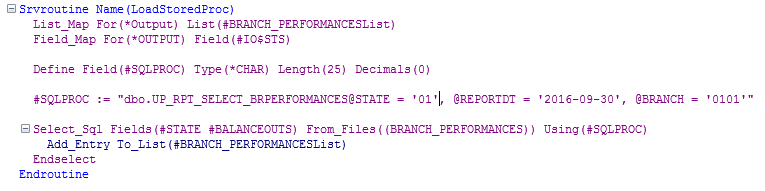
- 1.PNG (12.28 KiB) Viewed 19285 times
This is my mthroutine:
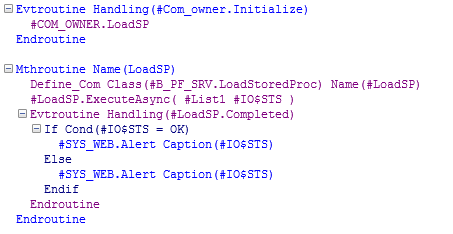
- 2.PNG (10.37 KiB) Viewed 19285 times
And this is the result:

- 3.PNG (12.52 KiB) Viewed 19285 times
I am not sure the right way to do this since there is no complete source that i can refer or ask for.
Regards.
Re: Stored Procedure
Posted: Wed Oct 19, 2016 11:00 pm
by Ingmar
it probably doesnt help your SQLPROC field allows not more than 25 chars
ingmar
Re: Stored Procedure
Posted: Thu Oct 20, 2016 12:50 pm
by wizard
Ingmar wrote:it probably doesnt help your SQLPROC field allows not more than 25 chars
Then if I change the field length to the bigger value will its works? Or the value must only 25 chars?
Regards
Re: Stored Procedure
Posted: Thu Oct 20, 2016 2:13 pm
by MarkD
The field needs to be, and can be, longer.
That might fix your problem, or there might be more issues with your code in how you formatted the USING() content.
If your server module still fails there are few standard ways to find out why:
- Check all the error logs (option in very top right of your IDE).
- Look for files named X_ERR.LOG on your web server. On an IBM i server also check for QPJOBLOG spool files.
- Run in debug mode and step the server module command by command until it fails.
The SELECT_SQL command you are using is documented here
http://docs.lansa.com/14/en/lansa015/co ... l_free.htm
It's possibly worth considering the IO_ERROR parameter. By default IO_ERROR(*ABORT) is being used.
That is probably what causes your server module to fail - ie: *ABORT.
If your USING(#XXXXX) value is wrong then the DBMS will issue an error, which LANSA will consider to be an IO_ERROR.
Re: Stored Procedure
Posted: Thu Oct 20, 2016 2:23 pm
by Stewart Marshall
You can also handle a failure of the call to the SRVRoutine better
You can monitor for the Failed event as well as the Completed event. This will stop the application crashing when the server module fails, and you can add your own code so that the user can carry on working. You can also monitor the #sys_web.RequestFailed event to handle all failures for the application. (
http://docs.lansa.com/14/en/lansa016/PR ... FAILED.htm)
Code: Select all
Mthroutine Name(LoadSP)

Define_Com ...

Evtroutine Handling(#LoadSP.Completed)
...
Endroutine

Evtroutine Handling(#LoadSP.Failed) Handled(#Handled)

#Handled := True

* User defined error handling goes here

Endroutine

endroutine
Re: Stored Procedure
Posted: Thu Oct 20, 2016 2:26 pm
by MarkD
One thing to consider about formatting SQL commands using data input from a UI is to consider that the user can type anything in.
For example you might format "CustomerNumber = '" + #CustNo + "'" as part of an SQL command.
So if a user types 324'566 into the #CustNo input field it would crash your SQL command because its becomes syntactically invalid.
If they could type 45622' OR Salary > 45000 then they could actually change what your SQL command was doing (ie: a type of SQL injection attack)