Page 1 of 1
Error Logs from ServerModules
Posted: Wed Dec 28, 2016 3:07 am
by jyoung
Sometimes my ServerModule crashes with a Fatal Error and I get the "Unrecoverable error occurred while executing the Web application routine" message.

- Capture.PNG (13.99 KiB) Viewed 12812 times
When I look for the error logs under local or web (both data and webserver) I don't have any log entries.
Should these errors be logged?
Perhaps I don't have logging enabled properly on my dev box. Is there a setting or something I need to check to ensure I get the logs?
Re: Error Logs from ServerModules
Posted: Thu Dec 29, 2016 4:21 am
by atostaine
Is your server running on i? Have you tried looking for LWEB_JOB Joblogs?
Re: Error Logs from ServerModules
Posted: Thu Dec 29, 2016 4:23 am
by jyoung
This is happening on my local dev box, so its Windows.
Re: Error Logs from ServerModules
Posted: Tue Jan 03, 2017 3:29 pm
by Stewart Marshall
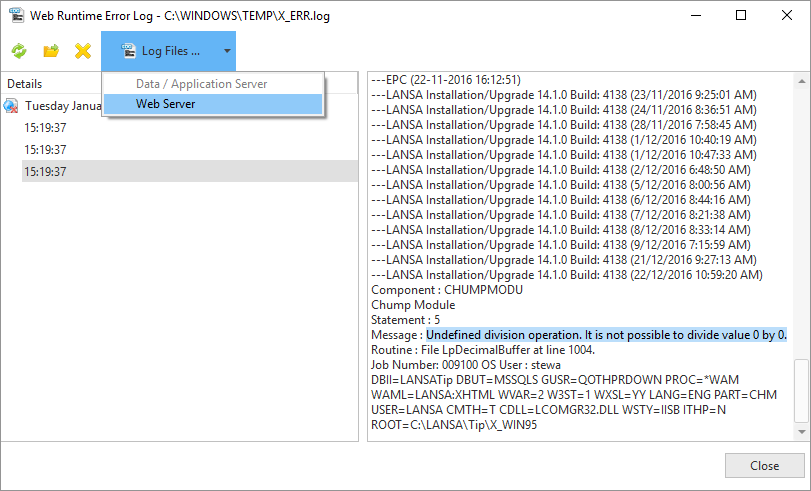
RDMLX errors that occur in the web server side are recorded in the Data/Application server error log.
- Capture.PNG (49.28 KiB) Viewed 12630 times
Re: Error Logs from ServerModules
Posted: Wed Jan 04, 2017 1:18 am
by jyoung
That's the problem, I am not getting any of those logs.
The problem turned out to be a error in the select_sql command.
I tried a divide by zero error to see if I get the log and I don't.

- error.png (12.42 KiB) Viewed 12611 times
Web Server Log
- log1.png (14.91 KiB) Viewed 12611 times
Data Server Log
- log2.png (18.02 KiB) Viewed 12611 times
Re: Error Logs from ServerModules
Posted: Thu Jan 05, 2017 1:35 pm
by Bikel
As we can see from your screenshot, the location of the web logs is c:\windows\temp, this C:\Windows\Temp location is effectively %TEMP% when IIS is running as a service. The most obvious explanation is that you don't have the authority to write to the c:\windows\temp location.
From a DOS command line, type this
start c:\windows\temp
If it opens, try to create a simple text file. If you can't do either of these, lack of permissions is probably the reason the logs can't be written.
After running that command, I was told (I've never seen this) that if you don't have permission to view this folder, a dialog is displayed where you can select to allow you to view the folder.
HTH
Re: Error Logs from ServerModules
Posted: Fri Jan 06, 2017 1:20 am
by jyoung
Come to find out I don't have access to that folder.
I got the dialog like you mentioned (wish I would have screen shot it) but after I hit Ok (or something I don't recall what it was) I can run the command again and get access to the folder.
Running the divide by zero routine and I get the error in the logs!
Thanks a ton! That has been bothering me for awhile and I did not even think to check the permissions.
Thanks again!
Joe