Page 1 of 1
Users and Task Ids
Posted: Wed Jan 25, 2017 8:47 am
by jyoung
I've been using DCXPGMLIB and one task to do all my recent development.
I would like to start using Tasks to track work.
So I logged into the IBM i as DCXPGMLIB and closed and finished the task I was working with.
I then went into the Administration menu and authorized myself in the "Authorize Visual LANSA Developer".
I then created a new Task and added myself as the authorized user.
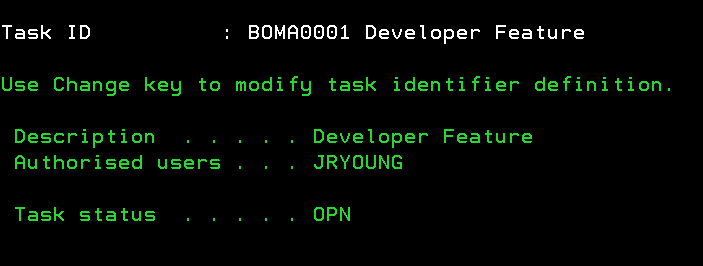
- Capture1.PNG (7.33 KiB) Viewed 9718 times
Now when I log into Visual LANSA, if I use DCXPGMLIB the Task shows up.
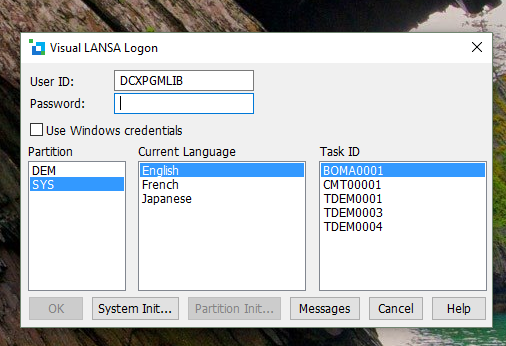
- Capture2.PNG (113.1 KiB) Viewed 9718 times
But if I use my account, the task does not show up. If I just try to login without selecting a task, I get the "User is not known to LANSA" message.
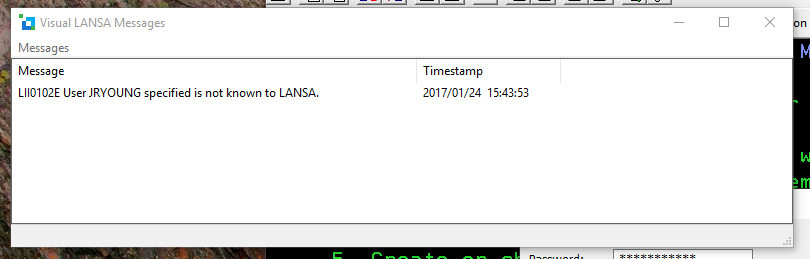
- Capture4.PNG (35.72 KiB) Viewed 9718 times
I feel like I am missing something but cannot seem to figure out what it is. I can log into the IBM i with JRYOUNG and I've authorized JRYOUNG as a developer. What else should I check to use my own account instead of DCXPGMLIB?
Re: Users and Task Ids
Posted: Wed Jan 25, 2017 9:15 am
by jyoung
I found the LANSA REQUEST(PCMAINT) command and added myself as a user.
Now I can log on, but I cannot checkout objects.

- Capture5.PNG (8.79 KiB) Viewed 9716 times
Re: Users and Task Ids
Posted: Thu Jan 26, 2017 1:56 am
by jyoung
So I may have figured this out. Would love some feedback.
When I looked at the security on a specific object I noticed that PUBLIC only had use access and DCXPGMLIB had full access.
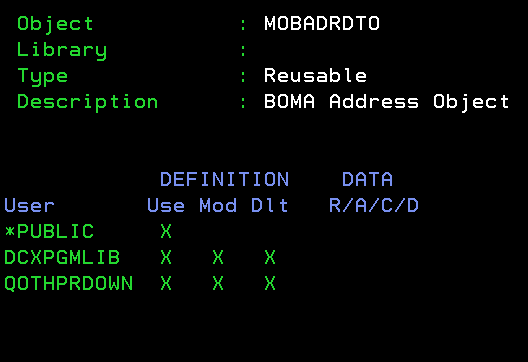
- Object Security.PNG (7.78 KiB) Viewed 9699 times
I looked in the user settings and noticed that I am in the QPGMR group.
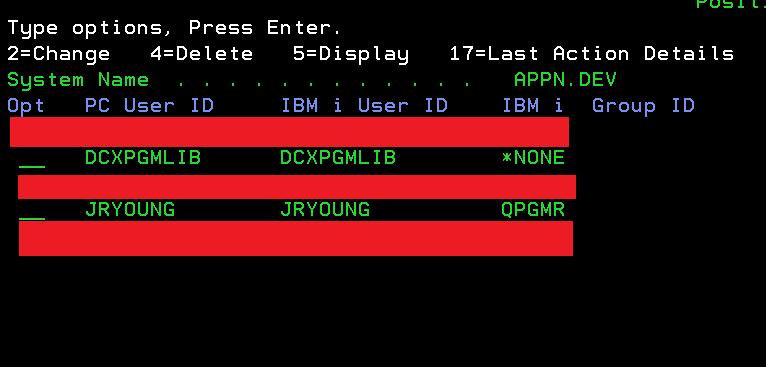
- Users.PNG (7.01 KiB) Viewed 9699 times
So I added QPGMR to have access
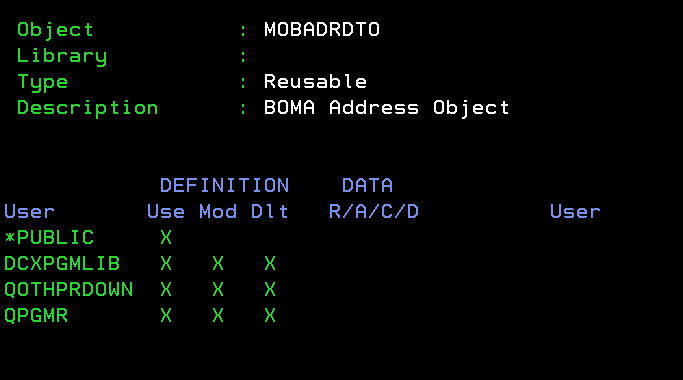
- QPGMR.PNG (8.77 KiB) Viewed 9699 times
Then a restart of Visual LANSA and I was able to access the object.
I am assuming that since most (pretty much all) objects where created under DCXPGMLIB that no other security access was granted to the object.
Then I ended up adding QPGMR to all the objects I created while I was using DCXPGMLIB.
In hindsight, perhaps it is best to NOT use DCXPGMLIB from the start and to setup your users and security first.

Hopefully this helps someone else.
Re: Users and Task Ids
Posted: Thu Jan 26, 2017 5:30 am
by PierreLefrancois
Hello,
In order for a user to be able to check-out an object for changes, the user or the group it belongs to, must have access in the LANSA security.
When you create an object in the repository, the security is set as follows :
The LANSA owner and the partition security officer gets full access.
If the user profile creating the object is setup as OWNER(*GRPPRF), then the group associated with the user profile gets full access.
If the user profile creating the object is setup as OWNER(*USRPRF), then only the user profile gets full access.
*Public gets NORMAL access (which means use only).
Suggestion : Never use LANSA owner or partition sec officer to create objects. Setup a group profile named DEV and have all your developers be part of that group and make sure each developer’s user profile has OWNER(*GRPPRF).
That way, any objects created by any developer is available for check-out (if it’s not already locked to a task of course).
If you have many objects with the wrong security in your repository, you will have to adjust it. You can use the F16=SelectAll and F15=BulkChg from the “HouseKeeping/Review access to objects defined within LANSA” to change many objects (not quite easy as GRTOBJAUT but it will be a time saver).
As of LANSA version 13.2, after this is done, you will need to refresh your PC repository with this new information. Use Master Objects/All object types from the IDE.
One more thing about new task Id’s being available on the PC. If you setup Repository Propagation, Task Ids will get propagated automatically to the PCs when it’s created on the IBM i.
Hope this helps - Pierre