Page 1 of 1
Need Advice on Specifying RAMP-One folder name in VLF-ONe at runtime
Posted: Tue Jan 31, 2017 3:59 am
by PatrickF
I have built an Export list and imported a VLFOne/RAMPOne application from DEV to TST. I have the Framework Files including the VLFOne .DAT file setup as External Resources and they extract correctly in the x_tst/execute folder on the IFS. The VLF One loads in TST and I can login. However, when running trace, I can see that the private folder it uses is dev (I name my private folders the same as the LANSA partition). I am looking for advice on best practice to set the private folder name in a non-development partition. In VLF-WIN, my technique is to have a servers.xml External Resource for TST and PRD that would reference the correct private folder and deploy that. In VLF-Web and VLF.Net the RAMP-TS private folder is part of the URL (TSPrivateSet=tst+TSPRIVATESHARED=TRUE) and therefore is set at run time.
Is there a way to set the RAMP-TS folder in the VLF One URL at run time ?
Re: Need Advice on Specifying RAMP-One folder name in VLF-ONe at runtime
Posted: Tue Jan 31, 2017 11:50 am
by MarkD
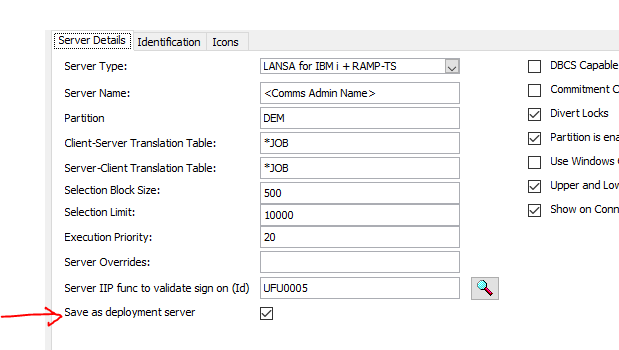
The RAMP and logon server default values that VLF-ONE uses at execution time are saved into your xxxxxxxxxxxxxxx_LLL_VLFONE_
Definition.DAT file from the server definition that is tagged as the deployment server …….
- capture1.png (14.78 KiB) Viewed 5855 times
So if you had your test server and production server both defined you could toggle between them to set the RAMP and logon server defaults used in your xxxxxxxxxxxxxxx_LLL_VLFONE_Definition.DAT file, but you'd have to remember which one to set on every save.
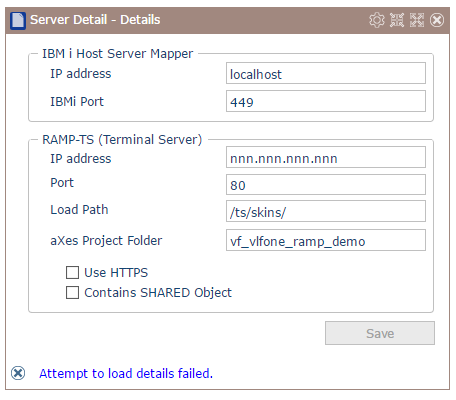
To override the defaults in-situ you need shipped command handler VF_CH009O in your framework.
For example, the shipped demo framework uses VF_CH009O as the option Administration -> Server Details:
- capture2.png (16.12 KiB) Viewed 5855 times
This program allows you to locally override the logon server and RAMP defaults shipped in your xxxxxxxxxxxxxxx_LLL_VLFONE_Definition.DAT file. It should create a file named xxxxxxxxxxxxxxx _ENG_VLFONE_
Configuration.DAT in your partition execute folder. You can find out more about shipping administration components as part of your VLF-ONE application here
http://docs.lansa.com/14/en/lansa048/in ... 8_6620.htm