Page 1 of 1
Corrupt/Missing License
Posted: Fri Feb 17, 2017 9:28 am
by jyoung
Is it possible to get a corrupt or missing license all of a sudden?
I working along and all of a sudden I started getting license errors with VLF-ONE. I got the "The service is not available, has failed, or has an expired license" message.
I tried my other app and got the fatal error "Error executing OFCSM.GETALL: Application server does not have a valid licence."
These are my licensed products, everything was working and then it all stopped.
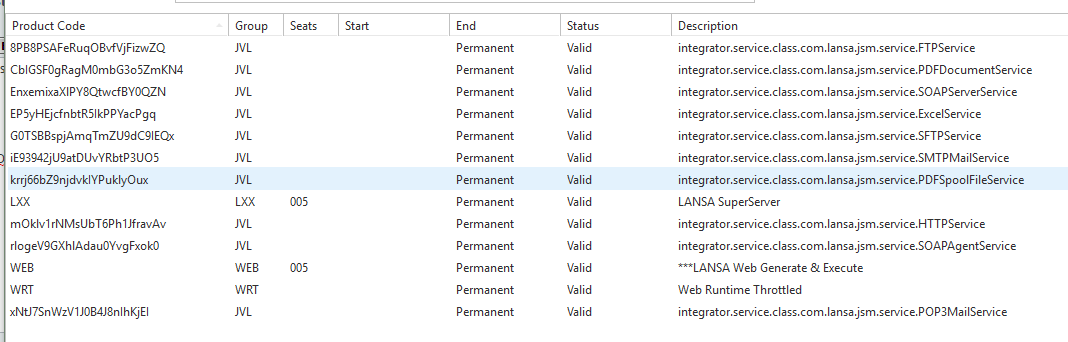
- Capture.PNG (30.15 KiB) Viewed 10165 times
I rebooted my PC and still nothing.
Re: Corrupt/Missing License
Posted: Fri Feb 17, 2017 10:45 am
by MarkDale
It is probably best to report this kind of problem to support, who are experienced in diagnosing such problems.
It is possible for a licence to expire.
There are 2 links:
1. Browser -> Webserver
2. Webserver -> Data Application server
It seems like it is the second link that is failing. Sometimes it is because the listener is not started on the server.
You can test whether the first link is ok using url:
http://host:port/cgi-bin/lansaweb?about
You can use the Web administrator (Start menu --> LANSA --> Settings and administration --> Web Administrator), and try Options --> Connect to see if that is working.
Are you getting the data from your local PC or from an IBMi?
Re: Corrupt/Missing License
Posted: Sat Feb 18, 2017 1:08 am
by jyoung
It just started happening on my local machine. The servers (dev and production) are working fine.
The browser renders client components fine, but when I try to access a server module, I get the licence expired message.
The about function, you mentioned works fine.
Probably best that I do contact support.
Thanks,
Joe
Re: Corrupt/Missing License
Posted: Sat Feb 18, 2017 1:39 am
by VLNinja70
What about regular web pages that are not VLOne just VLWeb?
I think you'll get the web page to come up but might have an issue with the server module.
Try running http://host:port/installname/partition/xvlwebtst.html
Run the test and see if something comes back.
If it doesn't then its going to be something in the web admin.
My best guess would be that your local profile's password used for the web has expired?
Take a look in control panel >> computer management >> local users + groups.
Re: Corrupt/Missing License
Posted: Sat Feb 18, 2017 1:46 am
by jyoung
You're right, I can get a web page up, but not a server module.
When I run
http://localhost:8080/lansa/sys/xvlwebtst.html
I get the same error.
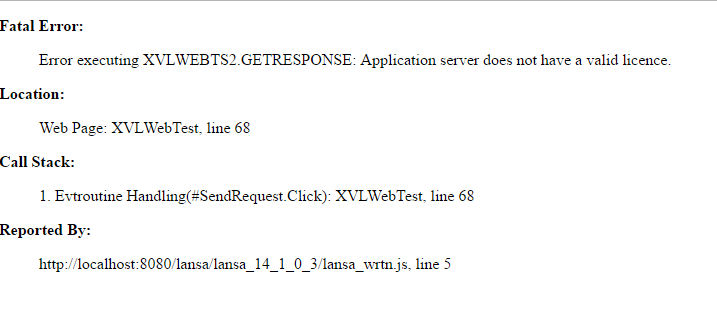
- capture2.PNG (20.2 KiB) Viewed 10139 times
Its really bizarre as it was working one moment and then stopped.
I can use the Web Administrator to connect to the local host system.
I have not tried deleting all the licenses and re-importing them. Will see what support has to say first.
I've contacted to support, hopefully they will the will be in touch soon and I will post the fix.
Thanks,
Joe
Re: Corrupt/Missing License
Posted: Sat Feb 18, 2017 2:35 am
by jyoung
Come to find out something was going on with the listener. It was in a perpetual stopping state.
Had to kill that process. Starting it up again would then fail.
Had to kill everything LANSA related to restart the listener. Once it was restarted, everything started working again.
Don't why it was trying to stop or why a reboot did not solve it.
Regardless, the listener is something to double check when everything seems to going haywire.