Page 1 of 1
Deployment (Windows): Start Icon
Posted: Tue Jun 28, 2016 8:02 pm
by Joerg Hamacher
Hi,
how can I tell the deployment tool to automatically create a desktop icon on the target PC to start the application.
My deployment package is based on "Client application using SuperServer Built-In Functions to connect to the data server".
Operating systems on my development laptop is Windows 10, operating system on the target PC is Windows 10,too.
Cheers,
Joerg
Re: Deployment (Windows): Start Icon
Posted: Wed Jun 29, 2016 11:23 am
by JamesDuignan
Windows client side deployments include desktop icons already.
By default it will use the Visual LANSA icon. To change this simply select the 'Application Icon' button and then add the path to the icon that you wish to use.
See the documentation for this here:
http://docs.lansa.com/14/EN/LANSA022/#lansa/dt_0005.htm
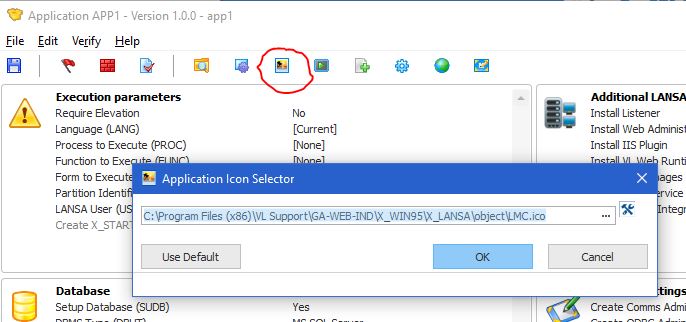
- icon.JPG (53.51 KiB) Viewed 7237 times
Re: Deployment (Windows): Start Icon
Posted: Fri Nov 18, 2016 3:16 am
by Joerg Hamacher
Hello - I like to "reopen" this post:
when creating a XCLTBIF (SuperServer Client using BIFs to connect to data server) deployment package I integrate a desktop icon into the package and set "Require Elevation" property to "No".
I thought setting "Elevation" to "No" means that no special administrator rights are necessary to install the MSI-file - but I always have to instal the file via a CMD-Window that I have opened as administrator.
And inspite of delivering a desktop icon and setting property "Create X_START Shortcuts" to YES I never get a shortcut on my desktop.
Deployment package is created in V14 on a windows10-system, installations are on windows10 systems, too.
At the moment our customers create the shortcut manually...
What are we doing wrong? Did any of you have experienced the same?
Many thanks in advance!
Joerg
Re: Deployment (Windows): Start Icon
Posted: Fri Nov 18, 2016 9:16 am
by JamesDuignan
Hi Joerg,
Correct, require elevation set to 'No' does mean that a user can perform the install without administrative rights. I have performed a quick test using the XCLTBIF template for a package and it is working ok.
Without being able to see the the package definition and installation logs this would be extremely hard to diagnose. So can you please report this to your regional LANSA Support Office.
Provide them with the deployment package from the x_apps directory as well as the MSI install logs and dpinstall log found in %temp% (make sure the date and time correspond with when you attempted the install).
Regards,
James