Page 1 of 1
Theme for required button style
Posted: Wed Apr 12, 2017 6:44 pm
by Jiri
Hello,
We have request for button style behaviour:
Inactive (dissabled) buttons should have fill color grey
Enabled buttons should fill red. All others states (i.e. focused, mouseover etc.) are identified by text style change and cursor for mouseover, the fill reminds red.
The problem is, in Theme definition, for pushButton style are available Mouseoverstyle, Focusedinactivestyle Selectedinactivestyle Selectedstyle and Focusedstyle
Therefore, all active changes are not problem, but we cannot find how to differ the color of Enabled/Dissabled button, which is not focused, not selected, not mouse placed. Can you advice how to set the theme for it?
Re: Theme for required button style
Posted: Thu Apr 13, 2017 12:15 am
by jyoung
Hi Jiri,
You may have to create a custom theme draw style for the enabled/disabled states. Then manually set the button's themedrawstyle when you enable or disable the button.
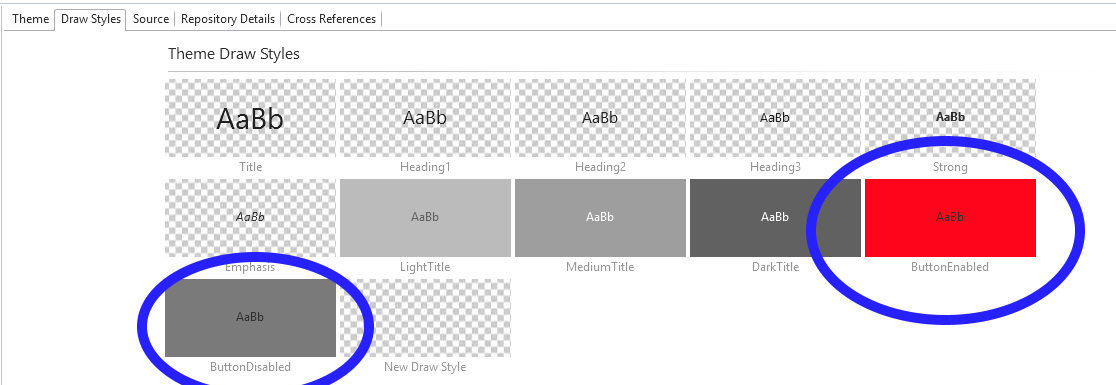
- theme.PNG (76.74 KiB) Viewed 8856 times
Code: Select all
if (#Button3.Enabled)
#Button3.Enabled := False
#Button3.ThemeDrawStyle := ButtonDisabled
else
#Button3.Enabled := True
#Button3.ThemeDrawStyle := ButtonEnabled
endif
endroutine
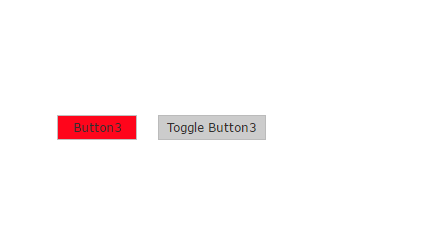
- page.PNG (2.56 KiB) Viewed 8856 times
This may get a bit messy as I don't think themes are additive, meaning you can not add multiple drawstyles to a single control. So the custom draw style may have to all the style elements for a particular state.
Re: Theme for required button style
Posted: Thu Apr 13, 2017 9:59 am
by Stewart Marshall
Hi Jiri
Currently, Theme's don't provide a way of specifying a disabled appearance, so you'll need to make a Disabled DrawStyle and apply it at runtime.
Fortunately, when defining a DrawStyle for a Disabled state, you need only specify the Style. The control will be disabled, so MouseOver, Focus and Selection become irrelevant.
If you change the PushButton DrawStyle itself to the colours you require, that will be applied automatically to all buttons, so Joe's sample code becomes as follows.
Code: Select all
if (#Button3.Enabled)
#Button3.Enabled := False
#Button3.ThemeDrawStyle := ButtonDisabled
else
#Button3.Enabled := True
#Button3.ThemeDrawStyle := ""
endif
endroutine
One important thing to note is that DrawStyles are cumulative. This can be done on the ribbon by holding down the Ctrl key, or by setting in code.
Code: Select all
#Control.ThemeDrawStyle := DrawStyle1+DrawStyle2
Only the features specifically coded in the Styles that make up a DrawStyle will be overriden. All other Style settings will remain exactly as is.
So in Joe's sample code where he's used a specific DrawStyle on a Button, you could write the following
Code: Select all
if (#Button3.Enabled)
#Button3.Enabled := False
#Button3.ThemeDrawStyle := ButtonEnabled+ButtonDisabled
else
#Button3.Enabled := True
#Button3.ThemeDrawStyle := ButtonEnabled
endif
endroutine
ButtonDisabled need only define the Fill colour. All other features of ButtonEnabled would remain unchanged.
Regards
Re: Theme for required button style
Posted: Thu Apr 13, 2017 11:08 pm
by jyoung
I did not know you could do that with DrawStyles.
Good to know!