Page 1 of 1
PRIM_LIST.Number spin buttons
Posted: Sat Jun 17, 2017 1:29 am
by atostaine
How can I hide the spin buttons? They don't make much sense for most of my numeric fields, like extension here that is mostly calculated but the user can zero out qty/rate and enter an extension.
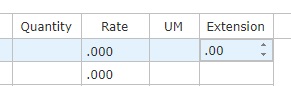
- Untitled.jpg (8.12 KiB) Viewed 6021 times
Re: PRIM_LIST.Number spin buttons
Posted: Mon Jun 26, 2017 3:33 pm
by Stewart Marshall
Hi Art
Prim_list columns are a specific type e.g. String, number etc. The source is simply there to define the variable to be used for the data value.
Numeric columns always show as a spin edit. However, string columns only ever show as a simple edit. So, by defining a string column to have a numeric source, you get precisely the behaviour you're after.
Code: Select all
Begin_Com Role(*EXTENDS #PRIM_WEB) Height(608) Width(840)
Define_Com Class(#PRIM_PPNL) Name(#Popup1) CloseButton(True) Left(184) TitleBar(True) Top(39) Height(234) Width(321) AutoClose(False) TouchMove(Both)
Define_Com Class(#PRIM_LIST) Name(#List1) DisplayPosition(1) Left(18) Parent(#COM_OWNER) TabPosition(1) Top(37) Height(468) Width(751)
Define_Com Class(#PRIM_LIST.String) Name(#ColumnXDEMONUMB1) ColumnWidth(131) DisplayPosition(1) Parent(#List1) Source(#xDemoNumber) ColumnReadOnly(False)
Define_Com Class(#PRIM_LIST.String) Name(#ColumnXDEMODECI1) ColumnWidth(196) DisplayPosition(2) Parent(#List1) Source(#xDemoDecimal) ColumnReadOnly(False)

Evtroutine Handling(#Com_owner.CreateInstance)

Begin_Loop Using(#xDemoNumber) To(20)

#xDemoDecimal := #xDemoNumber + .123456789
Add_Entry To_List(#List1)

End_Loop

Endroutine

End_Com
Regards
Re: PRIM_LIST.Number spin buttons
Posted: Tue Jun 27, 2017 9:26 am
by atostaine
Thank you Stewart.