Page 1 of 1
VL Web - How to divide text on several lines
Posted: Thu Aug 03, 2017 7:10 pm
by RomainM
Hi,
To manage different devices, I would like that the following screen

- WordWrap1_bis.JPG (12.25 KiB) Viewed 7578 times
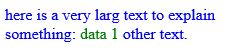
should be this one on a small device
- WordWrap2_bis.JPG (11.67 KiB) Viewed 7578 times
Note the two colors !
Using WAM it is simple to do that, but how can we do that with VL Web ?
Best regards.
Re: VL Web - How to divide text on several lines ?
Posted: Fri Aug 04, 2017 9:52 am
by Stewart Marshall
Hi Romain
This is simple in VL too.
The simple solution is to use an HTML control and to populate it with text as required.
The control is ContentHeightFitToWidth, so as the page size changes, the text will wrap and the control will get bigger/smaller as required
Regards
Code: Select all
Begin_Com Role(*EXTENDS #PRIM_WEB) Height(544) Width(640) LayoutManager(#Layout1)
Define_Com Class(#PRIM_TBLO) Name(#Layout1)
Define_Com Class(#PRIM_TBLO.Column) Name(#Column1) DisplayPosition(1) Parent(#Layout1)
Define_Com Class(#PRIM_TBLO.Column) Name(#Column2) DisplayPosition(2) Parent(#Layout1) Width(2)
Define_Com Class(#PRIM_TBLO.Column) Name(#Column3) DisplayPosition(3) Parent(#Layout1)
Define_Com Class(#PRIM_TBLO.Row) Name(#Row1) DisplayPosition(1) Parent(#Layout1)
Define_Com Class(#PRIM_TBLO.Row) Name(#Row2) DisplayPosition(2) Parent(#Layout1) Height(2)
Define_Com Class(#PRIM_TBLO.Row) Name(#Row3) DisplayPosition(3) Parent(#Layout1)
Define_Com Class(#PRIM_TBLO.Item) Name(#LayoutItem1) Column(#Column2) Manage(#Html) Parent(#Layout1) Row(#Row2) Sizing(ContentHeightFitToWidth) Alignment(TopCenter) Flow(Down)
Define_Com Class(#PRIM_TBLO.Item) Name(#LayoutItem2) Column(#Column2) Manage(#Label1) Parent(#Layout1) Row(#Row2) Sizing(FitToWidth) Flow(Down) Alignment(TopCenter)
Define_Com Class(#PRIM_TBLO.Item) Name(#LayoutItem3) Column(#Column2) Manage(#Label2) Parent(#Layout1) Row(#Row2) Sizing(FitToWidth) Flow(Down) Alignment(TopCenter)

Define_Com Class(#PRIM_WEB.HtmlContainer) Name(#Html) Description('Html Container') DisplayPosition(2) Height(121) Left(160) Parent(#COM_OWNER) TabPosition(1) TabStop(False) Top(168) Width(320)
Define_Com Class(#PRIM_LABL) Name(#Label1) Caption('Heading') DisplayPosition(1) Ellipses(Word) Height(32) Left(160) Parent(#COM_OWNER) TabPosition(3) TabStop(False) Top(136) VerticalAlignment(Center) Width(320) Alignment(Center) ThemeDrawStyle('Heading1+MediumTitle')
Define_Com Class(#PRIM_LABL) Name(#Label2) Caption('Footer') DisplayPosition(3) Ellipses(Word) Height(32) Left(160) Parent(#COM_OWNER) TabPosition(2) TabStop(False) Top(289) VerticalAlignment(Center) Width(320) Alignment(Center) ThemeDrawStyle('Heading1+MediumTitle')

Evtroutine Handling(#Com_owner.CreateInstance)

#Html := "Lorem ipsum dolor sit amet, consectetur adipiscing elit. <Span Style=Color:Green;font-size:20px;>Mauris non tristique velit. </Span>Proin lobortis nec sem in interdum. Donec vestibulum <Span Style=Color:Red>nisl vitae libero commodo volutpat.</Span> Nulla pretium mi feugiat massa vestibulum euismod vel id erat. Maecenas feugiat iaculis eros, vitae euismod massa molestie eu. Ut quis lacus diam. Morbi nulla nibh, blandit nec felis ac, rutrum sodales ipsum. <Span Style=Color:Blue>Donec ut magna quis dui</Span>  fermentum fringilla. Etiam vitae enim dui. Mauris nibh lorem, venenatis vitae est eget, tincidunt consectetur justo."

Endroutine

End_Com
Re: VL Web - How to divide text on several lines ?
Posted: Sat Aug 05, 2017 12:55 am
by RomainM
Stewart Marshall wrote: Fri Aug 04, 2017 9:52 am
Hi Romain
This is simple in VL too.
The simple solution is to use an HTML control and to populate it with text as required.
The control is ContentHeightFitToWidth, so as the page size changes, the text will wrap and the control will get bigger/smaller as required
Regards
It is a solution, but can I use themes with this solution?
Re: VL Web - How to divide text on several lines
Posted: Mon Aug 07, 2017 9:33 am
by Stewart Marshall
Hi Romain
The HTML control itself is transparent, but the text colour will be adopted from the theme.
If you want to "theme" any embedded text colours, you'll need to do that manually, although I'm not sure how practical that is in the real world.
Here I'm replacing &1, &2...with RGB values from the Theme colors. You also have access to all the Styles instances in the Theme as well.
Regards
Code: Select all
Begin_Com Role(*EXTENDS #PRIM_WEB) Height(544) Width(640) LayoutManager(#Layout1) Theme(#SYS_THEME<2015Red>)
Define_Com Class(#PRIM_TBLO) Name(#Layout1)
Define_Com Class(#PRIM_TBLO.Column) Name(#Column1) DisplayPosition(1) Parent(#Layout1)
Define_Com Class(#PRIM_TBLO.Column) Name(#Column2) DisplayPosition(2) Parent(#Layout1) Width(2)
Define_Com Class(#PRIM_TBLO.Column) Name(#Column3) DisplayPosition(3) Parent(#Layout1)
Define_Com Class(#PRIM_TBLO.Row) Name(#Row1) DisplayPosition(1) Parent(#Layout1)
Define_Com Class(#PRIM_TBLO.Row) Name(#Row2) DisplayPosition(2) Parent(#Layout1) Height(2)
Define_Com Class(#PRIM_TBLO.Row) Name(#Row3) DisplayPosition(3) Parent(#Layout1)
Define_Com Class(#PRIM_TBLO.Item) Name(#LayoutItem1) Column(#Column2) Manage(#Html) Parent(#Layout1) Row(#Row2) Sizing(ContentHeightFitToWidth) Alignment(TopCenter) Flow(Down)
Define_Com Class(#PRIM_TBLO.Item) Name(#LayoutItem2) Column(#Column2) Manage(#Label1) Parent(#Layout1) Row(#Row2) Sizing(FitToWidth) Flow(Down) Alignment(TopCenter)
Define_Com Class(#PRIM_TBLO.Item) Name(#LayoutItem3) Column(#Column2) Manage(#Label2) Parent(#Layout1) Row(#Row2) Sizing(FitToWidth) Flow(Down) Alignment(TopCenter)

Define_Com Class(#PRIM_WEB.HtmlContainer) Name(#Html) Description('Html Container') DisplayPosition(2) Height(121) Left(160) Parent(#COM_OWNER) TabPosition(1) TabStop(False) Top(168) Width(320) ThemeDrawStyle('Heading2')
Define_Com Class(#PRIM_LABL) Name(#Label1) Caption('Heading') DisplayPosition(1) Ellipses(Word) Height(32) Left(160) Parent(#COM_OWNER) TabPosition(3) TabStop(False) Top(136) VerticalAlignment(Center) Width(320) Alignment(Center) ThemeDrawStyle('Heading1+MediumTitle')
Define_Com Class(#PRIM_LABL) Name(#Label2) Caption('Footer') DisplayPosition(3) Ellipses(Word) Height(32) Left(160) Parent(#COM_OWNER) TabPosition(2) TabStop(False) Top(289) VerticalAlignment(Center) Width(320) Alignment(Center) ThemeDrawStyle('Heading1+MediumTitle')

Evtroutine Handling(#Com_owner.Initialize)

#Html := ("Lorem ipsum dolor sit amet, consectetur adipiscing elit. <Span Style=Color:&1;font-size:20px;>Mauris non tristique velit. </Span>Proin lobortis nec sem in interdum. Donec vestibulum <Span Style=Color:&2>nisl vitae libero commodo volutpat.</Span> Nulla pretium mi feugiat massa vestibulum euismod vel id erat. Maecenas feugiat iaculis eros, vitae euismod massa molestie eu. Ut quis lacus diam. Morbi nulla nibh, blandit nec felis ac, rutrum sodales ipsum. <Span Style=Color:&3>Donec ut magna quis dui</Span>  fermentum fringilla. Etiam vitae enim dui. Mauris nibh lorem, venenatis vitae est eget, tincidunt consectetur justo.").Substitute( #COm_owner.GetFormattedColor( #Com_owner.Theme.Theme200Color ) #COm_owner.GetFormattedColor( #Com_owner.Theme.Theme500Color ) #COm_owner.GetFormattedColor( #Com_owner.Theme.Theme800Color ) )

Endroutine

Mthroutine Name(GetFormattedColor)
Define_Map For(*Input) Class(#Prim_Alph) Name(#Color)
Define_Map For(*Result) Class(#Prim_Alph) Name(#Result)

#Result := (("RGB(&1)").Substitute( #Color )).ReplaceAll( ":" "," )

Endroutine

End_Com
Regards