Page 1 of 1
Round function not show the whole value.
Posted: Wed Aug 16, 2017 2:20 pm
by nazirul_fitri
Hi all,
I have encounter some weird result from using 'round' function.
I have a calculation which will result a set of number with 2 decimal point. I want to remove the decimal point and round up the value. If I round up to one decimal point, the result will come out okay. but if I round up to 0 decimal point, it will remove the first number in the set. see below:
code :
Code: Select all
#property := (#NewCollection1 + 2802043972.89).Round( Up 1 ).AsDisplayString( EditCode_A )
result:
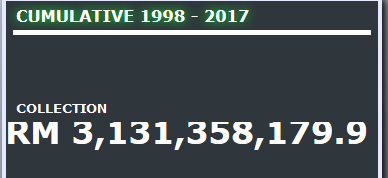
- round before.PNG (12.84 KiB) Viewed 9957 times
code:
Code: Select all
#property := (#NewCollection1 + 2802043972.89).Round( Up 0 ).AsDisplayString( EditCode_A )
result:
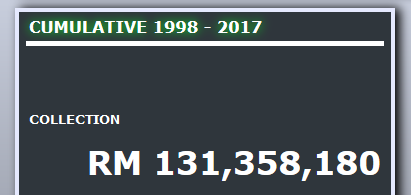
- round after.PNG (17.39 KiB) Viewed 9957 times
How can I round up to 0 decimal point without the first number getting remove?
Re: Round function not show the whole value.
Posted: Wed Aug 16, 2017 6:08 pm
by nazirul_fitri
No one know the solution??
Re: Round function not show the whole value.
Posted: Thu Aug 17, 2017 9:05 am
by GregSippel
Nazirul_fitri,
I just did a quick test page
Code: Select all
Begin_Com Role(*EXTENDS #PRIM_WEB) Layoutmanager(#Layout1)
Define_Com Class(#PRIM_VS.Style) Name(#Style1) Fontunits(Pixel) Fontsize(24)

Define_Com Class(#PRIM_TBLO) Name(#Layout1)
Define_Com Class(#PRIM_TBLO.Column) Name(#Column1) Displayposition(1) Parent(#Layout1)
Define_Com Class(#PRIM_TBLO.Row) Name(#Row1) Displayposition(1) Parent(#Layout1)
Define_Com Class(#PRIM_TBLO.Item) Name(#LayoutItem1) Column(#Column1) Manage(#Label1) Parent(#Layout1) Row(#Row1) Sizing(ContentWidthAndHeight)

Define_Com Class(#PRIM_LABL) Name(#Label1) Caption('Label1') Displayposition(1) Ellipses(Word) Height(33) Left(565) Parent(#COM_OWNER) Tabposition(1) Tabstop(False) Top(384) Verticalalignment(Center) Width(70) Style(#Style1)

Evtroutine Handling(#Com_owner.Initialize)

#Label1 := (1000000000 + 2131358179.89).AsString

Endroutine

Evtroutine Handling(#Label1.Click)

#Label1 := (1000000000 + 2131358179.89).Round( Up 0 ).AsDisplayString( EditCode_A )

Endroutine

End_Com
This produces the result you are seeking without issue as far as I can see.
I do note in the pic you sent through, the positioning of the result changes between the two different examples. This looks to me like a fixed amount of space, margin or alignment has been set. The browser is trying to make it fit, it can almost do it for the first example (but note how the top of numbers is being cut off). With the second example the first number and the comma are missing.
This make me think your logic is fine, but something about your alignment and/or sizing of the control is not quite right.
Hope this helps.
Cheers
Greg
Re: Round function not show the whole value.
Posted: Thu Aug 17, 2017 11:57 am
by nazirul_fitri
Hi Greg,
I try to use your quick test code, but it seems the problem is still there. The first number, which is '3' is missing.
before:
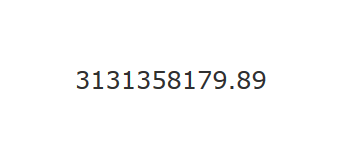
- before.PNG (3 KiB) Viewed 9913 times
after:
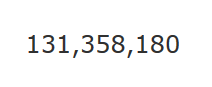
- after.PNG (2.28 KiB) Viewed 9913 times
Re: Round function not show the whole value.
Posted: Thu Aug 17, 2017 1:52 pm
by GregSippel
Since the code works for me and not you, I can only suggest that you need to ensure your EPC's are not up to date.
For me I am currently using EPC141050, which requires EPC141031.
To check what release you have in your IDE, click on the right arrow next to the question mark in the top right hand corner and select about. In the result dialog under the installation details tab you will see what EPCs have been applied.
You can download them from,
http://www.lansa.com/support/notes/epc/vl.htm#V14. If you don't have access contact your local LANSA office.
Cheers
Greg