Page 1 of 1
Hide VL-Framework Bar
Posted: Thu Aug 31, 2017 3:41 am
by boh
Goodmorning,
is there a way to get control of the highlighted bar in order to add controls to it?
Or at least a way to hide it programmatically?
Thank you
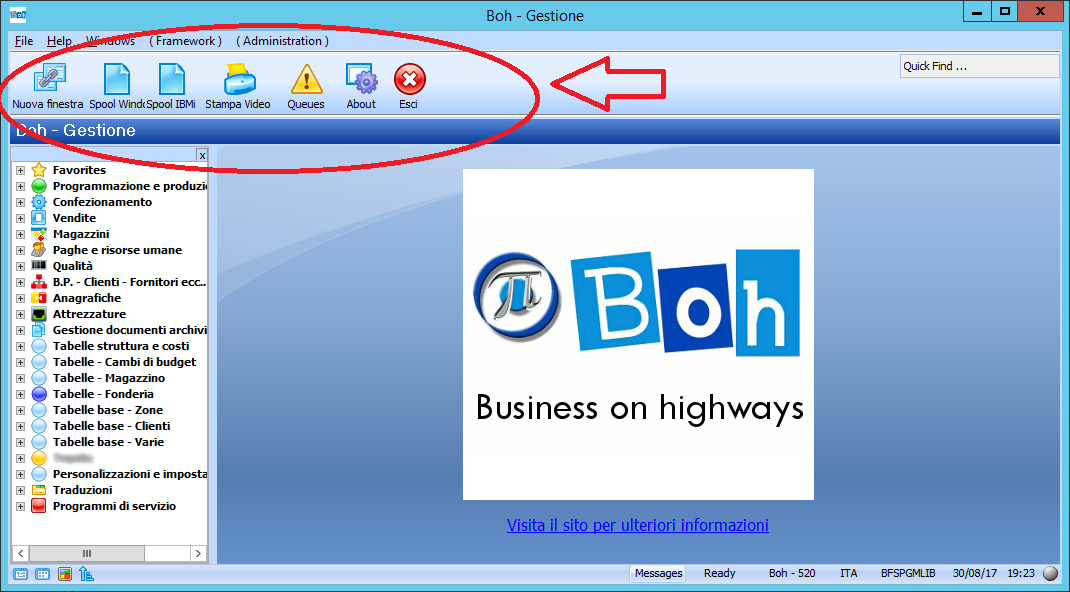
- framework.png (90.09 KiB) Viewed 4988 times
Re: Hide VL-Framework Bar
Posted: Thu Aug 31, 2017 9:50 am
by MarkD
Try #FIM.AssociatedVF_AC006.IE_ToolBar.Visible := False
A couple of considerations:
- I have not tried this.
- It’s considered ‘internal access’ so it could change in the future.
- VLF-WIN allows multiple open windows, and each could have a tool bar.
The #FIM reference should reference the window that your filter or command handler is currently executing in.
- I don’t think you could viably add new things to it.
Re: Hide VL-Framework Bar
Posted: Thu Aug 31, 2017 9:56 am
by MarkD
Have you tried this newer theme?
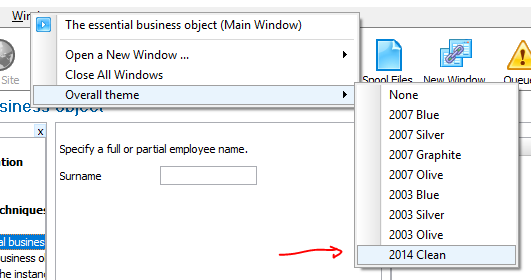
- Capture.PNG (18.71 KiB) Viewed 4976 times
Re: Hide VL-Framework Bar
Posted: Thu Aug 31, 2017 6:54 pm
by boh
MarkD wrote: Thu Aug 31, 2017 9:50 am
Try #FIM.AssociatedVF_AC006.IE_ToolBar.Visible := False
A couple of considerations:
- I have not tried this.
- It’s considered ‘internal access’ so it could change in the future.
- VLF-WIN allows multiple open windows, and each could have a tool bar.
The #FIM reference should reference the window that your filter or command handler is currently executing in.
- I don’t think you could viably add new things to it.
Thank you! This is correct and it works!
Now I'm trying to attach controls to it but it doesn't work... It shouldn't be so difficult: it is a panel as far as I know...
Unfortunately I can't use the new theme firstly because I'm on Lansa V13 and then because I need that buttons on others programs