Page 1 of 1
Image Zoom
Posted: Wed Sep 20, 2017 4:01 am
by lawingo
I have a carousel that displays a collection of images. I want to zoom in on the image as the user hovers the mouse over the image. I have found some third party products like (elevateZoom) that creates the zoom for you. This product (and a few others I have looked at) manipulates the DOM with jQuery. I have created a Widget to interface with this widget but I'm unsure how to assign the Image a specific class or Div ID so that I can idenfity it within the DOM with jQuery.
Maybe I'm going about this wrong. Has anyone successfully wrote something like this or can offer a better solution??
Many Thanks
-Chad-
Re: Image Zoom
Posted: Wed Sep 20, 2017 1:24 pm
by Stewart Marshall
Hi Chad
This is really easy to achieve in VL.
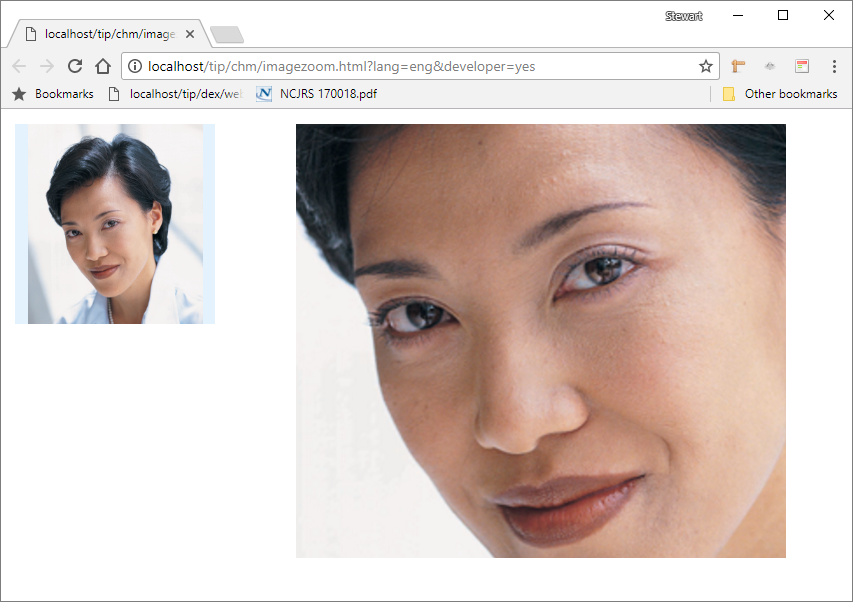
- Capture.PNG (598.14 KiB) Viewed 5267 times
In this example, the image on the left is 200 x 200. The image on the right is a 1000 x 1000 parented to a smaller panel which acts like a viewport allowing only some of the large image to be seen.
All we need do is move the big image around a proportional amount within the viewport as the mouse moves in the small image. If the viewport is 400 wide, there must be 600 pixels that can't be seen. The small image is 200 wide, so every pixel move on the small image needs to move the large image 3 pixels.
Code: Select all
Begin_Com Role(*EXTENDS #PRIM_WEB) Theme(#SYS_THEME<2015Blue>) Height(529) Width(896)

Define_Com Class(#PRIM_VS.Style) Name(#Style2) BackgroundBrush(#Brush1)
Define_Com Class(#PRIM_VS.SolidBrush) Name(#Brush1) Color(Theme50)

Define_Com Class(#PRIM_IMAG) Name(#SmallImage) DisplayPosition(1) Left(0) Parent(#SmallImagePanel) TabPosition(1) TabStop(False) Top(0) Height(200) Width(200) Image(#xImageEmployee512) ImageSizing(BestFit)
Define_Com Class(#PRIM_IMAG) Name(#ZoomedImage) DisplayPosition(1) Left(0) Parent(#Viewport) TabPosition(1) TabStop(False) Top(0) Height(1000) Width(1000) ImageSizing(BestFit)
Define_Com Class(#PRIM_PANL) Name(#Viewport) DisplayPosition(1) Left(295) Parent(#COM_OWNER) TabPosition(1) TabStop(False) Top(15) Height(434) Width(490) Style(#Style2)
Define_Com Class(#PRIM_PANL) Name(#SmallImagePanel) DisplayPosition(2) Left(14) Parent(#COM_OWNER) TabPosition(2) TabStop(False) Top(15) Height(200) Width(200) Style(#Style2)

Define_Com Class(#prim_timr) Name(#Timer) Interval(20) Startup(Manual)

Define Field(#MouseHorizontal) Type(*Dec) Length(9) Decimals(2)
Define Field(#MouseVertical) Type(*Dec) Length(9) Decimals(2)

Evtroutine Handling(#Com_owner.CreateInstance)

#ZoomedImage.Image <= #SmallImage.Image

Endroutine

Evtroutine Handling(#SmallImage.MouseEnter)

#Timer.Start

Endroutine

Evtroutine Handling(#SmallImage.MouseLeave)

#Timer.Stop

Endroutine

Evtroutine Handling(#Timer.Tick)

* Calculate the position of the mouse relative to the small image
#MouseHorizontal := #sys_mouse.HorPosition - #SmallImage.ScreenLeft
#MouseVertical := #sys_mouse.VerPosition - #SmallImage.ScreenTop

* Large image is parented to the ViewPort, so only a percentage showing
* Every pixel move needs to be amplified by the percentage of the image that's hidden
* Multiplied by -1 because the image moves in the opposite direction to the mouse
#ZoomedImage.Left := #MouseHorizontal * (#ZoomedImage.Width - #Viewport.Width) / #SmallImage.Width * -1
#ZoomedImage.Top := #MouseVertical * (#ZoomedImage.Height - #Viewport.Height) / #SmallImage.Height * -1

Endroutine

End_Com
Hope this helps
Regards