Page 1 of 1
Understanding Function Returns
Posted: Wed Jan 24, 2018 5:22 am
by jyoung
I mainly do VLWeb and VLF-ONE development with LANSA. For times when I need to share code via an object, I would normally create a Function inside a generic Process and just call that function when I needed, exchanging Fields and passing Lists as required.
Like this that I use to "upsert" an employee from Active Directory attibutes
Code: Select all
exchange fields(#DistinguishedName)
call process(*DIRECT) function(PTOEMPUpsert) pass_lst(#MessageList)
I use this pattern a lot and for the most part it has served me well, although recently some bizarre issues have been occurring when doing this.
The Function structure is typically something like this
Code: Select all
function options(*DIRECT) rcv_list(#MessageList)

* working fields / lists / components

* main function flow

return

* method routines
The first issue and the most concerning is that sometimes after a Function completes, execution simply stops. It is never returned to the caller (a Server Module). It just ends. No warning, no error, nothing. The behavior
ONLY OCCURS ON THE ISERIES. When running on Windows it works as expected.
I specifically use the "return" statement at the end of every Function, I have tried using the if_error(*NEXT) and *RETURN and still nothing. I have verifed this by having trace statements immediately before the Function, inside the Function and after the Function.
Code: Select all
#SYS_APPLN.TraceMessageData( "Calling PTOUpsert Function" )
exchange fields(#DistinguishedName)
call process(*DIRECT) function(PTOEMPUpsert) pass_lst(#MessageList)
#SYS_APPLN.TraceMessageData( "Returned from PTOEMPUpsert. Status: &1 EmployeeId: &2" #wk_Status #EmployeeId )
Here is the trace file on Windows
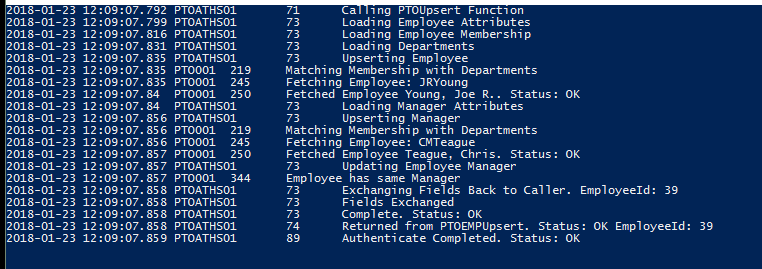
- Windows Trace.PNG (34.24 KiB) Viewed 24795 times
Here is the trace file on the iSeries
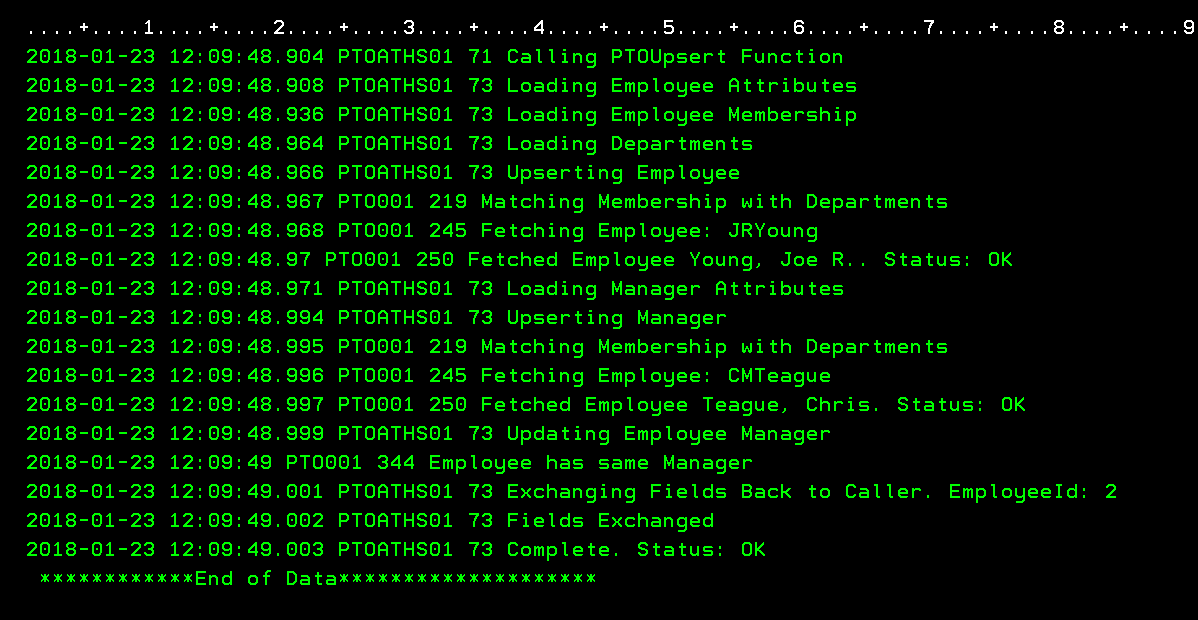
- iSeries Trace.PNG (47.14 KiB) Viewed 24795 times
They are nearly identical, as it should be as it is the EXACT SAME CODE, but notice how the last messages on the iSeries trace do not include the last messages on the Windows trace! The iSeries trace is missing the message "Returned from PTOEMPUpsert ..."
From what I have read in the docs, it seems like Functions are mainly designed for iSeries 5250 screen design and use.
Am I using Functions in an un-intended way? Should I just avoid them as much as I can? I can't stay away from them all together because they appear to be the only way to "submit" a long running job to batch.
How to I get a Function to ALWAYS return control?
Re: Understanding Function Returns
Posted: Wed Jan 24, 2018 9:06 am
by MarkD
Logic in a function can be ended with EXIT, MENU, ABORT or RETURN commands, or as result of some sort of failure.
For arcane 5250 menu reasons, if a function just runs to the end it will behave as if it executed a MENU command to end.
The best way to trap all situations in newer code is to code calls like this:
Call Process(*DIRECT) Function(XXXXX) Menu_Used(*NEXT) Exit_Used(*NEXT) If_Error(*NEXT)
If you still have the non-return problem then it sounds like a defect that should be reported to support.
Re: Understanding Function Returns
Posted: Wed Jan 24, 2018 9:08 am
by MarkD
Also consider whether the function you call itself then calls another function that ends with MENU (even by default) or by EXIT.
Re: Understanding Function Returns
Posted: Wed Jan 24, 2018 9:12 am
by jyoung
There is no other function in the Process, just the one.
I will try the catch you mentioned.
This is the function definition
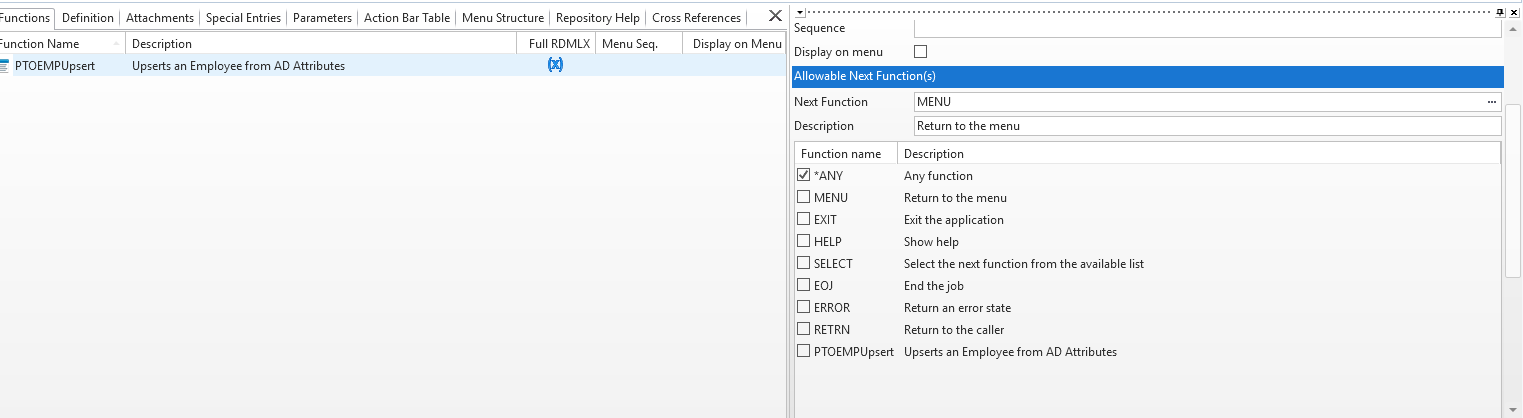
- function.PNG (23.56 KiB) Viewed 24785 times
I've tried checking "RETRN" and other options in the "Allowable Next Functions" but nothing seems to change.
This just rang a bell
Also consider whether the function you call itself then calls another function that ends with MENU (even by default) or by EXIT.
I do call other Functions from this Function how do I check if they end with MENU or EXIT?
All of the Functions that I call have a structure like this:
Code: Select all
exchange fields(#wk_Status) option(*ALWAYS)

#wk_Status := ER

if (#SAMAccountName = *BLANKS)
#STD_STRNG := "Missing SAMAccountName"
add_entry to_list(#MessagesList)
return
endif

if (#wk_String1 = *BLANKS)
#STD_STRNG := "Missing Attribute List in wk_String1"
add_entry to_list(#MessagesList)
return
endif

if (#COM_OWNER.Connect <> OK)
return
endif

if (#COM_OWNER.Search <> OK)
#COM_OWNER.Disconnect
return
endif

if (#COM_OWNER.LoadAttributes <> OK)
#COM_OWNER.Disconnect
return
endif

#COM_OWNER.Disconnect

#wk_Status := OK

return
I am always returning at the end
Re: Understanding Function Returns
Posted: Wed Jan 24, 2018 9:19 am
by jyoung
I tried to force it to break by doing a divide by zero and it just returns.
Code: Select all
#SYS_APPLN.TraceMessageData( "Calling PTOUpsert Function" )
exchange fields(#DistinguishedName)
call process(*DIRECT) function(PTOEMPUpsert) exit_used(*NEXT) menu_used(*NEXT) if_error(*NEXT) pass_lst(#MessageList)
#SYS_APPLN.TraceMessageData( "Returned from PTOEMPUpsert. Status: &1 EmployeeId: &2" #wk_Status #EmployeeId )

#STD_NUM := 1 / 0
If I take the call to the Function out, the error is thrown and I get the expected "Message : (0011) - Attempt to divide by zero encountered."
Re: Understanding Function Returns
Posted: Thu Jan 25, 2018 4:49 am
by jyoung
I narrowed this down to a single FETCH command inside the Function.
If I comment the FETCH out, execution returns correctly to the Server Module.
If the FETCH is executed, the Function completes correctly, but control is never returned to the Server Module and a Server Error occurs although nothing is written to the X_ERR.log.
Interestingly the FETCH executes just fine and IO$STS is OK. I've a SELECT instead of a FETCH and the same thing happens.
Re: Understanding Function Returns
Posted: Thu Jan 25, 2018 5:58 am
by Theo de Bruin
Hi,
Same as fro the CALL command, you can review your additional parameters on the FETCH command,
depending on what you have specified on the IO_Error() and Val_Error() e.g. like
Fetch Fields(#STD_DTIMX) From_File(PSLTIMES) Io_Error(*NEXT) Val_Error(*NEXT)
IO_Error() defaults to *ABORT so that could be the cause, as well as VAL_ERROR() defaults to *LASTDIS
Re: Understanding Function Returns
Posted: Thu Jan 25, 2018 7:21 am
by jyoung
Hi Theo,
Tried that and the same result.
Code: Select all
#SYS_APPLN.TraceMessageData( "Fetching Employee: &1" #AccountName )

fetch fields(#EmployeeFields) from_file(PTOEmployeeL01) with_key(#SAMAccountName) io_status(#FetchStatus) io_error(*NEXT) val_error(*NEXT)
if_status is_not(*OKAY)
#SYS_APPLN.TraceMessageData( "Fetch is NOT OK!" )
endif
This is VERY bizarre. The fetch works its does not error or abort, the data is loaded in the fields just as you would expect.
Except, something about this fetch, when the Function done and the return statement is executed,
execution control is stopped at the return.
Code: Select all
* ================================================================================
* MAIN
* ================================================================================
exchange fields(#wk_Status) option(*ALWAYS)

#wk_Status := ER

if (#DistinguishedName.Trim = *BLANKS)
message msgtxt('Missing DistingishedName')
return
endif

#EmployeeDN := #DistinguishedName

#SYS_APPLN.TraceMessageData( "Loading Employee Attributes" )

if (#COM_OWNER.LoadAttributes( #EmployeeDN ) <> OK)
#SYS_APPLN.TraceMessageData( "Loading Employee Attributes Failed!" )
return
endif

#SYS_APPLN.TraceMessageData( "Completed Loading Attributes. Count: &1" #AttributeCount )

#SYS_APPLN.TraceMessageData( "Loading Employee Membership" )

if (#COM_OWNER.LoadMembership( #EmployeeDN ) <> OK)
#SYS_APPLN.TraceMessageData( "Loading Employee Membership Failed!" )
return
endif

#SYS_APPLN.TraceMessageData( "Completed Loading Membership. Count: &1" #MembershipCount )

#SYS_APPLN.TraceMessageData( "Loading Departments" )

if (#COM_OWNER.LoadDepartments <> OK)
#SYS_APPLN.TraceMessageData( "Loading Departments Failed!" )
return
endif

#SYS_APPLN.TraceMessageData( "Completed Loading Departments. Count: &1" #DepartmentCount )


* FETCH IS IN THE UPSERT METHOD
#SYS_APPLN.TraceMessageData( "Upserting Employee" )
if (#COM_OWNER.Upsert( #EmployeeDN #EmployeeId ) <> OK)
#SYS_APPLN.TraceMessageData( "Upserting Employee Failed!" )
return
endif
#SYS_APPLN.TraceMessageData( "Completed Employee Upsert" )

* OTHER CODE OMITTED

* restore the employee fields and exchange them back to the caller
get_entry number(1) from_list(#EmployeeFieldsList)

#SYS_APPLN.TraceMessageData( "Exchanging Fields Back to Caller. EmployeeId: &1" #EmployeeId )

exchange fields(#EmployeeFields)

#SYS_APPLN.TraceMessageData( "Fields Exchanged" )

#wk_Status := OK

#SYS_APPLN.TraceMessageData( "Upsert Complete. Status: &1" #wk_Status )

return
I've been able to remotely debug it and stepping through the code as soon as the return is executed, I am bounced out and never brought back to the Server Module.
I have a request in with Support, will update when I can talk with them.
Re: Understanding Function Returns
Posted: Fri Jan 26, 2018 11:53 am
by atostaine
Anything in the joblog? Decimal data error? Weird
Art
Re: Understanding Function Returns
Posted: Sat Jan 27, 2018 2:04 am
by jyoung
Wow, yesterday was intense. Spent most of the day on the phone with support tracking this down and in the process identified some other issues that were occurring that I had no idea about.
After digging through the job logs, trace files, performance trace files, code page issues and a host of other things, the root cause of this whole problem was that I had a self referencing join (access route) on the File.
This works perfectly ok on Windows, however there is this very small grey icon in the Relationships property of the IDE that when you hover over it, it states that a self referencing join is not available on the IBM i.
Did it say this on the save, nope.
Did it say this on compile, nope.
Did it say this on check-in TO THE IBM I, nope.
So watch those access routes and DON'T use self referencing routes!