Page 1 of 1
VLF-ONE Add To Instance List Toolbar or Hide Filter Location Image
Posted: Fri Apr 06, 2018 2:57 am
by jyoung
With EPC 81 is it possible to either add a buttom / image to the Instance List toolbar or to hide the Filter Location image?
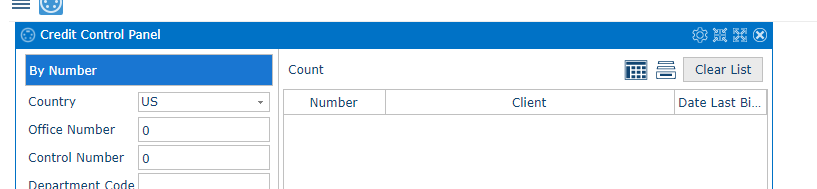
Due to some unique constraints, I have a custom instance list that has my own toolbar.
Like this
- capture1.PNG (9.55 KiB) Viewed 14375 times
The Count, Excel, Column Selection and Clear button are my own (not the Framework's).
Since the EPC update, the Filter Location image that seems to be hanging out by itself.
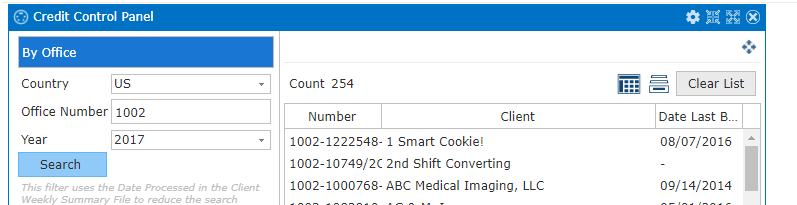
- capture2.PNG (15.13 KiB) Viewed 14375 times
If I revert back to the Framework's Excel, Clear List, Select columns, that helps but then I don't get the "Select Columns" item.
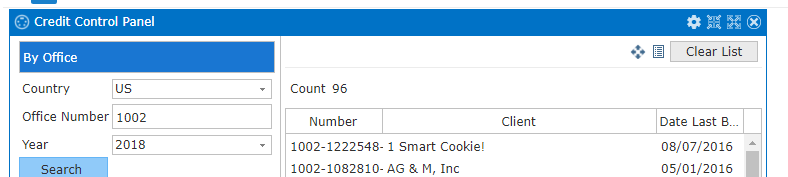
- capture3.PNG (10.94 KiB) Viewed 14375 times
It looks like the only way to get the "Select Columns" to show up is with the shipped Instance Lists.
So I either need to add my own "Select Columns" to the tool bar OR I need to hide the "Filter Location" on the toolbar and I will use my own OR get the "Select Columns" image to show up for my custom instance list.
Any thoughts on how to go about this?
EDIT
In the example Snap In Instance List, the "Select Columns" Image does not show up even though the "Show a Select Columns menu" is checked.
Is this by design?
It seems to me that it should be there and we can handle changes with
Code: Select all
mthroutine name(uHandleInstanceListColumnChange) options(*REDEFINE)
* inspect #uColumnDefinition to change custom list columns.
endroutine
Re: VLF-ONE Add To Instance List Toolbar or Hide Filter Location Image
Posted: Fri Apr 06, 2018 9:37 am
by MarkD
Yes, the filter location image had to move in EPC141081 because small and medium screen devices do not have movable panes with titles -
https://docs.lansa.com/14/en/lansa048/i ... 8_8055.htm
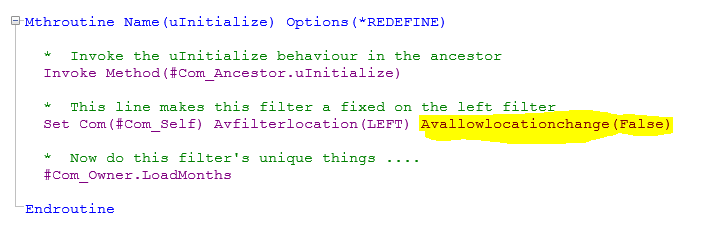
You should be able to make it go away by adding code like this to your filter’s uInitialize method
- Capture.PNG (10.96 KiB) Viewed 14362 times
Re: VLF-ONE Add To Instance List Toolbar or Hide Filter Location Image
Posted: Fri Apr 06, 2018 9:55 am
by MarkD
In your custom instance list browser you should be able to get the column selection image to show by setting #ShowSelectColumnsImage to true in your redefined uInitialize method.
When it is clicked a redefined uSelectColumns method in your custom instance list browser should be invoked.
I think you would have to handle everything about selecting, reordering and remembering the columns yourself because only your custom instance list browser understands what columns are shown (if any) and how they are shown.
Re: VLF-ONE Add To Instance List Toolbar or Hide Filter Location Image
Posted: Fri Apr 06, 2018 11:53 pm
by jyoung
I get an error while trying to set the "ShowSelectColumnsImage" in the custom instance list.

- capture1.PNG (14.91 KiB) Viewed 14342 times
Hiding it in the Filter by setting the "avAllowLocationChange" to false works, so that can be a work around. I don't think any of our users move the filter, I think they just leave them where they are.
One of the things I am confused by is the "Show a Select Columns menu" in the workbench.
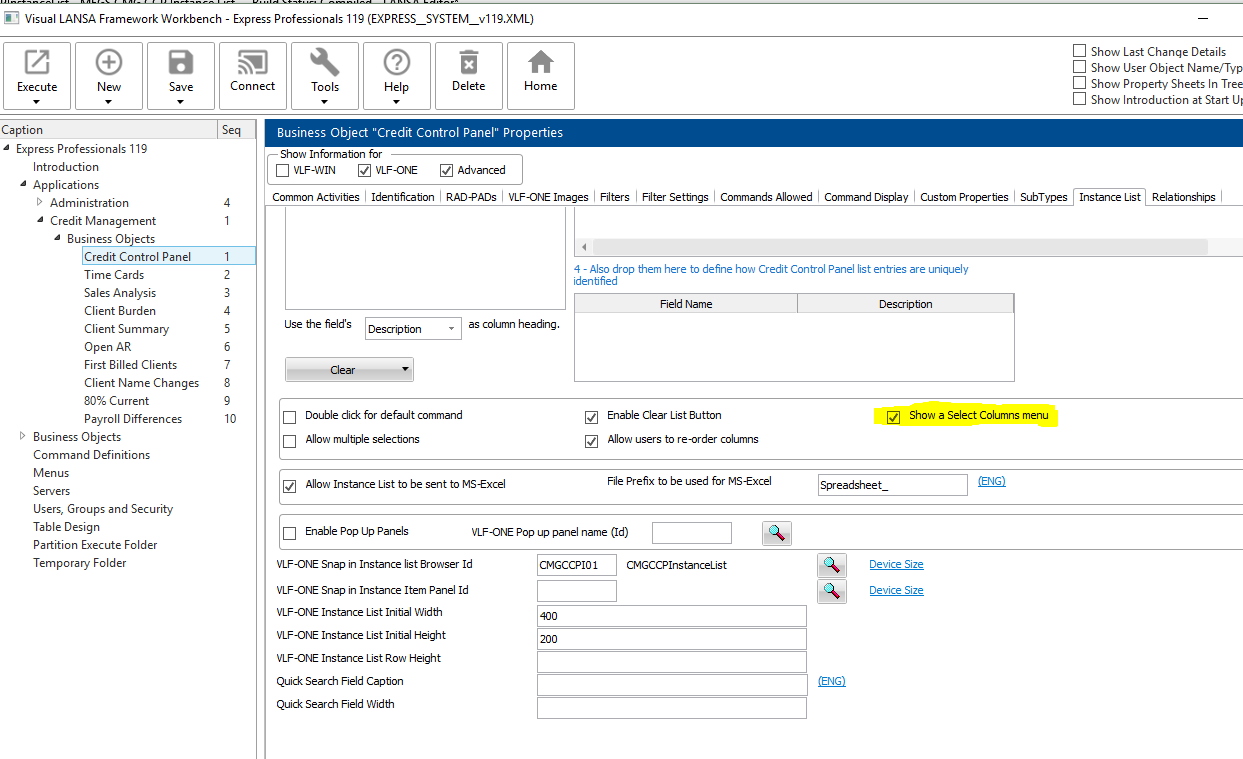
- capture2.PNG (66.67 KiB) Viewed 14342 times
I assume this is setting the "ShowSelectColumnsImage" property for the instance list, but it does not seem to affect custom instance lists.
I've been managing the column selection myself for this particular list. I just need to hooked into the events for the VLF image.
Thanks,
Joe
Re: VLF-ONE Add To Instance List Toolbar or Hide Filter Location Image
Posted: Sat Apr 07, 2018 8:37 am
by MarkD
Almost all those list control properties are for the shipped instance list browsers.
Use just #ShowSelectColumnsImage := True.
Re: VLF-ONE Add To Instance List Toolbar or Hide Filter Location Image
Posted: Sat Apr 07, 2018 8:40 am
by MarkD
The avAllowLocationChange := false is not a work around - that's how you turn it off and on.
You'll see it, an avFilterLocation used in the shipped demos and in some generated code as well I think.
Re: VLF-ONE Add To Instance List Toolbar or Hide Filter Location Image
Posted: Sat Apr 07, 2018 10:20 am
by MarkD
If your custom instance list browser is generic and you don't want to set #ShowSelectColumnsImage to a hard coded true or false then you can set if from the VLF developer's choice by using the same line of code as the shipped handlers VF_UM040O and VF_UM044O do:
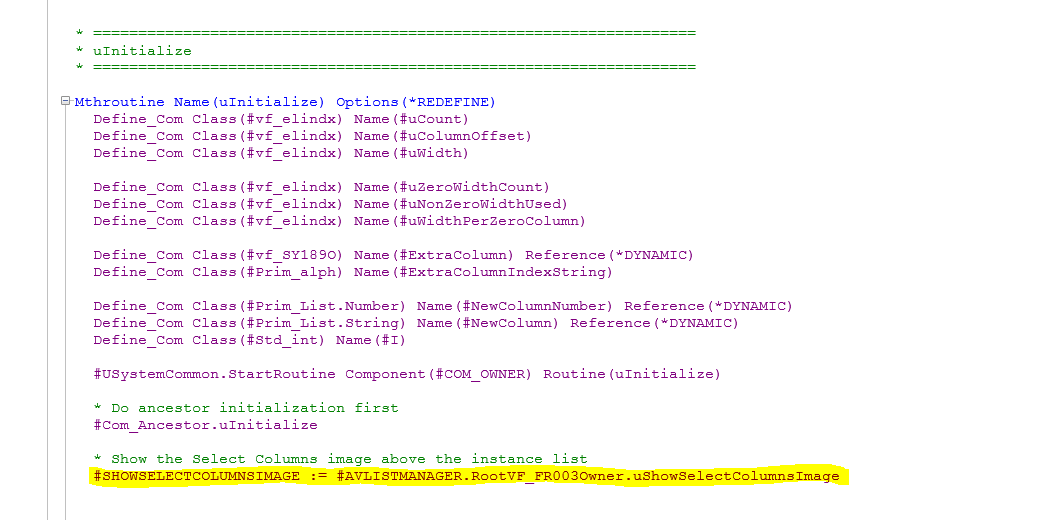
- Capture.PNG (32.88 KiB) Viewed 14333 times
Re: VLF-ONE Add To Instance List Toolbar or Hide Filter Location Image
Posted: Tue Apr 10, 2018 11:57 pm
by jyoung
Hey Mark,
I get what you are saying but I can't set the "ShowSelectColumnsImage". I get an error saying that it cannot be written.
Code: Select all
function options(*DIRECT)
begin_com role(*EXTENDS #VF_AC012O) height(270) width(500)

mthroutine name(uInitialize) options(*REDEFINE)
#COM_OWNER.ShowSelectColumnsImage := False
endroutine

end_com

- Capture.PNG (8.44 KiB) Viewed 14311 times
So setting the avAllowFilterChange is the only to not show the image. What am I doing wrong in the above code?
Re: VLF-ONE Add To Instance List Toolbar or Hide Filter Location Image
Posted: Wed Apr 11, 2018 2:08 am
by jyoung
Good Grief.
When extending #VF_AC012O apparently using any of the COM_ (OWNER, ANCESTOR, SELF) does not work.
Code: Select all
#COM_OWNER.ShowSelectColumnsImage := False
Whereas not using the COM_ does work
Why is it different?
EDIT
You can't do this in other components. This is a filter extending #VF_AC007O

- Capture3.PNG (14.35 KiB) Viewed 14305 times
Not trying to be difficult, but I don't understand the inconsistency.
Re: VLF-ONE Add To Instance List Toolbar or Hide Filter Location Image
Posted: Wed Apr 11, 2018 9:02 am
by MarkD
First, just to check that your issues are resolved – you have what you need by using?
#ShowSelectColumnsImage := False
And
Set Com(#Com_Owner) Avfilterlocation(LEFT) Avallowlocationchange(False)
Re: VLF-ONE Add To Instance List Toolbar or Hide Filter Location Image
Posted: Wed Apr 11, 2018 9:04 am
by MarkD
The definition of #ShowSortRequestImage in VF_AC012O looks like this:

- Capture.PNG (5.8 KiB) Viewed 14302 times
Note that there is no property setter, so ‘external’ code cannot alter #ShowSortRequestImage.
However, internal code in VF_AC012O, or in a descendant, can alter it because the variable #ShowSortRequestImage is exposed to it. That’s why you can and must code #ShowSortRequestImage := True.
We use this technique from time to time to define a read-only property from the point of view of any ‘external’ code. By ’external’ here I mean our own VLF-ONE developers, because it points out that their code should never (and in fact cannot) dynamically change this property.
If you look at the definition of avFilterLocation:

- Capture2.PNG (10.57 KiB) Viewed 14302 times
It has set and get methods.
Note how the associated storage variable is named #PTY_AVFILTERLOCATION, so in theory you could access that directly in descendant code.
Re: VLF-ONE Add To Instance List Toolbar or Hide Filter Location Image
Posted: Wed Apr 11, 2018 11:49 pm
by jyoung
Ahhh, I get it now. This is kinda like having an protected field in C#/Java with a public getter and no setter.
Yes, my issue has been resolved once I found that I had to access to the component directly.
Then I was trying to understand how/why the code worked.
Thanks for taking the time to explain it and your patience.

Joe