Page 1 of 1
Hiding tabs in V14 Sp2
Posted: Fri May 18, 2018 9:32 pm
by pravik
Hi All,
we have installed V14 SP2 and still we could find that tabs are only being greyed out and they are not hidden.
Adding to this we could find that filters with subtype being defined, in this case tabs which doesn't have authority are being made hidden. We wanted to know if we have some command to hide tabs which doesn't have authority irrespective of whether we have filter present or not.
Thanks for your help.
Regards,
Priya
Re: Hiding tabs in V14 Sp2
Posted: Sat May 19, 2018 11:16 am
by MarkD
Can we try some comparative anatomy to see if we are talking about the same thing?
Clear your browser cache.
Run the shipped VLF-ONE demo.
Use Examples -> Advanced -> Subtypes
Click on a SAV account, do you see these tabs?
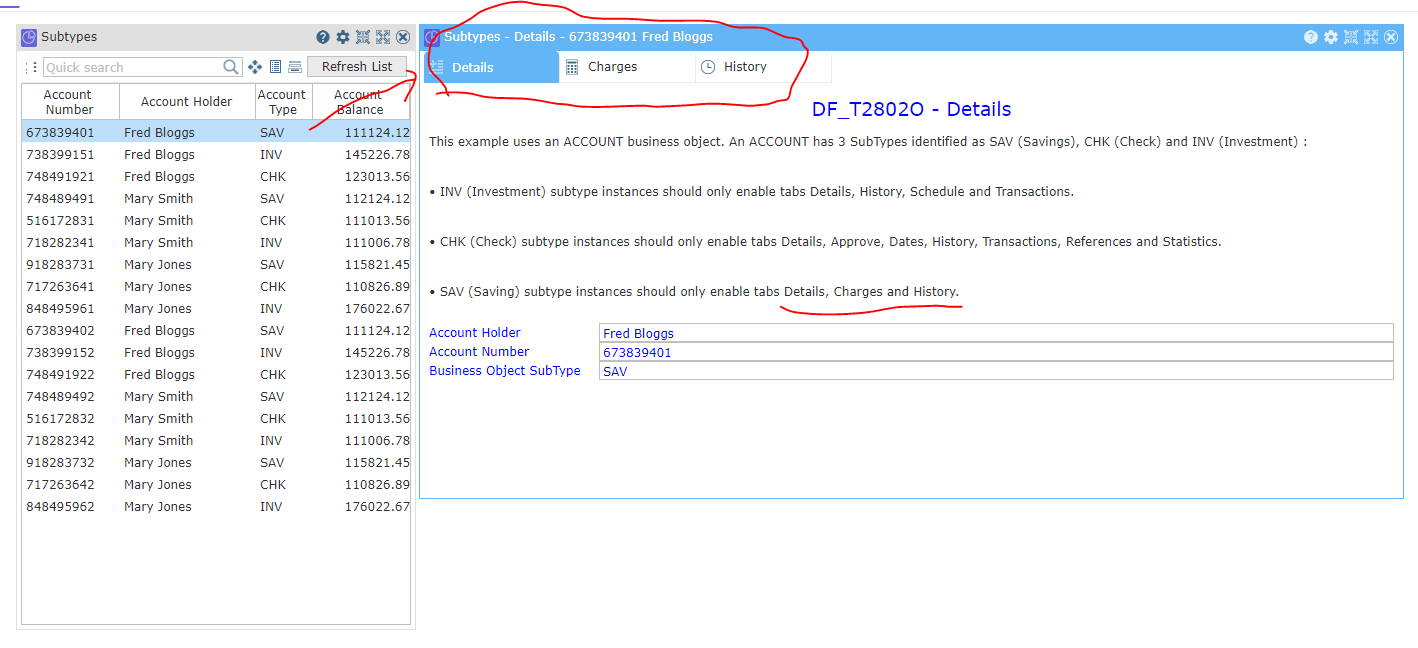
- Capture1.PNG (63.17 KiB) Viewed 12303 times
Click on an INV account, do you see these tabs?
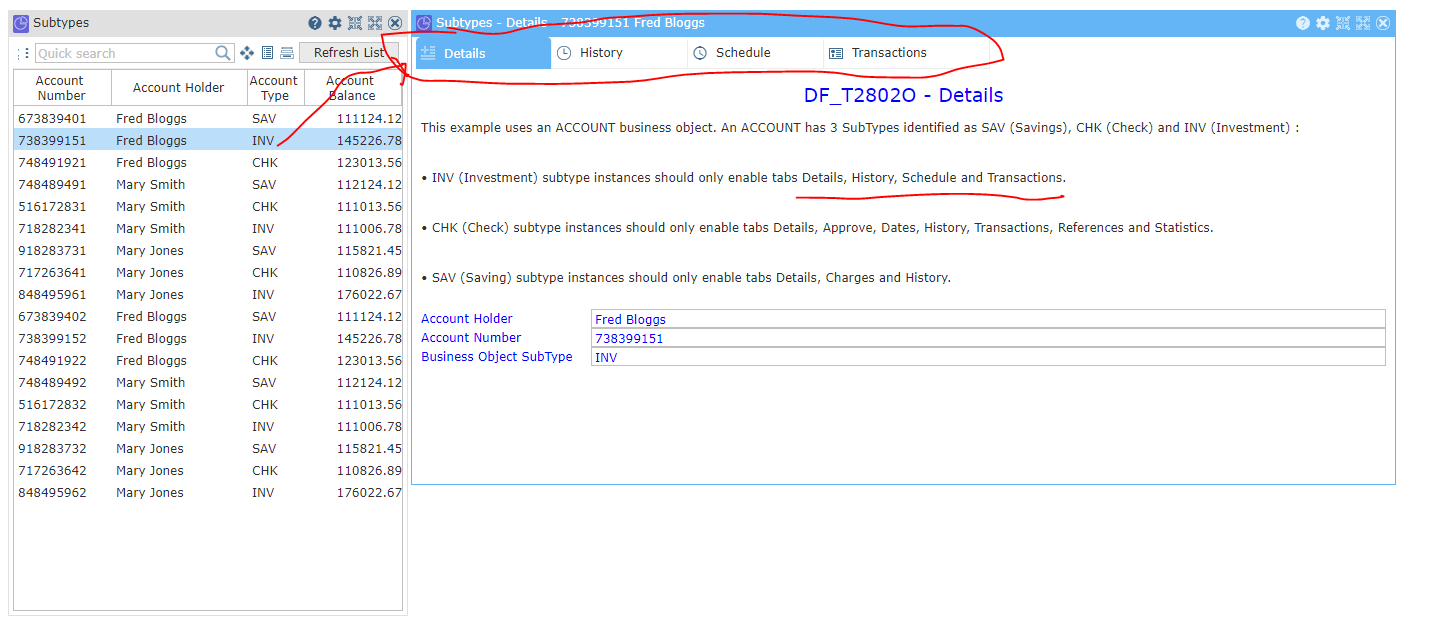
- Capture2.PNG (63.67 KiB) Viewed 12303 times
Click on an CHK account, do you see these tabs?
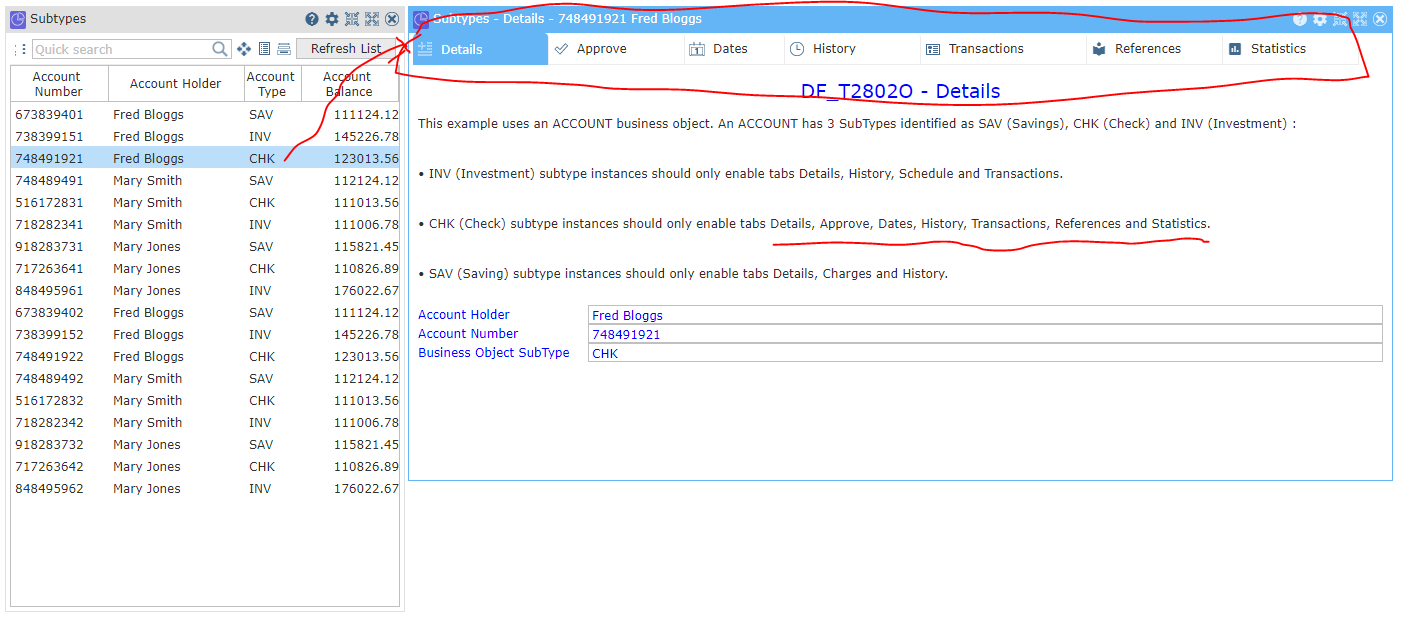
- Capture3.PNG (66.78 KiB) Viewed 12303 times
If this is what you see, then the SP2 change about tab visibility about subtypes seems to be working.
Re: Hiding tabs in V14 Sp2
Posted: Tue May 29, 2018 8:41 am
by MarkD
If the shipped example works I would compare what you are doing with how it works.
Using sub types is the only way to hide tabs.
Re: Hiding tabs in V14 Sp2
Posted: Fri Jun 01, 2018 8:35 am
by MarkD
How did you go with this one?
Re: Hiding tabs in V14 Sp2
Posted: Fri Jun 01, 2018 9:20 pm
by pravik
Hi Mark,
I have compared with shipped framework and saw that the example shows they are using subtypes to hide. As said earlier the same is working fine for our framework as well.
But we wanted to know how to hide tabs which doesn't have filter or subtypes.
Thanks for your response Mark.
Thanks & regards,
Priya
Re: Hiding tabs in V14 Sp2
Posted: Wed Jun 06, 2018 12:02 pm
by MarkD
There is this -
https://docs.lansa.com/14/en/lansa048/i ... 8_6740.htm
That could change the enablement of a tab dynamically, and if subtypes were involved as well, it might impact its visibility as well.
Remember that if you are dealing with instance level commands you'd have to enable after the user clicked on the item in the instance list, because when they do that all appropriate commands get enabled.
Re: Hiding tabs in V14 Sp2
Posted: Wed Jun 06, 2018 6:51 pm
by pravik
Hi Mark,
We have implemented this logic and this would only grey out tabs which doesn't have authority.
But we wanted the respective tab which doesn't authority should be hidden(i.e. those tabs must not be shown) as it does in subtype.
In subtype the tabs which doesn't have authority would not be shown, similarly we wanted to do for all tabs irrespective of whether we have subtype or not.
Kindly correct me if Im wrong.
Thanks & Regards,
Priya
Re: Hiding tabs in V14 Sp2
Posted: Thu Jun 07, 2018 8:25 am
by MarkD
Re: That could change the enablement of a tab dynamically, and if subtypes were involved as well, it might impact its visibility as well.
Did your test case involve subtypes?
If you don't use subtypes, tabs that are disabled will just gray out - to change that behavior would require a product enhancement.
However, if subtypes are used, then it might be that changing the commands enablement might cause the tab to be made invisible.
Re: Hiding tabs in V14 Sp2
Posted: Thu Jun 07, 2018 1:30 pm
by pravik
Hi Mark,
We had both the scenarios if our case, i.e tabs with subtype and tabs without subtype.
As you had mentioned when we have subtype then tabs are becoming invisible.
We are curious to know if we can make tabs invisible even when we don't have subtype used, as of now its getting greyout.
Thanks for your help.
Regards,
Priya
Re: Hiding tabs in V14 Sp2
Posted: Thu Jun 07, 2018 2:47 pm
by MarkD
If you don't use subtypes, tabs that are disabled will just gray out - to change that behavior would require a product enhancement.