Page 1 of 1
Google Fonts
Posted: Tue May 22, 2018 12:31 am
by atostaine
I saw this post that said just to include the font name
viewtopic.php?f=3&t=1085&p=1655&hilit=g ... onts#p1655
I tried specifying Zilla Slab as my face name in my Theme, then reference that in the reusable part. I don't think it's working, here is my example URL
http://www.lakewoodcemetery.com/dc-pgml ... l?lang=eng
Is there something else I'm missing?
Thanks, Art
Re: Google Fonts
Posted: Tue May 22, 2018 12:47 am
by jyoung
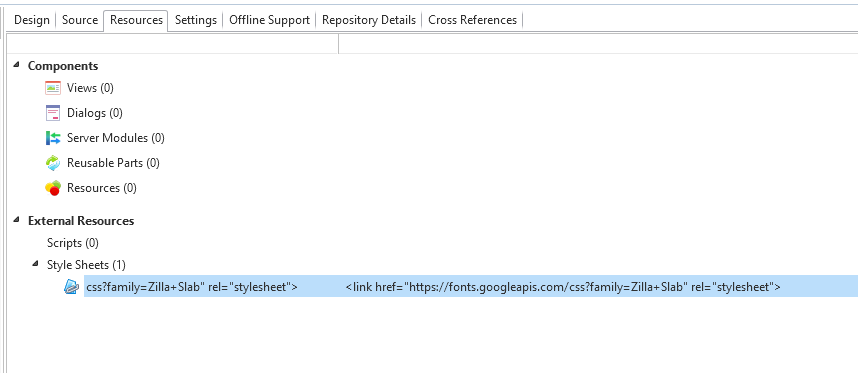
Did you include the resource?
- capture2.PNG (14.33 KiB) Viewed 7602 times
Code: Select all
begin_com role(*EXTENDS #PRIM_WEB) Theme(#SYS_THEME<MaterialDesignDeepPurple>)

define_com class(#PRIM_VS.Style) name(#Style1) FaceName('Zilla Slab')

define_com class(#PRIM_LABL) name(#Label1) Caption('Zilla Slab') DisplayPosition(1) Ellipses(Word) Height(25) Left(504) Parent(#COM_OWNER) TabPosition(1) TabStop(False) Top(112) VerticalAlignment(Center) Width(120) Style(#Style1)
define_com class(#PRIM_LABL) name(#Label2) Caption('Default') DisplayPosition(2) Ellipses(Word) Height(25) Left(504) Parent(#COM_OWNER) TabPosition(2) TabStop(False) Top(152) VerticalAlignment(Center) Width(120)

evtroutine handling(#Com_owner.Initialize)

endroutine

end_com
The difference is subtle but it seems to be there.

- capture3.PNG (2.17 KiB) Viewed 7602 times
And inspecting the HTML shows its there too.
Code: Select all
<div lansahandle="3" style="position: absolute; overflow: hidden; white-space: nowrap; box-sizing: border-box; border-style: solid; outline: none; border-width: 0px; top: 112px; left: 504px; height: 25px; width: 120px; font-family: "Zilla Slab", verdana; font-size: 14px; font-weight: normal; font-style: normal; text-decoration: none; border-radius: 0px; color: rgba(0, 0, 0, 0.87); border-color: rgba(0, 0, 0, 0.12); background: padding-box rgba(0, 0, 0, 0); cursor: inherit; display: block; opacity: 1; z-index: 1;"><div spellcheck="false" contenteditable="false" tabindex="-1" style="position: absolute; outline: none; overflow: visible; box-sizing: border-box; border-style: solid; border-width: 0px; cursor: inherit; text-decoration: inherit; white-space: pre-wrap; text-overflow: clip; left: 0px; top: 4px; height: 17px; width: 67px;">Zilla Slab</div><div style="position: absolute; background-size: contain; background-position: center center; background-repeat: no-repeat; left: 0px; top: 0px; height: 0px; width: 0px;"></div></div>
Tried it with an MD control and it worked too.
Looking at your source, it looks like you are missing the resource. You should see something like this.

- capture4.PNG (11.12 KiB) Viewed 7599 times
Re: Google Fonts
Posted: Tue May 22, 2018 12:52 am
by atostaine
Yeah I just did that. I think it's working now. I have to include that in every RP?
Re: Google Fonts
Posted: Tue May 22, 2018 12:53 am
by jyoung
No, you could add it to your page, then all your RPs will have access to it.
Re: Google Fonts
Posted: Tue May 22, 2018 1:06 am
by atostaine
So I define the font in my theme, include the resource in the web page, and then it works in my RP?
Re: Google Fonts
Posted: Tue May 22, 2018 1:15 am
by jyoung
I believe so. You could add it to each RP, and it will get included in the webpage. I think the compiler is smart enough to only include it once.
Or you can just add it to the web page to being with.