Page 1 of 1
VLF-ONE Material Button Color
Posted: Thu May 24, 2018 11:50 pm
by jyoung
Is there any way to customize the primary button color in VLF-ONE when using Material Buttons?
We have a theme customizer in place to only allow the Material Blue theme, but we would like to tweak the button color a bit to match our corporate color scheme.
Re: VLF-ONE Material Button Color
Posted: Tue May 29, 2018 8:44 am
by MarkD
If you are using the new MD style buttons in a VLF-ONE application then I guess that this is really a generic VL-Web question about how to tweak MD push button colors?
Re: VLF-ONE Material Button Color
Posted: Tue May 29, 2018 11:52 pm
by jyoung
I don't think so, but I could be missing something.
With VLWeb I can create a new theme and change the color palette to match corporate colors.
For example change the 500 Primary Medium color to change the Primary Button color.
With VLF-ONE, the theme gets customized with VF_SY170O by extending #VF_AC033O and there is no way to adjust the Primary Button Color.
It just occurred to me (literally as I type this out) I may be able to attach a standard theme to VLF-ONE in the same way that I do with a normal VLWeb app. It was my understanding that you
HAD to use VF_SY170O to customize the themes. Perhaps this is different in SP2?
EDIT
I tried adding a theme to the page but the buttons stay the same color. I think this is because of the theme that VLF-ONE uses captioned "Change the current theme".
I created a theme and changed the 500 Primary Medium color and added a "RaisedButton" Drawstyle.
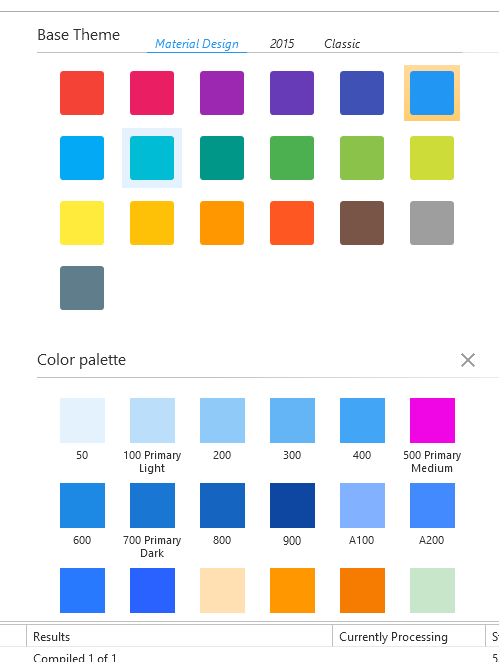
- Theme.PNG (17.35 KiB) Viewed 16661 times
The designer shows the right colors
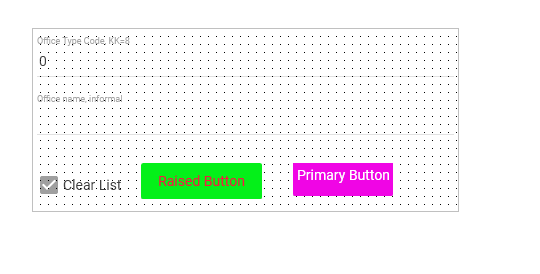
- designer.PNG (7.43 KiB) Viewed 16661 times
The filter, has the "green" theme selected from the theme icon in the upper right and does not use the custom theme colors.
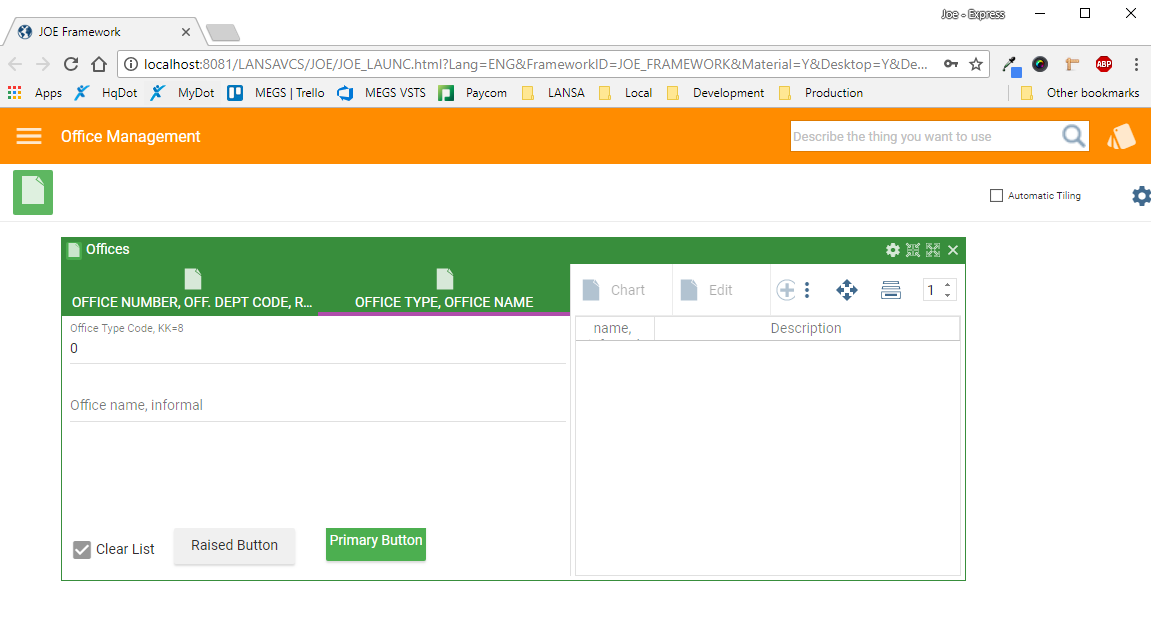
- Capture.PNG (47.06 KiB) Viewed 16661 times
The PRIM_WEB includes the theme.
Code: Select all
* -------------------------------------------------------------------------------------------------------------
* This is the customized VLF-ONE entry point (or launch point) form for framework JOE Framework
* Created 16th May 2018 by USERID with Material Design style controls.
* On the Resources tab (above) the script named VLFONE_Engine.js should be specified to maximize performance.
* -------------------------------------------------------------------------------------------------------------

begin_com role(*EXTENDS #PRIM_WEB) LayoutManager(#WebFormLayoutManager) Theme(#JOE_Theme)

define_com class(#PRIM_ATLM) name(#WebFormLayoutManager)
define_com class(#PRIM_ATLI) name(#VLF_One_AttachItem) Parent(#WebFormLayoutManager) Attachment(Center) Manage(#VLF_ONE)
define_com class(#VF_AC006O) name(#VLF_ONE) Parent(#COM_OWNER) Height(800) Width(1200)

* -------------------------------------------------------------------------------------
evtroutine handling(#COM_OWNER.CreateInstance)

* For more details of the all options available here see - http://%lansadocs%/lansa048/index.htm#lansa/lansa048_8285.htm
* To see the link, press the Ctrl key, then mouse over the URL and click to open the information in a browser.


* Start VLF-ONE for your framework
#VLF_ONE.uInitialize FrameworkIdentifer("JOE_FRAMEWORK") LogonExpiry(90) LogOnHeaderPanelId("JOE_LOGO") LogOnTrailerPanelId("JOE_LO_1") LogOnHandlerId("VF_AC026O") PasswordChangerId("") MtxtLoaderId("UF_OMULTI") ThemeCustomizerId("")

endroutine

* -------------------------------------------------------------------------------------
evtroutine handling(#SYS_WEB.CloseQuery)

if (#VLF_ONE *IsNot *null)
#VLF_ONE.uTerminate PossibletoCancel(False) BrowserisClosing(True)
endif

endroutine

end_com
So in VLWeb I can adjust the colors, but in VLF-ONE it "looks like" I HAVE to still use VF_SY170O. The only option I see to adjust Material Buttons is the MaterialButton_FontSize property.
Re: VLF-ONE Material Button Color
Posted: Wed May 30, 2018 8:17 am
by MarkD
Could you post your VF_SY170O object code and/or the code to you to set it up at start up?
Re: VLF-ONE Material Button Color
Posted: Wed May 30, 2018 8:57 am
by MarkD
VLF-ONE’s theme object has a huge amount of properties relate to the sizes, shapes, gaps, etc involved in menus, pop ups, sliders, etc, etc.
Probably most significantly, is has a VL-Web theme associated with it via property Vlwebapplicationtheme.
At start up a VLF-ONE application sets the VL-Web overall theme like this:
#SYS_WEB.WebPage.Theme <= #Sys_Theme<#USystem.CurrentTheme.
VLWebApplicationTheme>
which is more or less the what any VL-Web application that allowed theme selection would do.
So, if you had a VF_SY170O object that had property ForMaterialDesign=True, you would also need to make sure that its Vlwebapplicationtheme property named a Material Design style.
For example, the shipped Windows desktop mode blue VF_SY170O object is set up like this:

- Capture1.PNG (5.27 KiB) Viewed 16652 times
The matching material design one is set up like this:

- Capture2.PNG (7.42 KiB) Viewed 16652 times
This also means that if customize or lock down VLF-ONE themes, and allow users to choose to use Material Design and Windows desktop style applications – then you’d need to set up at least two VF_SY170O objects.
Re: VLF-ONE Material Button Color
Posted: Wed May 30, 2018 12:21 pm
by MarkD
I guess the one other area to check if you are changing things in this area is the virtual clipboard data in your browser's local storage.
This is a well formed data set example that shows a framework that has been run in Windows Desktop and Material Design mode.
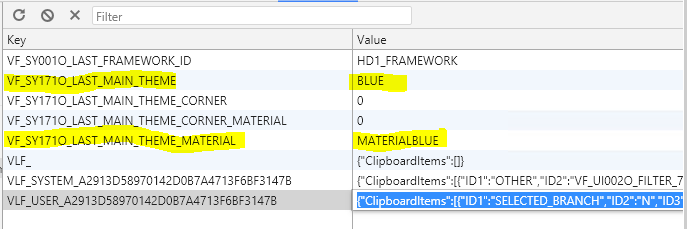
- Capture1.PNG (18.2 KiB) Viewed 16646 times
Re: VLF-ONE Material Button Color
Posted: Thu May 31, 2018 12:30 am
by jyoung
Hey Mark, I apologize, but I am all kinds of confused now.
In the examples I posted, I was not using VF_SY170O, I was just using a theme and experimenting with different things to see what would work.
Perhaps its best if I start over.
There has been a push internally to use our brand guide for apps and that guide includes the corporate color palette. We have three primary colors (all shades of blue) and two secondary colors.
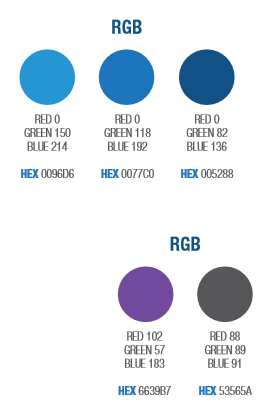
- colors.PNG (13.13 KiB) Viewed 16625 times
In our PRODUCTION app, we use a theme customizer to fix lock the theme to Material Blue and tweak some of the colors.
Code: Select all
begin_com role(*EXTENDS #VF_AC033O)

mthroutine name(Customize) options(*REDEFINE)

define_com class(#PRIM_ALPH) name(#lBlue)
* TODO: Change to "0:82:136"
#lBlue := "0:114:198"

for each(#theme) in(#Themes)
continue if(#theme.ForMaterialDesign = False)

if (#theme.SymbolicName = "MATERIALBLUE")
* customize the blue theme
#theme.BaseTitleStyle.NormBackColor := #lBlue
#theme.FloatingPanel_AtFrontTitleStyle.NormBackColor := #lBlue
#theme.FloatingPanel_AtFrontBorderBrush.Color := #lBlue
else
* disable all other themes
#theme.Enabled := False
endif
endfor

endroutine
end_com
What I am trying to do it make these buttons match our colors.
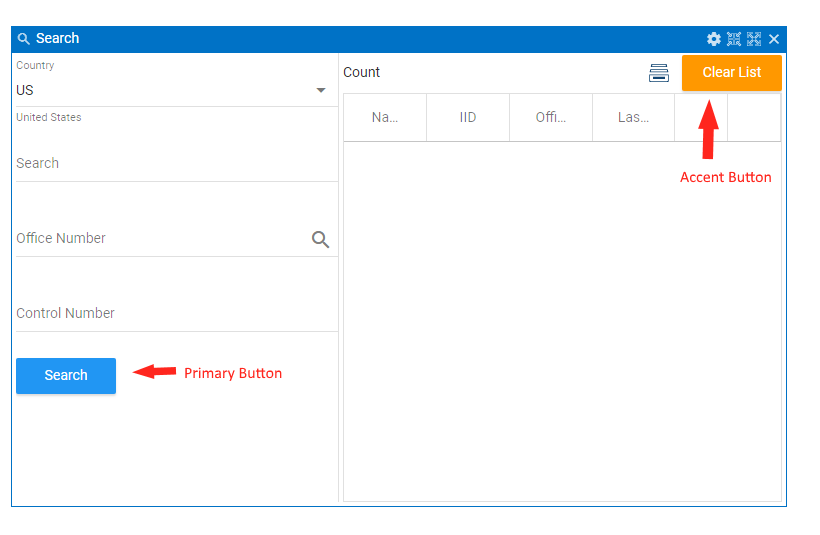
- buttons.PNG (18.13 KiB) Viewed 16625 times
Is there any way to do this using the Themes?
Thanks for the help.
Joe
EDIT
I should mention its not just buttons. It looks like most (if not all now) of the components pick up on the MD theme. I just need to be able to tweak the theme within VLF-ONE to match our brand guides.
Re: VLF-ONE Material Button Color
Posted: Thu May 31, 2018 8:43 am
by MarkD
Hi Joe – I think I get it now.
VLF-ONE applications can only use shipped VL-Web themes.
i.e. You can’t currently use a custom theme.
We are about to produce the first hotfix for the EPC142005 VLF version, and I think we could include the change required to allow you to use a custom theme. So you could probably have that new feature in a few weeks.
Re: VLF-ONE Material Button Color
Posted: Thu May 31, 2018 9:19 am
by MarkD
If you wanted to confirm that new feature would work for you, I think you could try putting this line
#SYS_WEB.WebPage.Theme <= #MyCustomTheme
into your framework’s IIP (your version of DF_OSYSTM) in the uInitialize method.
That would not affect buttons at logon - but it should affect all those created after that.
Re: VLF-ONE Material Button Color
Posted: Fri Jun 01, 2018 12:03 am
by jyoung
That is exactly what I was looking for!
Setting the theme in IIP works. It would be nice if it worked on the logon buttons, but I will take it.
Thanks!
Joe
Re: VLF-ONE Material Button Color
Posted: Fri Jun 01, 2018 8:04 am
by MarkD
Once you have the hotfix you can change your code to
if (#theme.SymbolicName = "MATERIALBLUE")
* customize the blue theme
#theme.UseCustomApplicationTheme <= #MyCustomTheme
instead, and that will impact the logon buttons.
Re: VLF-ONE Material Button Color
Posted: Wed Jun 20, 2018 2:44 pm
by MarkD
The hotfix containing this change is now available.