Page 1 of 1
how to change the date format in a datepicker [accepted as enhancement]
Posted: Tue Aug 07, 2018 1:49 am
by RomainM
Hi everybody,
Using Material Design, the datepicker display the selected date using the format « ShortDay, ShortMonth DayNum »
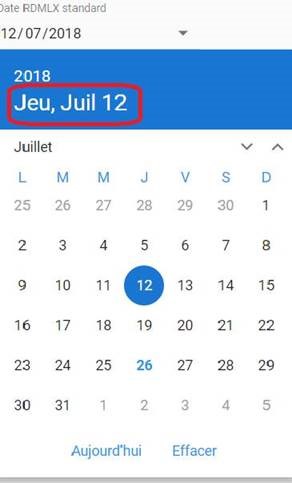
- MD.jpg (19.92 KiB) Viewed 30740 times
In France we do not use this date format, how can we have the date in « ShortDay. DayNum ShortMonth. » format?
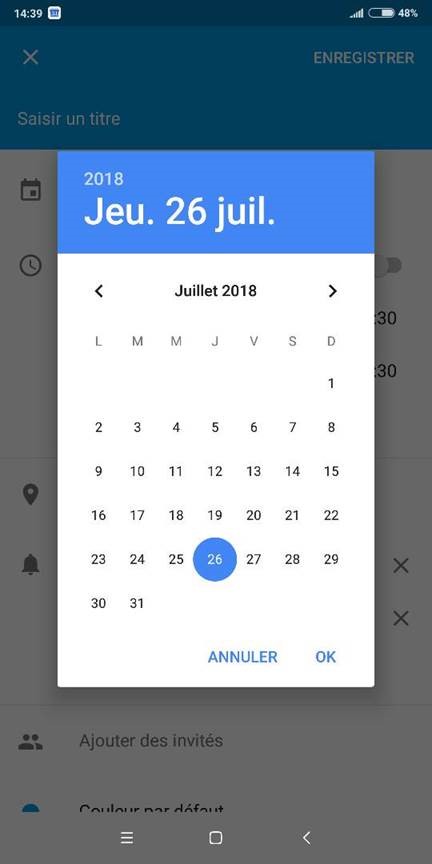
- Android.jpg (30.97 KiB) Viewed 30740 times
Best regards,
Romain
Re: how to change the date format in a datepicker?
Posted: Wed Aug 08, 2018 12:52 am
by atostaine
Just a hunch but is the date format from the Android device system settings?
Art
Re: how to change the date format in a datepicker?
Posted: Thu Aug 16, 2018 9:25 pm
by RomainM
atostaine wrote: Wed Aug 08, 2018 12:52 am
Just a hunch but is the date format from the Android device system settings?
Art
In fact, it is for Windows Web page, I sent an Android screen capture just to show what I want !
Romain.
Re: how to change the date format in a datepicker?
Posted: Fri Aug 17, 2018 9:21 am
by Theo de Bruin
Hi,
In your LANSA installation , move to this directory : ....\X_WIN95\X_LANSA\web\vl\lansa_14_2_0_13\locale\
and edit the locale-fr.json file (for French) , change the settings , e,g,
"dateFormat": "dd/MM/yyyy",
"dateLongFormat": "DDD, MMMM D, YYY",
"dateShortFormat": "DDD, MMMM D",
"timeFormat": "HH:mm:ss",
"startOfWeek": "Lundi",
If you run the English version, you will need to change the locale-en.json , etc.
Also make sure your IDE is set to the correct country , language iso code for each language in each partition
Theo de Bruin
LANSA SUPPORT
Re: how to change the date format in a datepicker?
Posted: Mon Aug 20, 2018 11:01 pm
by RomainM
Theo de Bruin wrote: Fri Aug 17, 2018 9:21 am
In your LANSA installation , move to this directory : ....\X_WIN95\X_LANSA\web\vl\lansa_14_2_0_13\locale\
and edit the
locale-fr.json file (for French) , change the settings , e,g,
Hi Theo,
I do not have the directory ...\vl\lansa_14_2_0_13\ , which EPC do you use ?
I have tried to change the locale-fr.json in the directory \lansa_14_2_1_0\locale but nothing change: i have the same behaviour.
Romain
Re: how to change the date format in a datepicker?
Posted: Fri Aug 24, 2018 3:12 pm
by dominique
Hi Romain
We had the same problem with sp2. It's not only the locale-fr.json which has an influence to the date.
Please check for French the lpcmnfra.bnd in the X_Lansa/execute Directory
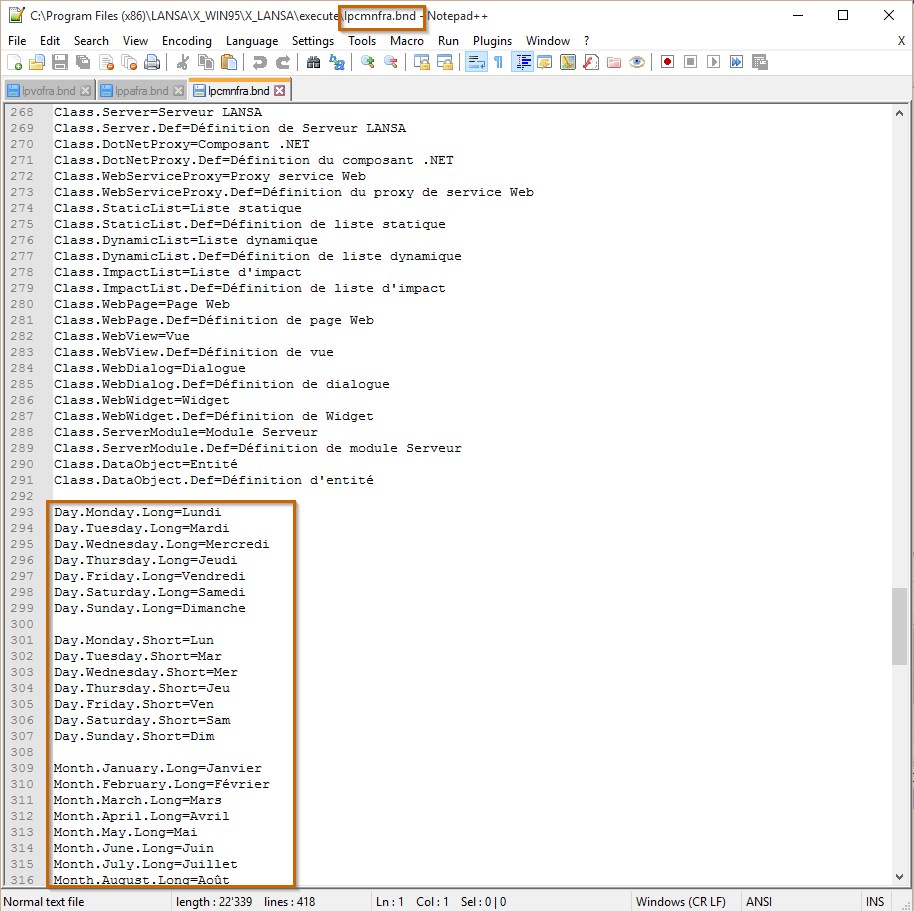
- LPCMNFRA.jpg (211.43 KiB) Viewed 30454 times
Dominique
Re: how to change the date format in a datepicker?
Posted: Fri Aug 24, 2018 5:29 pm
by RomainM
Thanks Dominique but that's OK, the file is OK on VL.
Romain
Re: how to change the date format in a datepicker?
Posted: Mon Sep 03, 2018 6:51 pm
by RomainM
RomainM wrote: Fri Aug 24, 2018 5:29 pm
that's OK, the file is OK on VL.
This not solves my issue, do you think I need to made an enhancement request?
Re: how to change the date format in a datepicker?
Posted: Tue Sep 04, 2018 5:58 am
by dannyoorburg
Hi,
The format should indeed come from the locale file, exactly like Theo said
If you're running in the FRA language, make sure your Partition has 'fr' as the ISO language code for the FRA language. This is how the web page knows which locale file to use.
If the ISO language code is empty, fill it in. Note that the web page won't know about it until it is recompiled, as the language to ISO mapping gets put into the generated HTML.
If you can't get it working, yes, why wouldn't you contact support, thats what they're there for....
Danny.
Re: how to change the date format in a datepicker [accepted as enhancement]
Posted: Fri Sep 14, 2018 5:01 pm
by RomainM
I have asked to the support who has confirmed that it is hardcoded so It has been accepted and logged as an enhancement.
Romain