Page 1 of 1
VL IDE - Check Out Readonly Tables and Fields
Posted: Sat Aug 11, 2018 12:42 am
by jyoung
We have new LANSA dev that we are getting everything hooked up with. We refreshed his repository with the master and have all the Tables and Fields but they are all "greyed" out, indicating they are on the server but not on his machine.
When doing a checkout readonly on the Table, it only checks out the Table, not its Fields.
Is there anyway to check out both at once or does he have to manually checkout readonly ALL the fields in the Repository first?
Thanks,
Joe
Re: VL IDE - Check Out Readonly Tables and Fields
Posted: Sat Aug 11, 2018 9:51 pm
by atostaine
For a new Developer I usually export from the IBM i. I create an export with fields, tables, VL Components, and whatever else. I never liked exporting all partition components because you would get the frameworks and other stuff you don't need. Frameworks are gone but old habits.
If you go the checkout route, you have to do it manually.
I do all fields, then tables, RP's, Forms, Web stuff. You'll see a refreshing repository message, but once everything is checked out, just close the IDE and open it again, it will be refreshed.
Art
Re: VL IDE - Check Out Readonly Tables and Fields
Posted: Tue Aug 14, 2018 10:27 am
by bark
And further to Arts sound advice, you should do your 'mass export' of the repository for read-only. Essentially, you just want to fill up the local slave repository with all objects. The developer can then check out for update anything to be worked on.
cheers
bark
Re: VL IDE - Check Out Readonly Tables and Fields
Posted: Tue Aug 14, 2018 10:42 am
by atostaine
Lol when you check out for update. That’s fun
Re: VL IDE - Check Out Readonly Tables and Fields
Posted: Tue Aug 14, 2018 11:07 pm
by jyoung
Hey Art and Bark,
I've only done exports to a save file to handle deployment scenarios.
Any advice on how to actually do a mass export from the iSeries?
Do you create an export list, add everything to it then export it?
Thanks,
Joe
EDIT
Could I create an export from the MY ide and use that? Will that cause conflicts with the server when it tries to reconcile the imported objects on their machine with the server's?
Re: VL IDE - Check Out Readonly Tables and Fields
Posted: Tue Aug 14, 2018 11:47 pm
by atostaine
Create an export list, choose target system type PC

- shot1.png (7.69 KiB) Viewed 10623 times
Here is what I like to put in it, although you could do all partition objects.
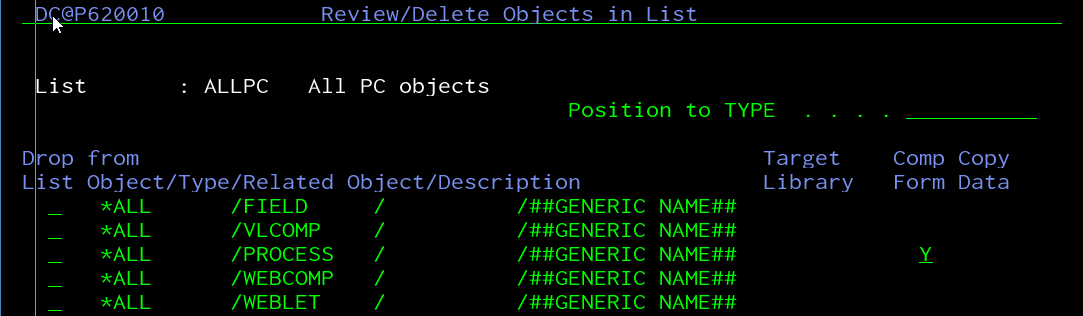
- shot2.png (30.26 KiB) Viewed 10623 times
Then when you run it, look in the IFS under /LANSA_XXXX/export/name of export
It's fastest to download all of the files to the PC and do an import, but you can import over a mapped drive to the IBM i
Art
Re: VL IDE - Check Out Readonly Tables and Fields
Posted: Wed Aug 15, 2018 1:27 am
by jyoung
I did not realize you could do *ALL.
Awesome, will try it out.
Thanks!
Joe
Re: VL IDE - Check Out Readonly Tables and Fields
Posted: Wed Aug 15, 2018 1:30 am
by atostaine
Oh the way I do that is by selecting option to export ALL partition objects, then go into the export list and delete the stuff I don't want.