Page 1 of 1
VLF-ONE SP2 Filter / Instance List Border Color
Posted: Fri Aug 17, 2018 12:29 am
by jyoung
Is there anyway to change the border color between a filter and an instance list in VLF-ONE SP2?
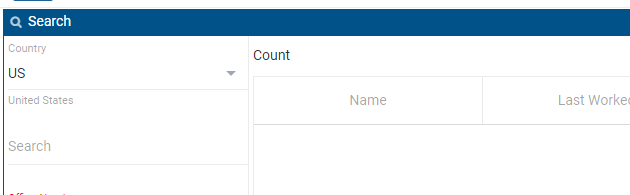
- capture1.PNG (6.6 KiB) Viewed 6373 times
On a lot of our monitors, that border is getting washed out to the point that it becomes invisible to the user, which makes it appear that it cannot be resize, which it can.
Is there are a way to darken that border?
Re: VLF-ONE SP2 Filter / Instance List Border Color
Posted: Fri Aug 17, 2018 11:16 am
by MarkD
The filters ancestors parents parent uses these very simple styles to create the allusion of a border depending on where the filter is located:
Define_Com Class(#Prim_vs.Style) Name(#BorderTop) Bordertop(1)
Define_Com Class(#Prim_vs.Style) Name(#BorderLeft) Borderleft(1)
Define_Com Class(#Prim_vs.Style) Name(#BorderBottom) Borderbottom(1)
Define_Com Class(#Prim_vs.Style) Name(#BorderRight) Borderright(1)
Unfortunately, these are not exposed, nor generic like most other VLF-ONE styling is.
I guess your filter could improve that allusion by adding some styling to its appropriate edge?
Easy enough to try out.
With the new EPC142011 version you can now link in your own custom VL theme, so I guess that would allow you to generically change how all simple borders are displayed.
Re: VLF-ONE SP2 Filter / Instance List Border Color
Posted: Tue Aug 21, 2018 9:04 am
by MarkD
The fact that this was not customizable is an oversight.
The new EPC142011 version (ETA very soon) corrects this.
https://docs.lansa.com/14/en/lansa048/i ... 8_8415.htm
Re: VLF-ONE SP2 Filter / Instance List Border Color
Posted: Tue Aug 21, 2018 11:28 pm
by jyoung
Awesome, thanks Mark.
Joe