Page 1 of 1
Layouts again
Posted: Wed Sep 12, 2018 5:41 am
by atostaine
I'm having a problem with a page. I want the list in RP2 to take go vertically to fit into the RP2 space, but width I want it to show a scroll bar to go right.
How do I setup the sizing?
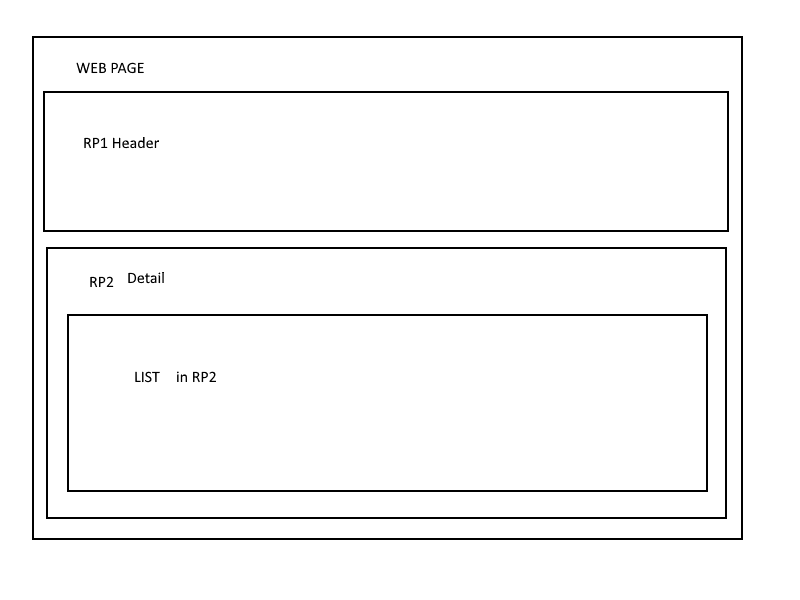
- webpage.png (7.29 KiB) Viewed 4540 times
Re: Layouts again
Posted: Thu Sep 13, 2018 8:47 am
by JamesDuignan
Hi Art,
I think the example below is what you are after. Key thing is that the Reusable part and the Table it contains are both set to fit to width. I put a panel into this to contain the table, for the sake of simplicity, but the concept is the same for using a reusable part.
Code: Select all
Begin_Com Role(*EXTENDS #PRIM_WEB) Theme(#SYS_THEME<MaterialDesignBlue>) Layoutmanager(#LayoutWebPage)
* * * * * * * * * * * * * * * * *
* * * * * Webpage layout* * * * *

Define_Com Class(#PRIM_TBLO) Name(#LayoutWebPage)
Define_Com Class(#PRIM_TBLO.Column) Name(#LayoutWebPageColumn1) Displayposition(1) Parent(#LayoutWebPage)

Define_Com Class(#PRIM_TBLO.Row) Name(#LayoutWebPageRow1) Displayposition(1) Parent(#LayoutWebPage) Height(100) Units(Pixels)
* Row to house detailer
Define_Com Class(#PRIM_TBLO.Row) Name(#LayoutWebPageRow2) Displayposition(2) Parent(#LayoutWebPage) Height(1.75)
* Layout Item header
Define_Com Class(#PRIM_TBLO.Item) Name(#LayoutWebPageItem2) Column(#LayoutWebPageColumn1) Manage(#Text) Parent(#LayoutWebPage) Row(#LayoutWebPageRow1)
* Layout Item Detailer
Define_Com Class(#PRIM_TBLO.Item) Name(#LayoutWebPageItem1) Column(#LayoutWebPageColumn1) Manage(#Panel) Parent(#LayoutWebPage) Row(#LayoutWebPageRow2)

* * * * * * * * * * * * * * * *
* * * * * Panel Layout* * * * *
Define_Com Class(#PRIM_TBLO) Name(#Layout1)
Define_Com Class(#PRIM_TBLO.Row) Name(#Layout1Row1) Displayposition(1) Parent(#Layout1)
Define_Com Class(#PRIM_TBLO.Column) Name(#Layout1Column1) Displayposition(1) Parent(#Layout1)
Define_Com Class(#PRIM_TBLO.Item) Name(#Layout1Item1) Column(#Layout1Column1) Manage(#List) Parent(#Layout1) Row(#Layout1Row1) Marginbottom(24) Marginleft(24) Marginright(24) Margintop(24)

* Header
Define_Com Class(#PRIM_MD.Label) Name(#Text) Caption('Header') Displayposition(1) Left(0) Parent(#COM_OWNER) Tabposition(1) Themedrawstyle('DarkTitle+Title') Top(0) Height(100) Width(1200)


* PRIM_PANEL Definition (Same as having an Reusable part int the page)
Define_Com Class(#PRIM_PANL) Name(#Panel) Displayposition(2) Height(700) Image(#xImagePoly19) Imagealignment(Stretch) Left(0) Parent(#COM_OWNER) Tabposition(2) Tabstop(False) Top(100) Width(1200) Layoutmanager(#Layout1)
Define_Com Class(#PRIM_LIST) Name(#List) Columnheaderheight(48) Columnmarginleft(24) Columnmarginright(24) Displayposition(1) Height(652) Left(24) Parent(#Panel) Rowheight(48) Tabposition(1) Top(24) Width(1152) Themedrawstyle('Popup')
Define_Com Class(#PRIM_LIST.CheckBox) Name(#ListCheckBox) Columnwidth(75) Displayposition(1) Parent(#List) Source(#xDemoBoolean)
Define_Com Class(#PRIM_LIST.String) Name(#ListString) Columncaption('Text') Columncaptionalign(Left) Columncaptiontype(Caption) Columnwidth(2500) Parent(#List) Source(#xDemoUnicode4K) Displayposition(4)
Define_Com Class(#PRIM_LIST.Number) Name(#ListNumber) Columncaption('No.') Columncaptionalign(Right) Columncaptiontype(Caption) Columnwidth(120) Displayalignment(Right) Displayposition(2) Parent(#List) Source(#xDemoNumber)
Define_Com Class(#PRIM_LIST.DateTime) Name(#ListDate) Columncaption('Date') Columncaptiontype(Caption) Columnwidth(120) Displayposition(3) Parent(#List) Showtime(False)

Evtroutine Handling(#COM_OWNER.Initialize)

#xDemoUnicode4K := 'some text'
#xDemoNumber := 42

Inz_List Num_Entrys(10)

Endroutine
End_Com
Re: Layouts again
Posted: Thu Sep 13, 2018 8:48 am
by atostaine
Thanks James. I’ll give it a try tomorrow.