Page 1 of 1
VLF ONE User Logon
Posted: Mon Sep 26, 2016 11:21 pm
by René Houba
In the latest VLF version, we defined that the VLF (we use VLF ONE) should use VLF User Authority.
We defined a user with password.
But after this, it is still possible to logon with ANY user and ANY password......
In other words, the user authority is still not checked.
Is there something we forgot??
Kind regards,
René
Re: VLF ONE User Logon
Posted: Tue Sep 27, 2016 8:38 am
by MarkDale
Hi René,
Is framework authority enabled in the source of your logon IIP?
In the framework properties --> Web/RAMP Details tab --> IIP Component to validate VLF-ONE sign on
There is the name of your version of UF_OLOGON
In the source for that component, locate these lines:
Code: Select all
* For this example we will not use framework authority
#UseFrameworkObjectAuthority := False
If you want VLF-ONE security to be active you have to use:
#UseFrameworkObjectAuthority := True
(and check it in and compile it on the server)
Re: VLF ONE User Logon
Posted: Wed Sep 28, 2016 10:11 pm
by René Houba
Hi Mark,
Thanks for your reply.
I created a copy of the UF_OLOGON and use this one is my framework definition.
I created an admin user with password. But when I fill in the user and password I always get:
1) Please check your server logs.
2) Call to user IIP failed.
On my PC there is NO X_ERR.log at all.
Kind regards,
Rene
Re: VLF ONE User Logon
Posted: Wed Sep 28, 2016 11:19 pm
by René Houba
I started my VLF in trace mode and see nothing in my trace.
But When I use F12 in my browser window I see:
<script src="/LANSADIL/lansa_14_1_0_3/lansa.js"></script>
But on my server lansa.js is stored in:
D:\LANSADIL\X_WIN95\X_LANSA\web\vl\lansa_14_1_0_3\lansa.js
Could this be the problem??
VLF ONE User Logon
Posted: Thu Sep 29, 2016 12:47 am
by René Houba
Hi,
I think that I found the solution for this problem.
In the framework properties --> Web/RAMP Details tab --> IIP Component to validate VLF-ONE sign on
You can fill in the IIP Component name.
We created a copy of UF_OLOGON and give it the name: DIL_LOGON. We used that name, but the VLF uses the (short) internal name to call this program.
So instead of thus the name DIL_LOGON, we used the short name (max 8 characters) now: DIL_LOGO and this works now!!
So when you use the LANSA shipped component, you should fill in the short name UF_OLOGO.
Re: VLF ONE User Logon
Posted: Thu Sep 29, 2016 4:25 pm
by MarkD
Anything snapped into the VLF must be specified by its Identifier, not its name.
You can show the Identifier of an object in your VL-IDE lists like this:
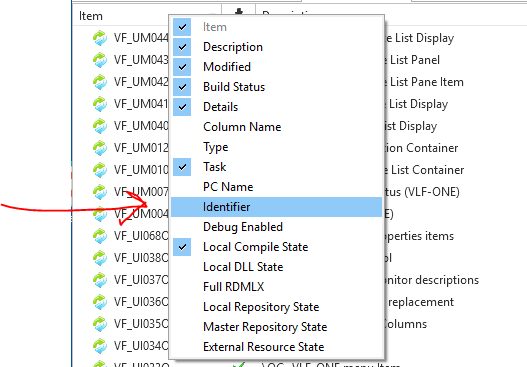
- image1.PNG (30.44 KiB) Viewed 16174 times
Here the names and the identifiers are all the same:
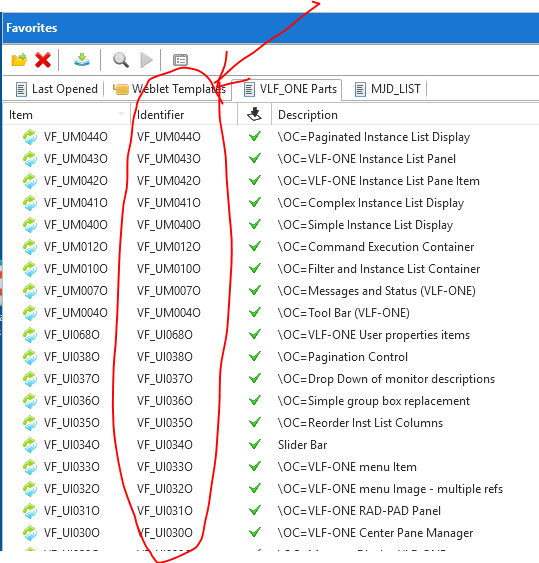
- image2.PNG (53.2 KiB) Viewed 16174 times
Technically this happens because of the way that the *CREATE_FROM option works in the SET_REF command -
http://docs.lansa.com/14/en/lansa015/in ... _ref_p.htm

- image3.PNG (10.86 KiB) Viewed 16174 times