Page 1 of 1
Responsive VL-WEB
Posted: Mon Jan 14, 2019 8:45 pm
by kno_dk
Hi.
I have changed a VL-WEB application to be responsive. I have a header (RP) where I have a lot of functionality. This RP's layout is very different from a PC to a mobile so the easy way was to split the RP into 2 - one for PC and one for mobile. In my index page I check the size of the device and then enable and make it visisble the correct RP. But if I do it this way I call both RP so I get other functions(RP) called twice. Is there a way I can "activate" only the one of the RP?
Case Of_Field(#sys_web.Device)
When Value_Is(= Mobile)
#Com_owner.LayoutManager <= #LayoutSmall
#KatalogMobileButtonMenu.Visible := true
Set Com(#KatalogTopResponsive) Visible(true) Enabled(true)
Set Com(#KatalogTop) Visible(False) Enabled(False)
When Value_Is(= Tablet)
#Com_owner.LayoutManager <= #LayoutLarge
#KatalogMobileButtonMenu.Visible := false
Set Com(#KatalogTopResponsive) Visible(False) Enabled(False)
Set Com(#KatalogTop) Visible(True) Enabled(True)
Otherwise
#Com_owner.LayoutManager <= #LayoutLarge
#KatalogMobileButtonMenu.Visible := false
Set Com(#KatalogTopResponsive) Visible(False) Enabled(False)
Set Com(#KatalogTop) Visible(True) Enabled(True)
/Klaus
Re: Responsive VL-WEB
Posted: Tue Jan 15, 2019 12:17 am
by Jurgen.Rentinck
Hi Klaus,
You can dynamically create the header panel.
If you look at the sample code below you can create a placeholder on your view, in this sample this is called #headerPanel.
Note that the reference parameter of this #prim_panl is set to *dynamic.
You can now dynamically instantiate the correct header panel based on your device.
I hope this helps.
JurgenR
Code: Select all
Define_Com Class(#PRIM_PANL) Name(#HeaderPanel) Reference(*DYNAMIC) DisplayPosition(2) Parent(#COM_OWNER) TabPosition(2) TabStop(False) Width(300) Height(129)

Evtroutine Handling(#COM_OWNER.Prepare)
Case Of_Field(#SYS_WEB.Device)
When Value_Is(= Desktop)
#HeaderPanel <= *New #SKY_HeadDesktop
When Value_Is(= Mobile)
#HeaderPanel <= *New #SKY_HeadMobile
Otherwise

Endcase
Endroutine
Re: Responsive VL-WEB
Posted: Tue Jan 15, 2019 2:06 am
by kno_dk
Hi Jurgen.
I have defined 2 layout on the Index page - LayoutSmall and LayoutLarge. LayoutSmall have 3 rows and 1 column and LAyoutLarge have 2 rows and 1 column. How do I then add the HeaderPanel to row 1 on both layouts?
/Klaus
Re: Responsive VL-WEB
Posted: Tue Jan 15, 2019 5:09 am
by atostaine
In the header components have you tried seeing if they are visible?
if #com_self.visible
do header processing
endIf
Art
Re: Responsive VL-WEB
Posted: Tue Jan 15, 2019 6:18 am
by Jurgen.Rentinck
You can also do this dynamically.
I added the complete code for the sample view I created.
Code: Select all
Begin_Com Role(*EXTENDS #PRIM_VIEW) DisplayPosition(1) TabPosition(1) LayoutManager(#Layout1) Caption('View2')

Define_Com Class(#PRIM_TBLO) Name(#Layout1)
Define_Com Class(#PRIM_TBLO.Row) Name(#Layout1Row1) DisplayPosition(1) Parent(#Layout1)
Define_Com Class(#PRIM_TBLO.Column) Name(#Layout1Column1) DisplayPosition(1) Parent(#Layout1)
Define_Com Class(#PRIM_TBLO.Item) Name(#Layout1Item1) Column(#Layout1Column1) Manage(#Label) Parent(#Layout1) Row(#Layout1Row1) Sizing(ContentWidthAndHeight)
Define_Com Class(#PRIM_TBLO.Item) Name(#Layout1Item2) Parent(#Layout1) Row(#Layout1Row1) Sizing(FitToWidth) Column(#Layout1Column1) Alignment(TopCenter)


Define_Com Class(#PRIM_TBLO) Name(#Layout2)
Define_Com Class(#PRIM_TBLO.Row) Name(#Layout2Row1) DisplayPosition(1) Parent(#Layout2)
Define_Com Class(#PRIM_TBLO.Column) Name(#Layout2Column1) DisplayPosition(1) Parent(#Layout2)
Define_Com Class(#PRIM_TBLO.Item) Name(#Layout2Item1) Column(#Layout2Column1) Manage(#Label) Parent(#Layout2) Row(#Layout2Row1) Sizing(ContentWidthAndHeight)
Define_Com Class(#PRIM_TBLO.Item) Name(#Layout2Item2) Parent(#Layout2) Row(#Layout2Row1) Sizing(FitToWidth) Column(#Layout2Column1) Alignment(TopCenter)


Define_Com Class(#PRIM_MD.Label) Name(#Label) Caption('View2') DisplayPosition(1) Height(51) IconHeight(0) Left(108) Parent(#COM_OWNER) TabPosition(1) Top(200) Width(84) CaptionAlignment(Center) ThemeDrawStyle('Heading1') PaddingBottom(10) PaddingLeft(10) PaddingRight(10) PaddingTop(10)


Define_Com Class(#PRIM_PANL) Name(#HeaderPanel) Reference(*DYNAMIC) DisplayPosition(2) Parent(#COM_OWNER) TabPosition(2) TabStop(False) Width(300) Height(129)

Evtroutine Handling(#COM_OWNER.Prepare #com_owner.DesignChanged)
Case Of_Field(#SYS_WEB.Device)
When Value_Is(= Desktop)
#HeaderPanel <= *New #SKY_HeadDesktop
#Layout1Item2.Manage <= #HeaderPanel
#com_owner.LayoutManager <= #Layout1
When Value_Is(= Mobile)
#HeaderPanel <= *New #SKY_HeadMobile
#Layout2Item2.Manage <= #HeaderPanel
#com_owner.LayoutManager <= #Layout2
Otherwise

Endcase
Endroutine
End_Com
Re: Responsive VL-WEB
Posted: Tue Jan 15, 2019 8:46 pm
by kno_dk
Hi.
it works regarding the numbers ofcall to the serve.
But now it will not fit the entire width when on a pc.I have the old index file and there it is using the entire width. How can i control the width on the HeaderPanel
Any suggestions?
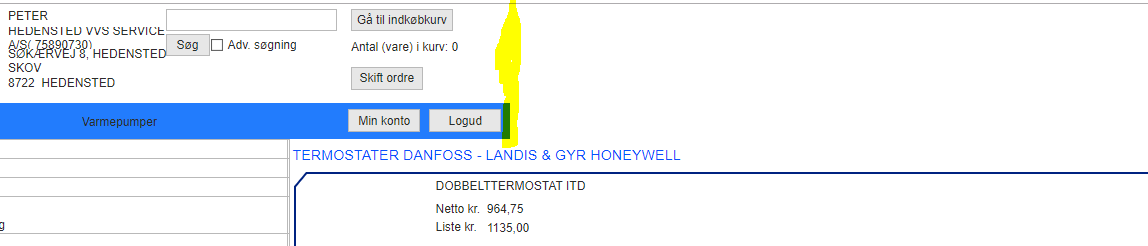
- ïndex1.PNG (14.57 KiB) Viewed 12107 times
Re: Responsive VL-WEB
Posted: Wed Jan 16, 2019 12:16 am
by Jurgen.Rentinck
In the layout you use the layout item that manages the header should have sizing(FitToWIdth).
This should now make sure the header takes the complete width.