Page 1 of 1
Override VLF ONE Download as CSV Image
Posted: Fri Jan 18, 2019 10:01 am
by caseywhite
Is it possible to override the download instance list as CSV image that is used using a property in the framework or is the only choice to manually change the .PNG file that exists on the server. This is the image I am referring to.

- CSVImage.png (248 Bytes) Viewed 10080 times
Re: Override VLF ONE Download as CSV Image
Posted: Mon Jan 21, 2019 8:05 am
by davidbalansa
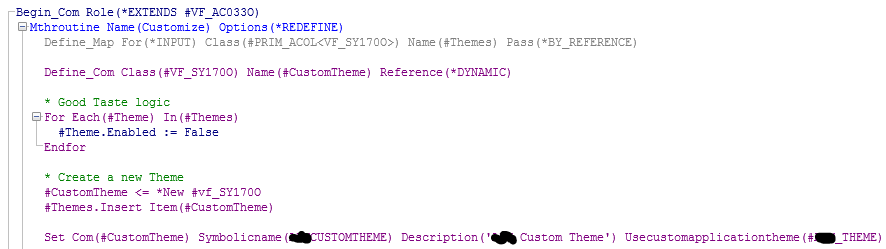
In the VLFONE theme customizer component, in the Customize method:
- Capture.PNG (15.36 KiB) Viewed 10054 times
Add the following line:
#CustomTheme.AddImageName Usesymbolicname(LIST) Actualimagename("to_bottom")
Where the image name "to_bottom" (or any other image) exists in the ....x_<partition>/web/vl/... directories.

- Capture2 .PNG (6.28 KiB) Viewed 10054 times
Hope this helps.
Re: Override VLF ONE Download as CSV Image
Posted: Mon Jan 21, 2019 12:01 pm
by MarkD
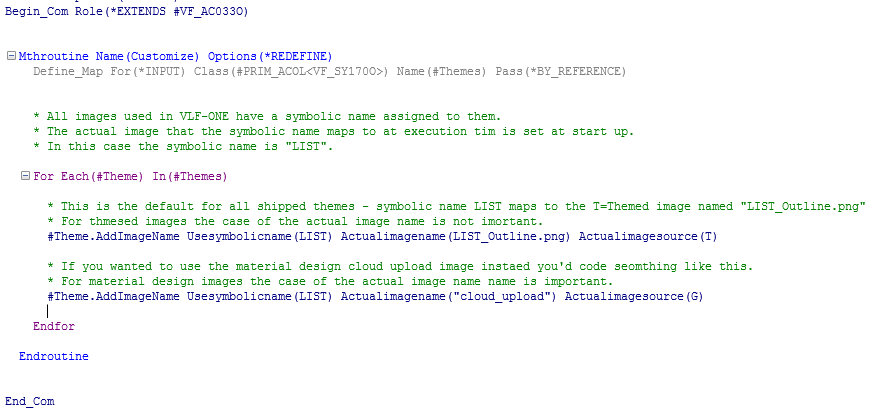
You don't have to create a new theme.
You can just override the associated default image name in all shipped themes, something like this:
- Capture.PNG (23.78 KiB) Viewed 10044 times
Re: Override VLF ONE Download as CSV Image
Posted: Mon Jan 21, 2019 2:11 pm
by MarkD
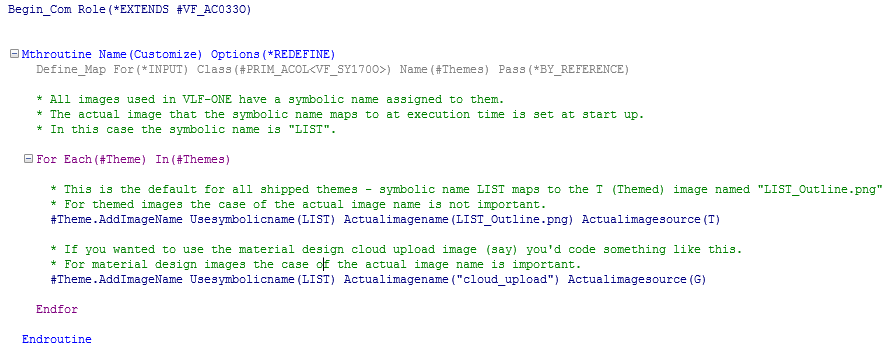
Here's the code snippet again with less typos in it ................
- Capture.PNG (23.17 KiB) Viewed 10041 times
Re: Override VLF ONE Download as CSV Image
Posted: Wed Jan 23, 2019 3:25 am
by caseywhite
Great. Thanks Mark and David.