Page 1 of 1
Lansa web About page error V14SP2
Posted: Thu Feb 28, 2019 8:24 am
by atostaine
Trying to run one of the demo mobile app on a dev PC with dongle. I think this error is because the app server isn't running? I did a repaid or modify web server on the PC, still getting same error
URL:
http://pc6:8080/cgi-bin/lansaweb?about
Unrecoverable error occurred while processing the Web request
Message text: Failed to access application server "A4DDS|A4DDS" for handling web request from web server "tostaine6:8080" with error code 11028 (ERR_CLASS_SPEC).
Message index: <N/A>
I'll submit to support but Paul will probably yell at me because I think I had this problem @ V14.
Re: Lansa web About page error V14SP2
Posted: Thu Feb 28, 2019 8:42 am
by MarkD
Any elaboration in the server's X_ERR.LOG file?
Typically that's found in c:\windows\temp folder.
Re: Lansa web About page error V14SP2
Posted: Thu Feb 28, 2019 10:14 am
by atostaine
Nothing in x_err.log. Isn't there a service supposed to be running? I have lConnect running.
Re: Lansa web About page error V14SP2
Posted: Thu Feb 28, 2019 11:33 am
by MarkD
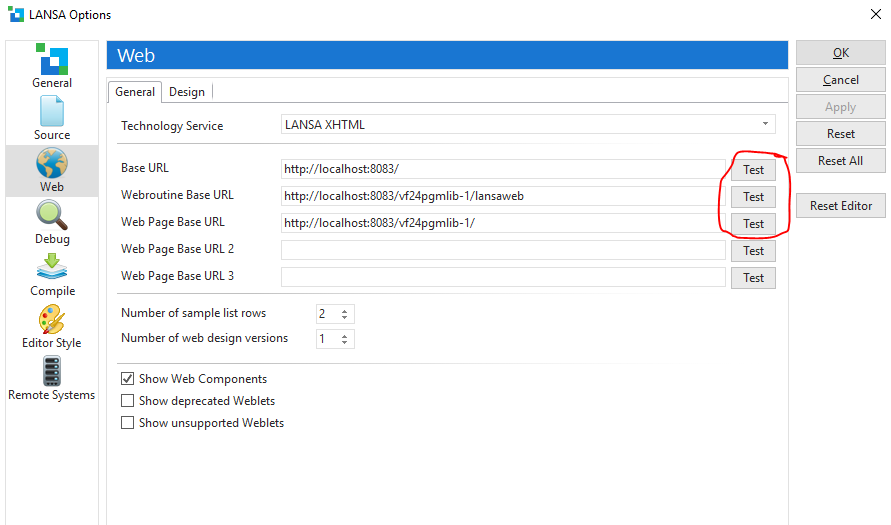
Is it possible to try out these options in any VL-IDE installed on the system?
- Capture.PNG (37.56 KiB) Viewed 25451 times
Re: Lansa web About page error V14SP2
Posted: Thu Feb 28, 2019 11:35 am
by MarkD
Maybe also try running IISRESET as an administrator to stop and restart IIS?
Re: Lansa web About page error V14SP2
Posted: Thu Feb 28, 2019 11:39 am
by atostaine
Yes, first one is fine. 2nd one get 404 not found. 3rd one comes up, click test application server, get this
Re: Lansa web About page error V14SP2
Posted: Thu Feb 28, 2019 11:44 am
by bark
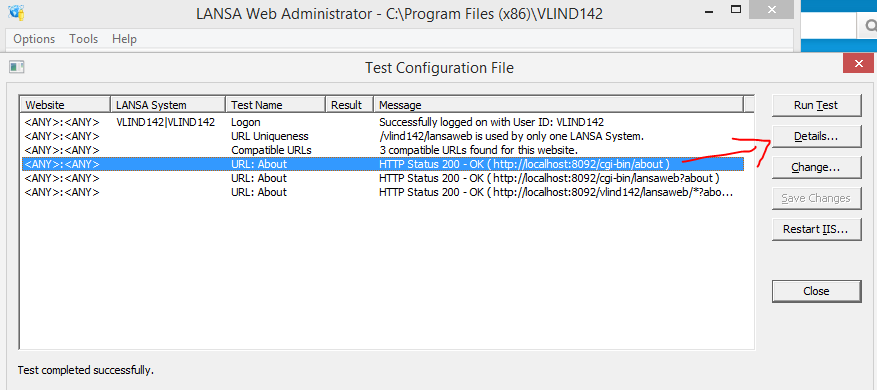
You should start the Web Administrator from the Settings and Administration folder. Open the local webplugin.conf config file and from the Tools menu, there is a Test option. Use this to run a test and see whats failing/not set up correctly. You can even check the details, make changes and restart IIS from this test screen.
- webadmin_test.PNG (26.01 KiB) Viewed 25447 times
Re: Lansa web About page error V14SP2
Posted: Thu Feb 28, 2019 11:49 am
by atostaine
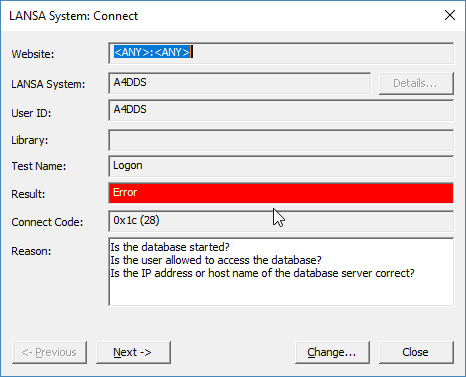
Thanks. This is the message I see. I've tried adding a user in SQL server, but that doesn't help. The DB is started, My IP is correct.
- 2019-02-27 19_48_18-LANSA System_ Connect.png (9.47 KiB) Viewed 25447 times
Re: Lansa web About page error V14SP2
Posted: Thu Feb 28, 2019 11:50 am
by atostaine
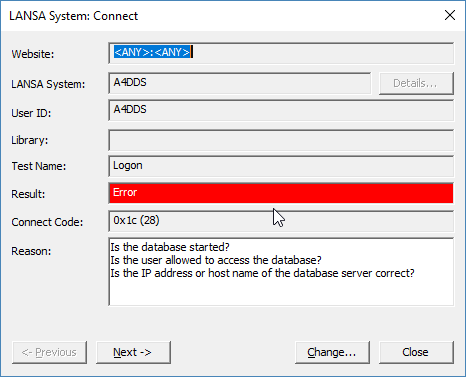
Thank you. This is the message I see. I've tried adding a user in SQL server, but that doesn't help. The DB is started, My IP is correct.
- 2019-02-27 19_48_18-LANSA System_ Connect.png (9.47 KiB) Viewed 25447 times
Re: Lansa web About page error V14SP2
Posted: Thu Feb 28, 2019 2:54 pm
by bark
If I stop my database service in Windows control panel -> services, I get the same 0x1c (28) as you. So, that's the area to focus on.
Have you tried the ODBC Data sources Admin, select your data source/Configure -> Test Data Source?
If that connects successfully, using the Change button in the error screen below will take you to the D/A Server options in the Web admin. Double check the settings....pointing to the correct LANSA system, port correct for this server, listener started, User password correct and authorized to the database, If all looks OK, LANSA support would be the next port of call.
Re: Lansa web About page error V14SP2
Posted: Sat Jan 30, 2021 3:13 am
by Dino
I know this is out of time, but I just notice this error in another pc, and the reason have to do with mcafee antivirus blocking LANSA.