Page 1 of 1
Decimal / Percent Conversion and Display
Posted: Fri Mar 08, 2019 5:58 am
by jyoung
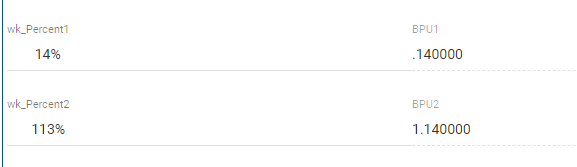
I have two fields (BPU1 and BPU2) that are a signed(7,6).
For display and data entry purposes I need those fields to be a whole percent. To do so, I have created a new field (wk_Percent1 and wk_Percent2) both of which are int(4).
I calculate the percentage using wk_Percent1 = BPU1 * 100 so that .140000 becomes 14. Nothing extraordinary here.
I am experiencing 2 issues.
- I want to display the wk_Percent fields with the percent sign. I tried using an edit word with ' %' but that pushes the value over to the right, which I don't want, it want it displayed simply as 14% not ' 14%' (note the spaces before the 14)
- When converting a decimal that is greater than 1, I am getting rounding errors. So that 1.140000 * 100 is showing 113 whereas is should be 114.
The conversion is quite simple
Code: Select all
evtroutine handling(#Get.Completed)
if (#wk_Status = "OK")
#CurrentBPU1 := #BPU1
#CurrentBPU2 := #BPU2

#wk_Percent1 := #BPU1 * 100
#wk_Percent2 := #BPU2 * 100
endif
endroutine
- capture.PNG (4.55 KiB) Viewed 20265 times
I have a feeling that is so simple I am missing something.

And am going to be quite embarrassed when the solution presents itself.

What am I doing wrong?
Joe
Re: Decimal / Percent Conversion and Display
Posted: Fri Mar 08, 2019 6:38 am
by lawingo
Could you change the wk_percent field to a String field and then format it with the following?
Code: Select all
Define Field(#wk_Percent1) Type(*STRING)
Define Field(#wk_Percent2) Type(*STRING)
#BPU1 := .14000
#BPU2 := 1.14

#wk_Percent1 := (#BPU1 * 100).Round.AsDisplayString( EditCode_Z ) + '%'
#wk_Percent2 := (#BPU2 * 100).Round.AsDisplayString( EditCode_Z ) + '%'
Best,
Chad
Re: Decimal / Percent Conversion and Display
Posted: Fri Mar 08, 2019 7:15 am
by jyoung
That was going to be my next move.
I was trying to avoid it as when the user enters a value, I am going to have to do some checking to ensure only numbers are entered. Easily enough done, I was just wanting to avoid it if I could.
The calculation should not require rounding. When I tried it with the percent as a decimal field, I would get 113.99. Do you get that in your example without the rounding?
Joe
Re: Decimal / Percent Conversion and Display
Posted: Fri Mar 08, 2019 7:56 am
by lawingo
I hard coded your values. My end result was 114%. I was confused at how you could even get 113 when your value was clearly 1.140000. Also, I didn't throw the values to a screen. I just used a "MESSAGE_BOX_ADD" to show me the values. I would assume that shouldn't make a difference.
What is the Definition of #CurrentBPU1? Could you evaluate the value of BPU1 before it's passed into that field? Maybe something weird is happening when the value is being passed into it. For instance maybe #BPU2 is actually 1.13999 but when you pass it into #currentBPU2 it gets rounded up so it looks correct on the screen but your next evaluation uses the #BPU2 value and not the #currentBPU2 value. Just a guess <grin>.
Chad
Re: Decimal / Percent Conversion and Display
Posted: Fri Mar 08, 2019 8:29 am
by jyoung
In this instance CurrentBPU1 should not be relevant. It is used in a diff calculation later.
It is defined as a reffld of BPU1
Code: Select all
define field(#CurrentBPU1) reffld(#BPU1)
BPU1 & 2, wk_Percent1 & 2 are the only fields displayed.
From your MESSAGE_BOX_ADD, I assume you are using VLWIN, whereas I am in VLWEB.
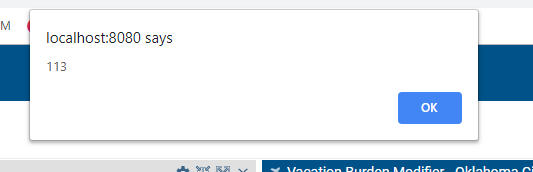
Throwing wk_Percent2.AsString into a an alert box shows:
Code: Select all
#SYS_WEB.Alert( #wk_Percent2.AsString )
- capture1.PNG (5.81 KiB) Viewed 20250 times
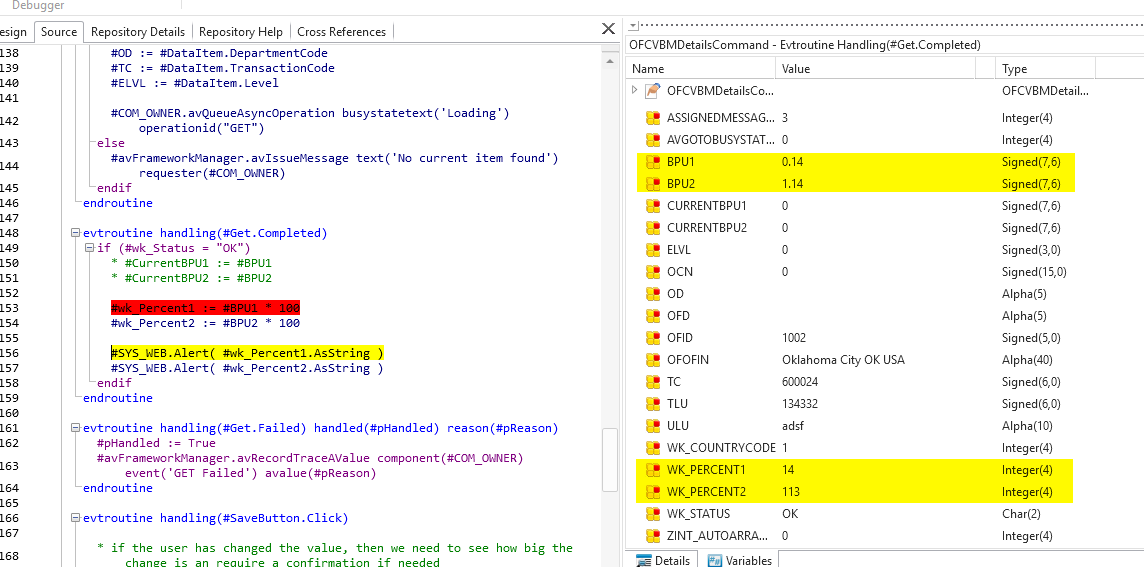
When debugging it, I just evaluated wk_Percent2, but the debugger value shows 113!
- capture 3.PNG (72.57 KiB) Viewed 20250 times
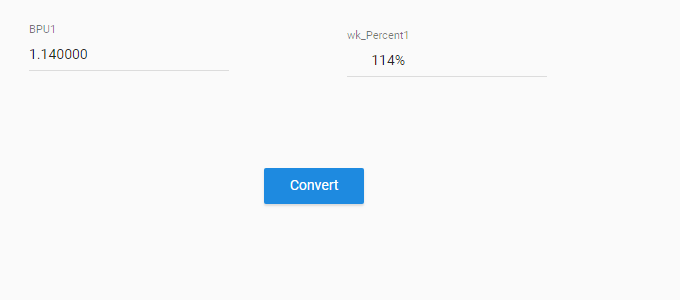
Oddly enough, when I create a test page and do the same calculation, it works.The only difference here is that the value of BPU1 is being hard coded whereas in the app its coming from the server.
Code: Select all
begin_com role(*EXTENDS #PRIM_WEB) theme(#SYS_THEME<MaterialDesignBlue>)

define_com class(#BPU1.EditField) name(#BPU1) displayposition(1) left(72) parent(#COM_OWNER) tabposition(1) top(104) caption('BPU1') captiontype(Caption)
define_com class(#wk_Percent1.EditField) name(#wk_Percent1) displayposition(2) left(390) parent(#COM_OWNER) tabposition(2) top(110) caption('wk_Percent1') captiontype(Caption)
define_com class(#PRIM_MD.RaisedButton) name(#Button) caption('Convert') displayposition(3) left(307) parent(#COM_OWNER) tabposition(3) themedrawstyle('MediumTitle') top(255)

evtroutine handling(#Com_owner.Initialize)
#BPU1 := 1.14
endroutine

evtroutine handling(#Button.Click)
#wk_Percent1 := #BPU1 * 100
endroutine
end_com
- Capture2.PNG (4.36 KiB) Viewed 20250 times
Re: Decimal / Percent Conversion and Display
Posted: Fri Mar 08, 2019 8:32 am
by jyoung
Response from the server shows the right values.
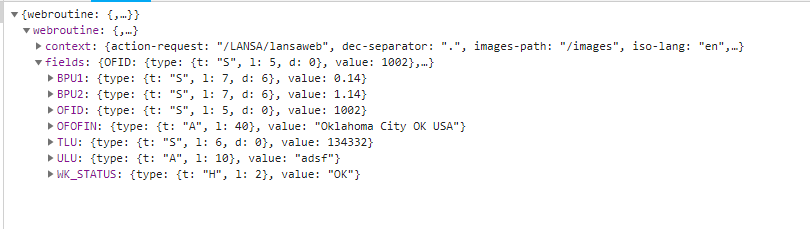
- capture4.PNG (15.87 KiB) Viewed 20250 times
Re: Decimal / Percent Conversion and Display
Posted: Fri Mar 08, 2019 8:40 am
by jyoung
Put this in a server module
Code: Select all
begin_com role(*EXTENDS #PRIM_SRVM)

srvroutine name(Get)
field_map for(*OUTPUT) field(#BPU1)

#BPU1 := 1.14
endroutine
end_com
Then this in a web page
Code: Select all
begin_com role(*EXTENDS #PRIM_WEB) theme(#SYS_THEME<MaterialDesignBlue>)

define_com class(#BPU1.EditField) name(#BPU1) displayposition(1) left(72) parent(#COM_OWNER) tabposition(1) top(104) caption('BPU1') captiontype(Caption)
define_com class(#wk_Percent1.EditField) name(#wk_Percent1) displayposition(2) left(390) parent(#COM_OWNER) tabposition(2) top(110) caption('wk_Percent1') captiontype(Caption)
define_com class(#PRIM_MD.RaisedButton) name(#Button) caption('Convert') displayposition(3) left(307) parent(#COM_OWNER) tabposition(3) themedrawstyle('MediumTitle') top(255)

define_com class(#TestModule2.Get) name(#Get)

evtroutine handling(#Com_owner.Initialize)
#Get.ExecuteAsync bpu1(#BPU1)
endroutine


evtroutine handling(#Button.Click)
#wk_Percent1 := #BPU1 * 100
endroutine
end_com
The result:
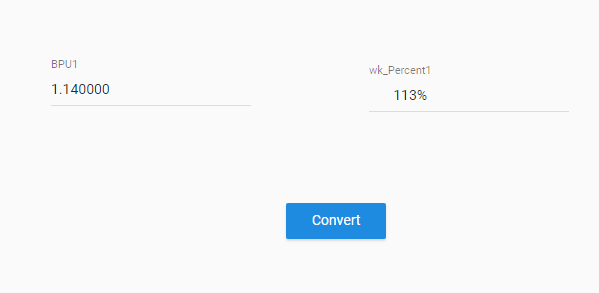
- capture5.PNG (4.28 KiB) Viewed 20247 times
The WRONG value. Attached is an export if you don't mind trying it yourself.
Re: Decimal / Percent Conversion and Display
Posted: Fri Mar 08, 2019 2:38 pm
by dannyoorburg
Hi Joe,
I just gave it a try too. It's a bug in Visual LANSA.
In plain JavaScript the result of
I know it's weird but that's what it does. It's got to do with the imprecise nature of the JavaScript floating point number. (You can easily verify this on w3schools.com)
To get around this, LANSA doesn't hold on to decimal values as JavaScript numbers, it's got a dedicated decimal value object that can do PRECISE calculations (plus it can hold much bigger values, since LANSA allows decimal numbers of up to 63 digits ( the JavaScript number goes up to 15 I think ) )
The value you got back from the Server Routine call didn't get converted into a decimal object (it should have been), it stayed a regular JavaScript number and therefor suffered from that particular rounding issue. When you defined the value in the program it turned it into a decimal objects straight away and was therefor correct.
I can imagine you thought you were growing crazy.
I'd ask support for a fix, or alternatively code around it by adding .5 before turning it into an integer, even though that looks a bit dumb...
Code: Select all
#wk_Percent1 := (#BPU1 * 100) + 0.5
Cheers,
Danny
Re: Decimal / Percent Conversion and Display
Posted: Sat Mar 09, 2019 1:29 am
by jyoung
Ahh, I thought it may be a javascript thing.
I submitted a support ticket because it was driving me crazy. I'll add your info to it.
It dawned on me late last night, that I can do the conversion on the server and avoid the issue.
Management is concerned that a user may mis-enter a decimal point which could have a significant impact on some downstream calculations. Hence the need for a whole number edit.
