Confirmed by LPC Support that the Layout Helper has been deprecated.
The LayoutManager dialog was removed in favor of the Layout Ribbon as we could no longer justify the confusion in documentation or the duplication of effort in maintenance. Also new features like variable sizing and Table Layout were not available from the old Layout Helper dialog as only the Layout Ribbon and Designer are being maintained and enhanced.
From V13 onwards VL’s Layouts were majorly enhanced with Table Layout and Designer responsiveness through the Layout Ribbon. All new development was pushed this direction by the functionality being front and center in the Editor.
What everyone did get was a more flexible Layout mechanism suitable for more modern Layouts.
The V14 designer responds to selection and the information is always available. Simply click on the UI and all Layout information is available (see pic below).
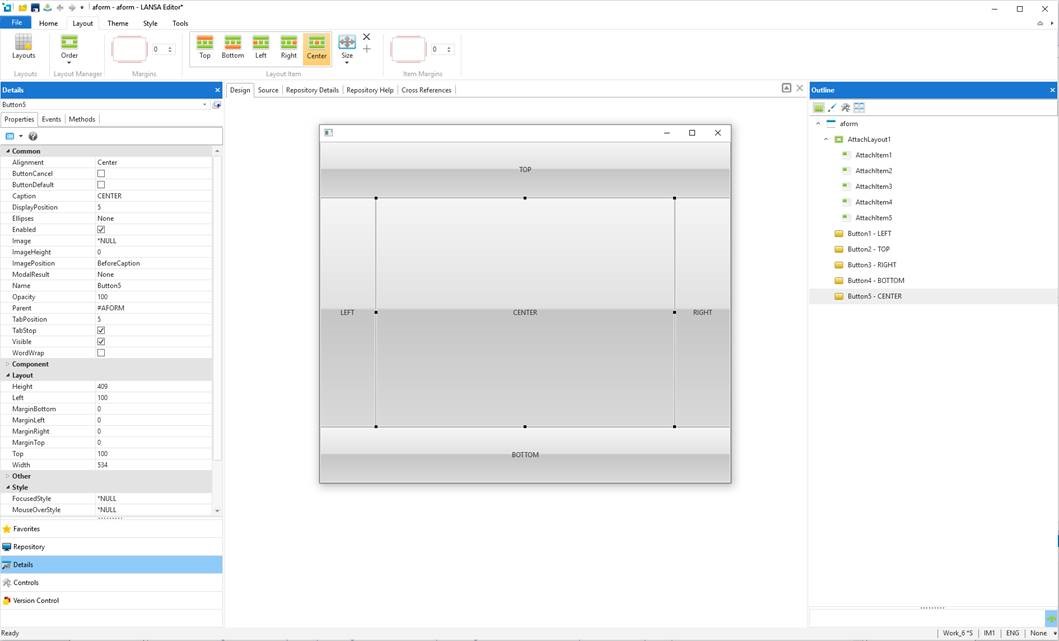
- Example.jpg (71.86 KiB) Viewed 15273 times
Clicking on a UI control shows its Layout information. Clicking on a UI Composite shows both its LayoutItem information as a Child in its parent and its LayoutManager information that will be applied to its children.
This is definitely a different way of thinking but removes the abstraction that the Layout Helper Dialog required. It keeps the designer front and center and Layout a more natural part of design. We feel this is a step forward rather than the previous means of opening the LayoutHelper Dialog and navigating the UI from there.
So to answer the individual question….
I guess the concerns are…
• Are we losing some functionality or a way at looking at it… I did not see a way to do things like determine the child and parent like in the layout helper
It is a different way of thinking but we have simplified development for new users. Layout is now part of the designer with the Layout Sheet providing all details. Structure of the UI is provided from the Outliner view and all parent\child structure is handled through designer selection.