Page 1 of 1
Trouble with persistant virtual clipboard manager
Posted: Fri Jun 21, 2019 5:03 am
by Echo
This is version 13.2. We are trying to change the location that Virtual Clipboard files are stored, but encounter an error when executing the command. Code is below:
Code: Select all
* uVCPath defaults to the *TEMP_DIR system value. uVCFilePrefix defaults to a blank/empty string.
* When uVCFilePrefix is blank/null the virtual clipboard files are named:
*     <partition>_User_Virtual_ClipBoard.Dat and <partition>_Framework_Virtual_ClipBoard.Dat
* When uVCFilePrefix is not blank/null the virtual clipboard files are named
*     <partition>_<uVCFilePrefix>_User_Virtual_ClipBoard.Dat and <partition>_<uVCFilePrefix>_Framework_Virtual_ClipBoard.Dat

* eg: Set Com(#Com_Owner) uVCPath('MyPathName') uVCFilePrefix('MyFilePrefix')

Set Com(#Com_Owner) uVCPath('C:\Users\Public\Public Documents\') uVCFilePrefix('TestUser')
When doing this, we get this error message as the application closes:
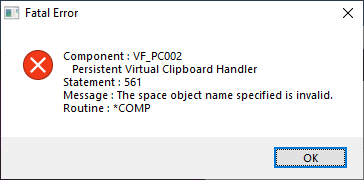
- image.png (8.76 KiB) Viewed 18729 times
The handler creates and writes the "Framework_Virtual_Clipboard.dat" file, and creates the "User_Virtual_Clipboard.dat" file but writes nothing to it, so I believe this is where the problem is occurring. It generates a log file, but says nothing of consequence. I've tried different locations and using environmental variables instead of explicit paths, but the result doesn't change. I would debug it and look at the line number mentioned in the error message, but the part handling clipboard persistence(VF_PC002) is closed source. If anyone has any experience using the persistent clipboard manager, I would appreciate feedback as to overcoming this error or an alternate way of doing the same thing. Thanks.
Re: Trouble with persistant virtual clipboard manager
Posted: Fri Jun 21, 2019 10:05 am
by MarkD
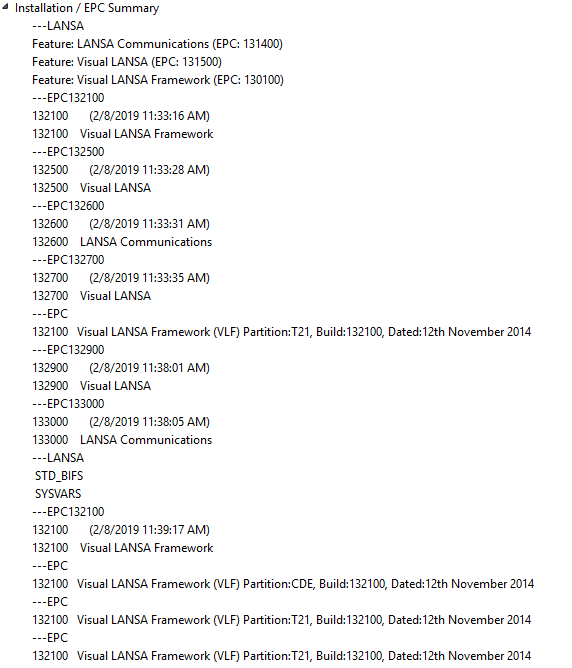
Could you post your VLF-WIN EPC number?
Use the Help -> About Framework menu options working as a developer/designer and scroll to the end.
Re: Trouble with persistant virtual clipboard manager
Posted: Fri Jun 21, 2019 10:12 am
by MarkD
Also, could you post the complete code of the entry point Windows form you are using?
The one that you would have copied from shipped example forms UF_DESGN, UF_EXEC or AF_ADMIN?
Re: Trouble with persistant virtual clipboard manager
Posted: Sat Jun 22, 2019 2:49 am
by Echo
Here is the source we are using from UF_EXEC:
Code: Select all
*  ===========================================================================================================
*
*  Component   : MSSEXEC2
*  Type        : Form
*  Ancestor    : VF_AC006
*
*  ===========================================================================================================
Function Options(*DIRECT)
Begin_Com Role(*EXTENDS #VF_AC006) Clientheight(556) Clientwidth(771) Height(595) Left(580) Top(214) Width(787)
Define_Com Class(*ANCESTOR) Name(#BROWSER) Width(104)
Define_Com Class(*ANCESTOR) Name(#COMMANDHANDLER) Height(123) Width(439)
Define_Com Class(*ANCESTOR) Name(#COMMAND_PANEL) Height(123) Width(439)
Define_Com Class(*ANCESTOR) Name(#INTRO_PANEL) Height(342) Width(439)
Define_Com Class(*ANCESTOR) Name(#RIGHT_PANEL) Height(342) Width(439)
Define_Com Class(*ANCESTOR) Name(#SELECT_PANEL) Width(104)
Define_Com Class(*ANCESTOR) Name(#TOP_PANEL) Width(439)
Define_Com Class(*ANCESTOR) Name(#WORK_PANEL) Height(342) Width(439)
Define_Com Class(*ANCESTOR) Name(#STATUS) Left(273)
Define_Com Class(*ANCESTOR) Name(#TOOLBAR) Width(767)
Define_Com Class(*ANCESTOR) Name(#IDENT_PANEL) Width(767)
Define_Com Class(*ANCESTOR) Name(#MAIN_PANEL) Width(767) Height(342)
Define_Com Class(*ANCESTOR) Name(#IDENT_BUTTON) Left(746)
Define_Com Class(*ANCESTOR) Name(#CURRENT_OBJECT) Width(579)
Define_Com Class(*ANCESTOR) Name(#LEFT_PANEL) Height(342) Width(320)
Define_Com Class(*ANCESTOR) Name(#STATUS_BAR) Width(767)
Define_Com Class(*ANCESTOR) Name(#MiniFilter) Width(579)
Define_Com Class(*ANCESTOR) Name(#Right_panel_Main) Height(342) Left(328) Width(439)
Define_Com Class(*ANCESTOR) Name(#WindowBar) Width(767)
Define_Com Class(*ANCESTOR) Name(#Body_Panel) Height(401) Width(767)
Define_Com Class(*ANCESTOR) Name(#BODY_PANEL_BEMS) Top(350) Width(767)
Define_Com Class(*ANCESTOR) Name(#BODY_PANEL_MAIN) Height(342) Width(767)
Define_Com Class(*ANCESTOR) Name(#BODY_PANEL_SIPS) Top(486) Width(767)
Define_Com Class(*ANCESTOR) Name(#StatusBarPanel) Top(536) Width(767)
Define_Com Class(#VF_PC002) Name(#VF_PC002)
Define_Com Class(#VF_PC002) Name(#VF_PC002_1)


*  =============================================================================
*  Method Routines
*  =============================================================================

Mthroutine Name(uInitializeFramework) Options(*Redefine)

*  Set up for end user mode

Set Com(#Com_Owner) Udesignmode(FALSE)
Set Com(#Com_Owner) Uadminmode(FALSE)

*  Set to start up image name

Set Com(#Com_Owner) Ustartupimage(#SD_LOGO)

*  Nominate the XML file containing the framework design

Set Com(#Com_Owner) Usystemxmlfile('HD_ver02_system.xml')

* Set Virtual Clipboard path

Set Com(#Com_Owner) Uvcpath('C:\Users\Public\') Uvcfileprefix('TestUser')

Endroutine


End_Com
EPC info:
- epc.PNG (29.63 KiB) Viewed 18683 times
Re: Trouble with persistant virtual clipboard manager
Posted: Mon Jun 24, 2019 10:49 am
by MarkDale
Could you try it with a simple directory.
e.g. Create a directory called C:\Temp and point UF_EXEC at that and see if it works.
I noticed that C:\Users\Public\Public Documents\ is a bit unusual. When you look at it in explorer in the tree it looks like
C:\Users\Public\Public Documents\
but when you select the url in explorer it looks like this
C:\Users\Public\Documents
If I use the first url I get an error that the .dat file was not saved, during shutdown. If I use the second url it seems to work ok.
Also, if I use a simple url like c:\temp\ it seems ok too.
Re: Trouble with persistant virtual clipboard manager
Posted: Tue Jun 25, 2019 6:04 am
by Echo
Thanks for the reply. I Tried that and I don't get the fatal error message, but I do get this instead:
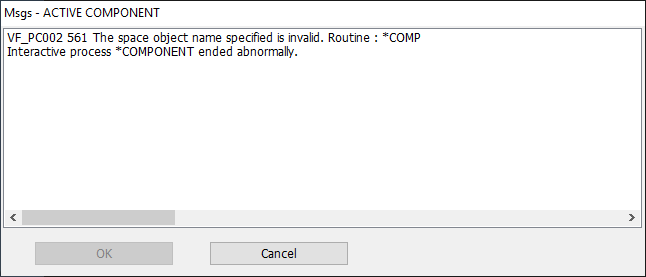
- invalidnamespace.png (5.76 KiB) Viewed 18640 times
Looks like the same message as before, but it doesn't flag it as fatal. Also, it writes the files to 'C:\Temp' but nothing gets written to the user virtual clipboard file.

- vc.PNG (5.85 KiB) Viewed 18640 times
I checked the error log, but again, it only says the same as what is in the error message box. I thought maybe I didn't have write authority to the file for some reason, but that wasn't the case either. Still pretty new to Lansa so maybe there's something I don't understand yet, but I wish these closed source Lansa parts(like VF_PC002) were easier to debug or just had better documentation.
Re: Trouble with persistant virtual clipboard manager
Posted: Tue Jun 25, 2019 9:30 am
by MarkD
Can you execute your framework application before the error occurs?
i.e Does the error happen only when you exit from your framework application?
I'm asking because if the error appears to happen when you are starting up you application it might indicate that you are being thrown out of the application for some other reason - such as security, a different error, etc.
Re: Trouble with persistant virtual clipboard manager
Posted: Wed Jun 26, 2019 2:00 am
by Echo
The error occurs on application exit. I can use business objects and use the application as I normally would. It seems like it's trying to save the session values in the Virtual_Clipboard_User file when exiting the application, but then encounters the error on exit.
Re: Trouble with persistant virtual clipboard manager
Posted: Wed Jun 26, 2019 9:29 am
by MarkD
I think the problem is caused by these 2 lines in your entry point form:
Code: Select all
Define_Com Class(#VF_PC002) Name(#VF_PC002)
Define_Com Class(#VF_PC002) Name(#VF_PC002_1)
These would instantiate two clipboard instances, which at exit are destroyed, at which time they attempt to save their content.
However, they were never initialized properly, so the space name in them is blank/null, which is what I think is causing the error.
Delete both DEFINE_COM lines and see if that corrects the problem.
Re: Trouble with persistant virtual clipboard manager
Posted: Fri Jun 28, 2019 4:21 am
by Echo
That worked. The message no longer appears and the file gets written. Thank you.