Page 1 of 1
Activex error for one user
Posted: Tue Jul 30, 2019 6:20 am
by atostaine
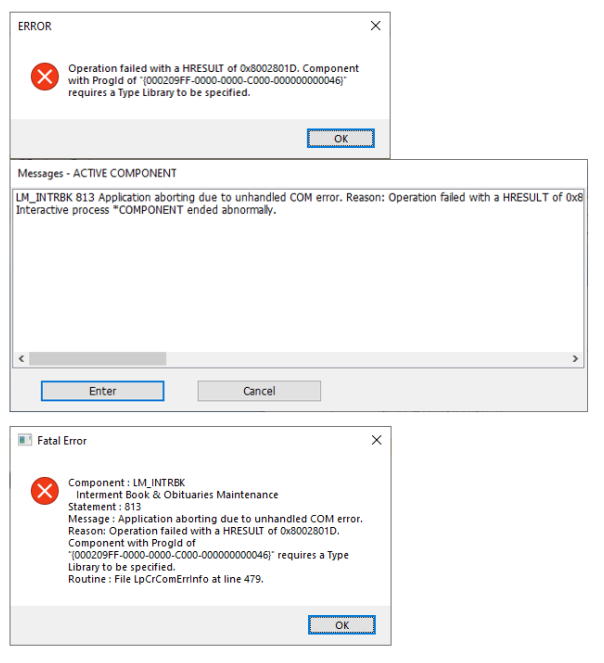
VLF-WIN, we use VA_WORD from shipped examples to work with MS Word. One user started getting the errors below when using one component that uses VA_WORD. Other components are fine.
I've tried recompiling the components that use VA_WORD but he's still getting the same errors. Line 813 in my component is the SET_REF to VA_WORD.
Thanks for any info
- errors.png (87.02 KiB) Viewed 32131 times
Re: Activex error for one user
Posted: Tue Jul 30, 2019 9:55 pm
by lawingo
The version of Word on the deployed computer must be the same as the version registered in the Active X.
Re: Activex error for one user
Posted: Tue Jul 30, 2019 11:50 pm
by atostaine
It looks like maybe there is a mismatch. I go into the IDE and open the activeX component. When I click to update the ProgID the IDE crashes. When I click typeLibId I can't see the latest version of Word activex there.
Art
Re: Activex error for one user
Posted: Wed Jul 31, 2019 1:13 am
by lawingo
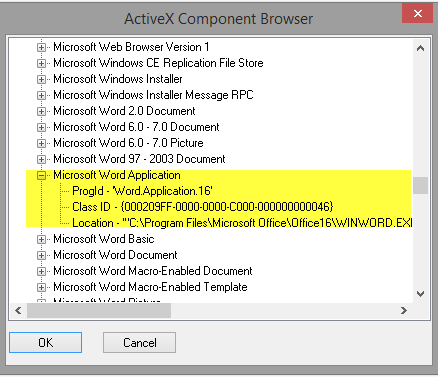
Here is what I use. This is under "Other Components" when looking at the ActiveX Component Browser.
Hope it helps.
Chad
Re: Activex error for one user
Posted: Wed Jul 31, 2019 2:31 am
by atostaine
Thanks Chad. I was able to type that in manually somehow. Waiting for testing results.
Re: Activex error for one user
Posted: Wed Jul 31, 2019 10:57 am
by bark
Regarding this bit "When I click to update the ProgID the IDE crashes."
Check out this
https://www.lansa.com/support/notes/p0463.htm
ActiveX crash in Visual LANSA editor after applying Windows 10 update
I know there has been a round of Windows updates recently so this is a distinct possibility.
Re: Activex error for one user
Posted: Thu Aug 01, 2019 12:52 am
by atostaine
bark wrote: Wed Jul 31, 2019 10:57 am
Regarding this bit "When I click to update the ProgID the IDE crashes."
Check out this
https://www.lansa.com/support/notes/p0463.htm
ActiveX crash in Visual LANSA editor after applying Windows 10 update
I know there has been a round of Windows updates recently so this is a distinct possibility.
This worked. Thanks
Re: Activex error for one user
Posted: Thu Aug 01, 2019 10:04 am
by MarkD
Can we mark this one as resolved?
Re: Activex error for one user
Posted: Thu Aug 01, 2019 12:19 pm
by atostaine
Yes thank you.
Re: Activex error for one user (RESOLVED)
Posted: Thu Feb 06, 2020 9:05 am
by atostaine
Need to revisit this

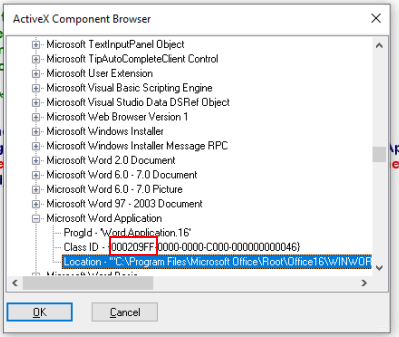
Here is what my DEV pc shows when I'm trying to select the Word activex component. Notice the "FF" in the type id.
- shot1.png (45.46 KiB) Viewed 31683 times
When I click on the typelib ID to add that, I go to the microsoft word component, select it and it brings in a different typelibid. The FF is what the end users have on their systems.
Code: Select all
Function Options(*DIRECT)
Begin_Com Role(*EXTENDS #PRIM_MCCO) Progid('Word.Application.16') Typelibid('{00020905-0000-0000-C000-000000000046}8.7,0')
End_Com
Any users who deploy the latest application from DEV are all failing when using word. The get that the progid needs a type id specified.
We have Office 2016 installed on all PC's.
Any ideas? Thanks
Re: Activex error for one user (RESOLVED)
Posted: Thu Feb 06, 2020 11:22 am
by bark
I think what you are saying is that the end users still have the same version of MS Word but the TypeLibID on your own dev PC has changed so when you build and deploy, it fails for the users. Correct?
So what has changed on your PC since this was last OK? Did you get a new update of Office 2016? Have you moved to 64-bit MS Office (and Word)? Can you type it in manually?
Re: Activex error for one user (RESOLVED)
Posted: Thu Feb 06, 2020 11:24 am
by atostaine
Several users had upgraded to Office 2019 and this problem started. So we put DEV and all PC's on Office 2016 so they all match.
Something is wrong when I select the Activex the typelibid doesn't show what I double clicked on.
Re: Activex error for one user
Posted: Fri Feb 07, 2020 8:03 am
by atostaine
We submitted an incident to support in USA. Does anyone think the fact that I click one activex that after selecting it shows a different type lib id could be an IDE problem?
Re: Activex error for one user
Posted: Wed Feb 12, 2020 2:46 am
by atostaine
I used Regedit to remove Word activex entries for older versions. In fact I deleted all of them and then did a repair in programs and features. This solved my problem.