Page 1 of 1
VLF-ONE LOGIN (RESOLVED)
Posted: Tue Aug 27, 2019 2:44 pm
by adrian.bustillo
Hi!
I just want to ask if it's possible to change the background of VLF-ONE log-in page? Something like a login screen of windows 10? What I saw from the documentation was only to change the header and the footer of login dialog box. Would it be possible to change the background (behind the dialog box)?
Thanks!
Adrian Bustillo
Re: VLF-ONE LOGIN
Posted: Wed Aug 28, 2019 8:47 am
by MarkD
That should be possible. I'll try and post a little example later today.
Re: VLF-ONE LOGIN
Posted: Wed Aug 28, 2019 10:37 am
by MarkD
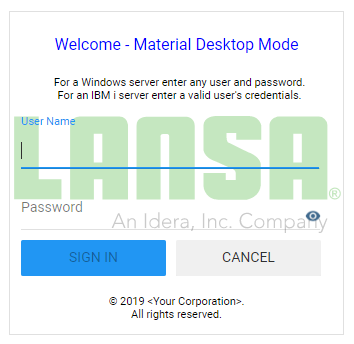
Using this reusable part with identifier MJDLOGON as my logon panel:
Code: Select all
Begin_Com Role(*EXTENDS #vf_ac026O)
Define_Com Class(#PRIM_IMAG) Name(#ChosenImage) Parent(#COM_OWNER) Displayposition(5) Tabposition(5) Imagesizing(BestFit) Visible(False) Marginleft(4) Marginright(4) Marginbottom(4) Margintop(4)
Define_Com Class(#Prim_Timr) Name(#ShowImageonDelay) Interval(0)
* ----------------------------------------------------------------------------
Mthroutine Name(uInitialize) Options(*REDEFINE)
#COM_ANCESTOR.uInitialize
#ShowImageonDelay.Interval := 100
Endroutine
* ----------------------------------------------------------------------------
Mthroutine Name(uTerminate) Options(*REDEFINE)
#ShowImageonDelay.Interval := 0
#COM_ANCESTOR.uTerminate
Endroutine
* ----------------------------------------------------------------------------
Evtroutine Handling(#COM_OWNER.SizeChanged)
#ShowImageonDelay.Interval := 100
Endroutine
* ----------------------------------------------------------------------------
Evtroutine Handling(#ShowImageonDelay.Tick)
#ShowImageonDelay.Interval := 0
Set Com(#ChosenImage) Visible(True) Displayposition(999) Top(0) Left(0) Width(#Com_Owner.Width) Height(#COM_OWNER.Height) Filename("https://www.lansa.com/img/lansa-logo.svg?v=2.1") Opacity(30)
Endroutine
End_Com
and changing my entry point form to use it instead of the default VF_AC026O ......... #VLF_ONE.uInitialize Logonhandlerid(MJDLOGON)
I see this behind the logon panel. Is that what you had in mind?
- CaptureImage.PNG (16.44 KiB) Viewed 36766 times
Re: VLF-ONE LOGIN
Posted: Wed Aug 28, 2019 11:26 am
by adrian.bustillo
Hi MarkD,
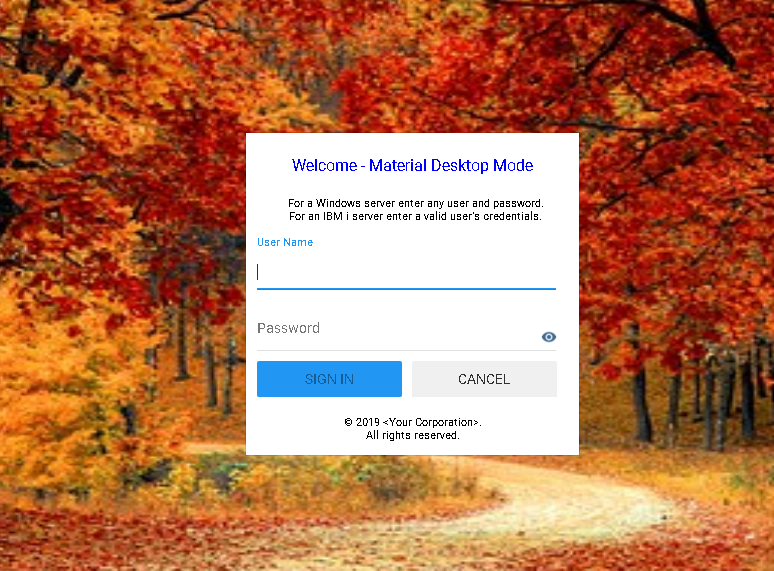
Thank you for your help. But what I was trying to achieve is like this image below. I was able to do it by changing the property of VLF_ONE component. I made a copy of UF_OEXEC so I can custom VLF_ONE component. But this shows to all the page of VLF-ONE.
Are there an event routine for the successful log in so I can change the Image property again of VLF_ONE component? and Can we set the opacity of the login component to see the background and form only?
- Capture.PNG (1.03 MiB) Viewed 36754 times
Re: VLF-ONE LOGIN
Posted: Wed Aug 28, 2019 1:21 pm
by MarkD
Can you post your version of UF_OEXEC?
Re: VLF-ONE LOGIN
Posted: Wed Aug 28, 2019 2:42 pm
by adrian.bustillo
How can I find UF_OEXEC version? are you asking for LANSA IDE Version? I'm using V14 SP2. Repository Details doesn't tell about version.
Re: VLF-ONE LOGIN
Posted: Wed Aug 28, 2019 4:06 pm
by MarkD
Sorry the way I worded that was quite unclear.
You said "I made a copy of UF_OEXEC so I can custom VLF_ONE component".
Can you post the code of your copy of UF_OEXEC?
Re: VLF-ONE LOGIN
Posted: Wed Aug 28, 2019 6:15 pm
by adrian.bustillo
Hi MarkD, sorry I didn't get what you mean. Below is the code. Thanks!
Code: Select all
Begin_Com Role(*EXTENDS #PRIM_WEB) Layoutmanager(#WebFormLayoutManager)

Define_Com Class(#PRIM_ATLM) Name(#WebFormLayoutManager)
Define_Com Class(#PRIM_ATLI) Name(#VLF_One_AttachItem) Parent(#WebFormLayoutManager) Attachment(Center) Manage(#VLF_ONE)
Define_Com Class(#VF_AC006O) Name(#VLF_ONE) Parent(#COM_OWNER) Height(800) Width(1200) Image(#BGSAMPLE) Imagealignment(Stretch)

* -------------------------------------------------------------------------------------
Evtroutine Handling(#COM_OWNER.CreateInstance)

* For more details of the all options available here see - http://%lansadocs%/lansa048/index.htm#lansa/lansa048_8285.htm
* To see the link, press the Ctrl key, then mouse over the URL and click to open the information in a browser.

#VLF_ONE.uInitialize Frameworkidentifer("") Logonhandlerid(VF_AC026O) Passwordchangerid("") Mtxtloaderid(UF_OMULTI) Themecustomizerid("") Logonexpiry(90) Logonheaderpanelid(UF_OHEADP) Logontrailerpanelid(UF_OTRALP) Showrestartbutton(True) Usebadges(True) Materialdesigndefault(True) Usepaneltransitions(False)

Endroutine


* -------------------------------------------------------------------------------------
Evtroutine Handling(#SYS_WEB.CloseQuery)

If (#VLF_ONE *IsNot *null)
* Cancellation is not possible from here so always use possibletocancel(False)
#VLF_ONE.uTerminate Possibletocancel(False) Browserisclosing(True)
Endif

Endroutine

End_Com
Re: VLF-ONE LOGIN
Posted: Fri Aug 30, 2019 1:58 pm
by MarkD
In your code globally declare a standard reference to the VLF-ONE system manager like this:
Define_Com Class(#VF_SY001O) Name(#uSystem) Scope(*APPLICATION)
then add this event handler:
Evtroutine Handling(#uSystem.SystemReadyforBusiness)
#VLF_ONE.Image <= *Null
Endroutine
The background image should disappear after logging on.
Re: VLF-ONE LOGIN
Posted: Fri Aug 30, 2019 2:27 pm
by MarkD
You could play around with the logon panel, maybe something like this:
Code: Select all
Begin_Com Role(*EXTENDS #vf_ac026O)

Define_Com Class(#Prim_vs.Style) Name(#NoBorder) Borderbottom(0) Bordertop(0) Borderleft(0) Borderright(0)
Define_Com Class(#Prim_vs.Style) Name(#TransparentBackground) Normbackcolor(Transparent)
Define_Com Class(#Prim_vs.Style) Name(#ColoredBackground) Normbackcolor(White)

Mthroutine Name(uInitialize) Options(*REDEFINE)

#COM_ANCESTOR.uInitialize

#COM_OWNER.Styles.Add Style(#NOBORDERS)
#COM_OWNER.Styles.Add Style(#TransparentBackground)
#Panel_Logon.Styles.add Style(#ColoredBackground)
#PANEL_LOGON.Opacity := 50

Endroutine

End_Com