Page 1 of 1
How to select part of a field in a grid
Posted: Wed Aug 28, 2019 10:41 pm
by PhilA
Hi, Can anyone help please,
I have a VL form with a grid with a text field column,
If I select part of the text with the mouse and click a button, is there any way to see what part of the field has been selected... (ie sales alloy)
I have attached a screenprint, Any help would be appreciated...
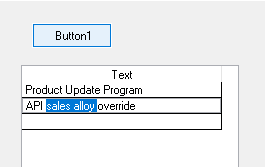
- Capture.PNG (1.86 KiB) Viewed 12270 times
Re: How to select part of a field in a grid
Posted: Fri Aug 30, 2019 10:04 am
by MarkD
The code does it for a simple entry field, so I guess you can do it for a field in a grid:
Code: Select all
Begin_Com Role(*EXTENDS #PRIM_FORM) Clientwidth(1017) Clientheight(736) Componentversion(2) Left(766) Top(413) Renderstyle(DirectX)
Define_Com Class(#std_Textl.Visual) Name(#Inputfield) Parent(#COM_OWNER) Displayposition(2) Height(21) Tabposition(2) Usepicklist(False) Width(545) Autoselect(False) Left(32) Top(64)
Define_Com Class(#Prim_phbn) Name(#Test) Parent(#COM_OWNER) Caption('Test') Displayposition(1) Tabposition(1) Left(112) Top(120)
Evtroutine Handling(#COM_OWNER.Initialize)
#Inputfield := "This is a test data entry field"
Endroutine
Evtroutine Handling(#Test.Click)
Use Builtin(MESSAGE_BOX_ADD) With_Args("#Inputfield.SelectionStart=" #Inputfield.SelectionStart)
Use Builtin(MESSAGE_BOX_ADD) With_Args("#Inputfield.SelectionEndt=" #Inputfield.SelectionEnd)
Use Builtin(MESSAGE_BOX_SHOW)
Endroutine
End_Com
Re: How to select part of a field in a grid
Posted: Fri Aug 30, 2019 1:41 pm
by MarkD
You seem to be able to do it using a reusable part in the grid.
This part TESTEDITOR is the reusable part:
Code: Select all
Begin_Com Role(*EXTENDS #PRIM_PANL *implements #Prim_dc.iMonitorSubject #Prim_dc.iContextualSubject) Defaultpty(Value) Displayposition(1) Height(25) Left(0) Tabposition(1) Tabstop(False) Top(0) Width(249) Layoutmanager(#AttachManager)

Define_Com Class(#Prim_atlm) Name(#AttachManager)
Define_Com Class(#Prim_atli) Name(#LayoutItem1) Parent(#AttachManager) Manage(#TextValue) Attachment(Center)

Define_Com Class(#std_textl.Visual) Name(#TextValue) Displayposition(1) Marginleft(0) Parent(#COM_OWNER) Tabposition(1) Width(249) Height(25) Usepicklist(False) Autoselect(False)

Define_Pty Name(Value) Get(*auto #TextValue) Set(*Auto #TextValue)

Define_Evt Name(ValueSelectionUpdate)
Define_Map For(*INPUT) Class(#std_textl) Name(#Value)
Define_Map For(*INPUT) Class(#Std_Int) Name(#SelectionStart)
Define_Map For(*INPUT) Class(#Std_Int) Name(#SelectionEnd)

Mthroutine Name(OnContextChanged) Options(*REDEFINE)

Endroutine


Evtroutine Handling(#TextValue.LostFocus #TextValue.Changed #TextValue.MouseEnter #TextValue.Mouseleave)
Signal Event(ValueSelectionUpdate) Selectionstart(#TextValue.SelectionStart) Selectionend(#TextValue.SelectionEnd) Value(#TextValue)
Endroutine

End_Com
This is a VL-Web form with a grid that uses it - it records the selection start and end postions as columns in the grid:
Code: Select all
Begin_Com Role(*EXTENDS #PRIM_FORM) Clientwidth(1017) Clientheight(736) Componentversion(2) Left(1315) Top(285) Renderstyle(DirectX)
Define_Com Class(#PRIM_Grid) Name(#Grid1) Displayposition(1) Left(80) Parent(#COM_OWNER) Showsortarrow(True) Tabposition(1) Top(40) Height(225) Width(657) Columnbuttonheight(24) Rowheight(27)

Define_Com Class(#PRIM_GDCL) Name(#Column1) Displayposition(1) Parent(#Grid1) Readonly(False) Editorpart(#TestEditor) Editappearance(ReusablePart) Source(#STD_DESCL) Widthtype(Remainder) Caption('Entry field') Captiontype(Caption) Captionalign(Left)

Define_Com Class(#PRIM_GDCL) Name(#Column2) Displayposition(2) Parent(#Grid1) Source(#STD_NUM) Caption('Selection Start') Captiontype(Caption)
Define_Com Class(#PRIM_GDCL) Name(#Column3) Displayposition(3) Parent(#Grid1) Source(#STD_INT) Caption('Selection End') Captiontype(Caption)

Define_Com Class(#TestEditor) Name(#TestEditor)

Evtroutine Handling(#COM_OWNER.Initialize)
Define_Com Class(#Std_int) Name(#Index)
Begin_Loop Using(#Index) To(5)
#STD_DESCL := "Entry field number " + #Index.asString
Add_Entry To_List(#Grid1)
End_Loop
Endroutine

Evtroutine Handling(#TestEditor.ValueSelectionUpdate) Selectionstart(#Start) Selectionend(#End) Value(#Value)
If (#Grid1.CurrentItem *IsNot *null)
Get_Entry Number(#Grid1.CurrentItem.Entry) From_List(#Grid1)
#STD_DESCL := #Value
#Std_Num := #Start
#Std_Int := #End
Upd_Entry In_List(#Grid1)
Endif

Endroutine
End_Com
There's probably a simpler way to do this - so if anyone else knows please update this item.
Re: How to select part of a field in a grid
Posted: Thu Sep 05, 2019 11:47 pm
by PhilA
Hi Mark,
Thanks for taking the time to reply, I will give it a try...cheers Phil