Page 1 of 1
drag and drop a row in list(#PRIM_MD.List)
Posted: Thu Aug 29, 2019 4:36 pm
by Rieko Saitoh
Hi all,
I would like to drag and drop a row of list (#PRIM_MD.List) in Webpage.
Does anyone have a sample code like this? May I have a sample code?
Thank you.
Best regards,
Rieko Saitoh
LANSA japan
Re: drag and drop a row in list(#PRIM_MD.List)
Posted: Tue Sep 03, 2019 9:43 am
by MarkD
This shipped example (xDemoWebDragandDrop) demonstrates dragging and dropping between two #PRIM_LIST controls.
I suspect that the code to do that with a #PRIM_MD.List would be more or less the same:
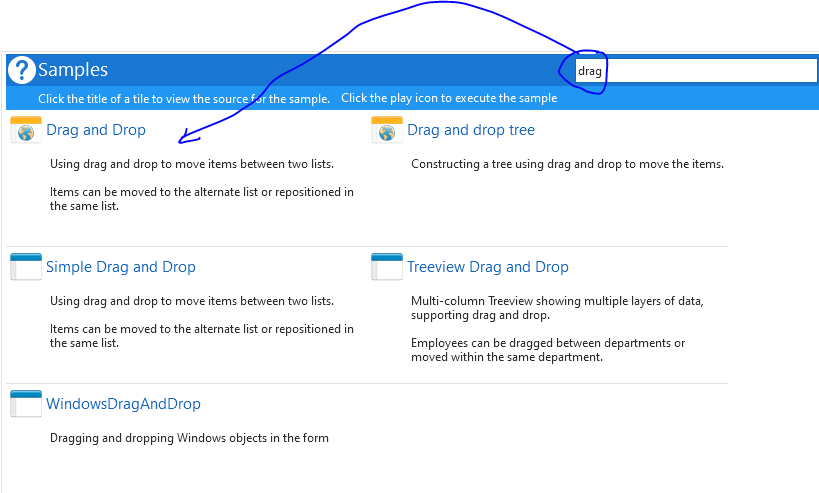
- CaptureDragandDrop.PNG (25.62 KiB) Viewed 9588 times
Re: drag and drop a row in list(#PRIM_MD.List)
Posted: Mon Sep 09, 2019 4:18 pm
by Rieko Saitoh
Hi Mark,
Thank you for presenting the sample. I am going to use it as an example. Thank you for your support.
Best regards,
Rieko Saitoh
LANSA japan
Re: drag and drop a row in list(#PRIM_MD.List)
Posted: Wed Sep 11, 2019 12:15 pm
by Rieko Saitoh
Hi,
I ran this sample on a touch device, but I couldn't rearrange the rows. I looked for a sample that moved the list rows by touch, but I couldn't find it. Do you have a sample that moves the rows of a list by touch operation?
Best regards,
Rieko Saitoh
LANSA japan