Page 1 of 1
Visual LANSA Context Menu
Posted: Tue Sep 24, 2019 9:40 am
by soa
I would like to have a list control where each line has a button which when clicked displays a drop down/context menu, Is this possible. I can easily create a button with three vertical dots but I can't find a context menu. I found an example of a button with a drop down menu but the control is not available from the material design palette. Di I have to use a dialog to do this?
Re: Visual LANSA Context Menu
Posted: Tue Sep 24, 2019 2:41 pm
by dannyoorburg
Hi,
The last EPC (EPC142060) introduced the #PRIM_LIST.DropdownColumn class, which will display a cell as a dropdown.
I'm not sure if that's what you're after... but it's worth mentioning on the forum anyway.
Cheers,
Danny
Re: Visual LANSA Context Menu
Posted: Tue Sep 24, 2019 5:44 pm
by soa
Not quite but I'm looking forward to getting my hands on this epc.
Re: Visual LANSA Context Menu
Posted: Tue Sep 24, 2019 11:36 pm
by jyoung
We do this with a popup window in our VLF-ONE app
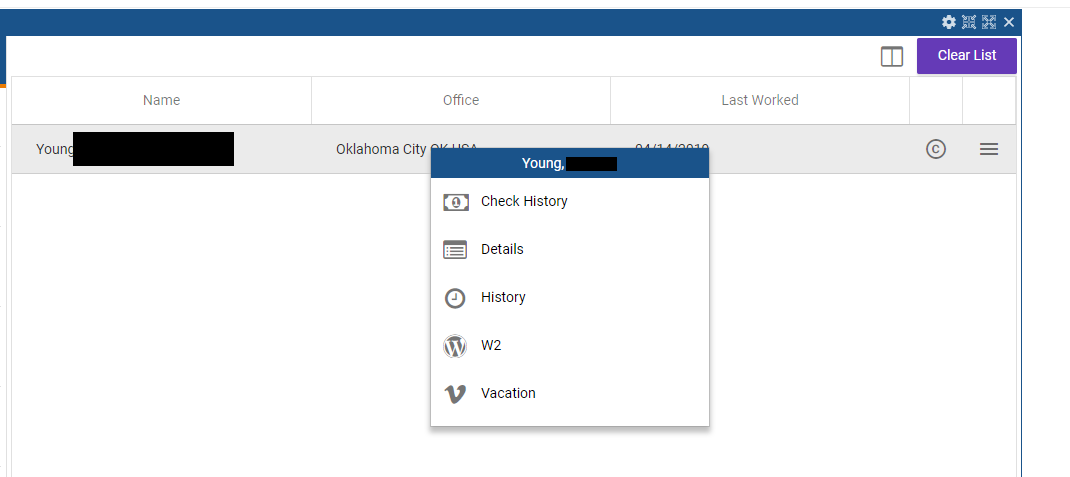
- Capture.PNG (24.47 KiB) Viewed 36426 times
The navigation list is pretty simple
Code: Select all
define_com class(#PRIM_PPNL) name(#NavigationPopup) LayoutManager(#NavigationPopupLayout) TitleBar(True) TitleBarThemeDrawStyle('PopupTitleBar') Left(633) Top(40) Height(225)
define_com class(#PRIM_MD.List) name(#NavigationList) DisplayPosition(1) LayoutManager(#NavigationListLayout) Left(0) Parent(#NavigationPopup) RowHeight(48) TabPosition(1) Top(30) Height(193) Width(278)
define_com class(#PRIM_MD.ListLabel) name(#ListSTD_TEXTS1) Caption('Navigation Item') DisplayPosition(2) DragStyle(None) Left(48) Parent(#NavigationList) Source(#STD_TEXTS) TabPosition(1) Top(6) Width(278) Style(#Style1)
define_com class(#PRIM_MD.ListIcon) name(#NavigationIcon) DisplayPosition(1) DragStyle(None) Icon('fa-star') Left(0) Parent(#NavigationList) TabPosition(4) Top(0) ThemeDrawStyle('ForegroundSecondary')
define_com class(#PRIM_MD.ListLabel) name(#ListSTD_CODEL1) Caption('Standard CODE LONG') DisplayPosition(4) DragStyle(None) Left(87) Parent(#NavigationList) Source(#STD_CODEL) TabPosition(2) Top(48) Visible(False)
The Datalist sets has the Popup property set to the NavigationPopup
Code: Select all
define_com class(#PRIM_LIST) name(#DataList) ColumnHeaderHeight(48) ColumnMarginLeft(24) ColumnMarginRight(24) DisplayPosition(2) Height(329) Left(0) Parent(#COM_OWNER) RowHeight(48) TabPosition(2) Top(40) Width(633) ColumnLines(False) Popup(#NavigationPopup)
define_com class(#PRIM_LIST.String) name(#ColumnWK_STR11) ColumnWidth(1) DisplayPosition(1) Parent(#DataList) Source(#wk_String1) ColumnUnits(Proportion) ColumnCaption('Name') ColumnCaptionType(Caption) SortOnClick(True)
define_com class(#PRIM_LIST.String) name(#ColumnWK_STR21) ColumnWidth(1) DisplayPosition(2) Parent(#DataList) Source(#wk_String2) ColumnCaption('Individual ID') ColumnCaptionType(Caption) ColumnUnits(Proportion) SortOnClick(True)
define_com class(#PRIM_LIST.String) name(#ColumnWK_STR31) ColumnWidth(1) DisplayPosition(3) Parent(#DataList) Source(#wk_String3) ColumnCaption('Office') ColumnCaptionType(Caption) ColumnUnits(Proportion) SortOnClick(True)
define_com class(#PRIM_LIST.String) name(#ColumnWK_STR41) ColumnWidth(1) DisplayPosition(4) Parent(#DataList) Source(#wk_String4) ColumnCaption('Last Worked') ColumnCaptionType(Caption) ColumnUnits(Proportion) SortOnClick(True) SortAsColumn(#ColumnWK_DATE1)
define_com class(#PRIM_LIST.Part) name(#ColumnMGSAPPP011) ColumnWidth(50) Design(#MGSIconListDesignPanel) DisplayPosition(5) Parent(#DataList)
define_com class(#PRIM_LIST.Part) name(#ColumnMGSAPPP012) ColumnWidth(50) Design(#MGSIconListDesignPanel) DisplayPosition(6) Parent(#DataList)
define_com class(#PRIM_LIST.Number) name(#ColumnWK_DATE1) ColumnWidth(0) DisplayPosition(7) Parent(#DataList) Source(#wk_Date) ColumnVisible(False)
On CreateInstance we populate the navigation menu
Code: Select all
mthroutine name(PopulateNavigationMenu)

if (#MGSApplicationManager.avFrameworkManager.avCheckAvailability( "ASC_CHECK_HISTORY" ))
#STD_CODEL := "CHKHST"
#STD_TEXTS := "Check History"
add_entry to_list(#NavigationList)
#NavigationIcon.CurrentItem.Icon := "fa-money"
else
#MGSApplicationManager.avFrameworkManager.avRecordTraceAValue Component(#COM_OWNER) Event('User Does Not Have Authority') AValue('ASC_CHECK_HISTORY')
endif

if (#MGSApplicationManager.avFrameworkManager.avCheckAvailability( "ASC_WORKFORCE" ))
#STD_CODEL := "WRKFRC"
#STD_TEXTS := "Workforce Account"
add_entry to_list(#NavigationList)
#NavigationIcon.CurrentItem.Icon := "fa-user-circle-o"
else
#MGSApplicationManager.avFrameworkManager.avRecordTraceAValue Component(#COM_OWNER) Event('User Does Not Have Authority') AValue('ASC_WORKFORCE')
endif

if (#MGSApplicationManager.avFrameworkManager.avCheckAvailability( "ASC_DETAILS" ))
#STD_CODEL := "DETAIL"
#STD_TEXTS := "Details"
add_entry to_list(#NavigationList)
#NavigationIcon.CurrentItem.Icon := "fa-list-alt"
else
#MGSApplicationManager.avFrameworkManager.avRecordTraceAValue Component(#COM_OWNER) Event('User Does Not Have Authority') AValue('ASC_DETAILS')
endif

if (#MGSApplicationManager.avFrameworkManager.avCheckAvailability( "ASC_HISTORY" ))
#STD_CODEL := "HISTORY"
#STD_TEXTS := "History"
add_entry to_list(#NavigationList)
#NavigationIcon.CurrentItem.Icon := "fa-clock-o"
else
#MGSApplicationManager.avFrameworkManager.avRecordTraceAValue Component(#COM_OWNER) Event('User Does Not Have Authority') AValue('ASC_HISTORY')
endif

if (#MGSApplicationManager.avFrameworkManager.avCheckAvailability( "ASC_W2" ))
#STD_CODEL := "W2"
#STD_TEXTS := "W2"
add_entry to_list(#NavigationList)
#NavigationIcon.CurrentItem.Icon := "fa-wordpress"
else
#MGSApplicationManager.avFrameworkManager.avRecordTraceAValue Component(#COM_OWNER) Event('User Does Not Have Authority') AValue('ASC_W2')
endif

if (#MGSApplicationManager.avFrameworkManager.avCheckAvailability( "ASC_VACATION" ))
#STD_CODEL := "VACATION"
#STD_TEXTS := "Vacation"
add_entry to_list(#NavigationList)
#NavigationIcon.CurrentItem.Icon := "fa-vimeo"
else
#MGSApplicationManager.avFrameworkManager.avRecordTraceAValue Component(#COM_OWNER) Event('User Does Not Have Authority') AValue('ASC_VACATION')
endif
endroutine
When a list item is clicked, we show the popup
Code: Select all
evtroutine handling(#DataList.ItemClick)
#DataList.Popup.ShowPopup Context(#DataList)
endroutine
We adjust the size and position of the popup on Prepare
Code: Select all
evtroutine handling(#NavigationPopup.Prepare)
define_com class(#ASCSRHAssociate) name(#lAssociate) reference(*dynamic)
define_com class(#PRIM_NMBR) name(#lVisibleItems)

#lAssociate <= #ASCSRHObjectManager.GetItem( (#DataList.CurrentItem.RelatedReference *As #VF_LM003O) )

#NavigationPopup.Caption := ("&1, &2 &3").Substitute( #lAssociate.LastName #lAssociate.FirstName #lAssociate.MiddleName )

* if the associate does not have a workforce account, don't show the option
selectlist named(#NavigationList) where(#STD_CODEL = 'WRKFRC')
#NavigationList.CurrentItem.Visible := #lAssociate.HasWorkforceAccount
endselect

* adjust the height, otherwise it looks like there are gaps in the list
selectlist named(#NavigationList)
if (#NavigationList.CurrentItem.Visible)
#lVisibleItems += 1
endif
endselect

#NavigationPopup.Height := (#lVisibleItems * 48) + 40
endroutine
And finally when an item is selected from the popup, we switch to the appropriate object.
Code: Select all
evtroutine handling(#NavigationList.ItemClick)
#MGSApplicationManager.avFrameworkManager.avRecordTraceAValue Component(#COM_OWNER) Event("Navigation Item Clicked") AValue(#STD_TEXTS)
case of_field(#STD_TEXTS.UpperCase)
when (= 'CHECK HISTORY')
#ASCApplicationManager.SwitchToCheckHistory( #ASCApplicationManager.CurrentAssociate #ASCSRHObjectManager.CountryCode )
when (= 'DETAILS')
#MGSApplicationManager.avFrameworkManager.avSwitch Caller(#COM_OWNER) ToObjectNamed("ASC_DETAILS") Execute("SUMMARY")
when (= 'HISTORY')
#MGSApplicationManager.avFrameworkManager.avSwitch Caller(#COM_OWNER) ToObjectNamed("ASC_HISTORY") Execute("COMMAND_PERSINFO")
when (= 'COMPANIONATE')
#MGSApplicationManager.avFrameworkManager.avSwitch Caller(#COM_OWNER) ToObjectNamed("ASC_SEARCH") Execute("COMMAND_COMPANIONATE")
when (= 'DIRECT DEPOSIT')
#MGSApplicationManager.avFrameworkManager.avSwitch Caller(#COM_OWNER) ToObjectNamed("ASC_SEARCH") Execute("COMMAND_DIRECTDEPOSIT")
when (= 'GARNISHMENTS')
#MGSApplicationManager.avFrameworkManager.avSwitch Caller(#COM_OWNER) ToObjectNamed("ASC_SEARCH") Execute("COMMAND_GARNISHMENTS")
when (= 'WORKFORCE ACCOUNT')
#MGSApplicationManager.avFrameworkManager.avSwitch Caller(#COM_OWNER) ToObjectNamed("ASC_WORKFORCE") Execute("COMMAND_WORKFORCE")
when (= 'W2')
#ASCApplicationManager.SwitchToW2( #ASCApplicationManager.CurrentAssociate #ASCSRHObjectManager.CountryCode )
when (= 'VACATION')
#MGSApplicationManager.avFrameworkManager.avSwitch Caller(#COM_OWNER) ToObjectNamed("ASC_VACATION") Execute("COMMAND_DETAILS")
* when (= 'TAX EXEMPTION HISTORY')
* #MGSApplicationManager.avFrameworkManager.avSwitch caller(#COM_OWNER) toobjectnamed("ASC_TAX_EXEMPTION_HISTORY")
endcase


#NavigationPopup.ClosePopup
endroutine
Hope this helps,
Joe
Re: Visual LANSA Context Menu
Posted: Wed Sep 25, 2019 12:03 am
by LANSAGuru
Danny,
Does #PRIM_LIST.DropdownColumn support different entries for the possible drop down values per row?
Does #PRIM_LIST.DropdownColumn then not require an RP to instantiate the drop down?
Do you have a little sample you can post here or is there one shipped to look at?
I have not had a chance to look at the new EPC yet...
Thanks,
Paul
Re: Visual LANSA Context Menu
Posted: Wed Sep 25, 2019 7:40 pm
by dannyoorburg
Hi Paul,
Yes to different values per row and yes to NOT needing a reusable part anymore...
Example maybe tomorrow... This is just a quick answer from my phone

Danny
Re: Visual LANSA Context Menu
Posted: Thu Sep 26, 2019 12:16 am
by LANSAGuru
Danny,
No rush. Of everything in VL Web when compared to WAMs...about the only thing I thought was too complicated was the use of Drop Downs and Drop Downs in lists particularly.
"Your skills are complete. Indeed you are powerful, as the Emperor has foreseen."

Thanks,
Paul
Re: Visual LANSA Context Menu
Posted: Thu Sep 26, 2019 8:09 am
by soa
Good discussion. Thanks to everybody who participated.
