Page 1 of 1
VL-WEB What column clicked in list?
Posted: Thu Nov 14, 2019 8:05 am
by atostaine
I have a Fedex/UPS tracking# as one column in a #PRIM_LIST. If the user clicks on the row, I need to do one thing. But if they click on the tracking#, I need to load the specific shippers website.
How do I know what column they clicked on?
I thought I saw this but haven't found it.
Re: VL-WEB What column clicked in list?
Posted: Thu Nov 14, 2019 8:14 am
by davidbalansa
Hi Art,
The column has a click event.
Evtroutine Handling(#ListColumn.Click)
...
endroutine
David
Re: VL-WEB What column clicked in list?
Posted: Thu Nov 14, 2019 8:17 am
by atostaine
Thanks for the quick reply!
I've been testing that event and it looks like it only fires when I click on the column heading. That would mean the user would have to click on the row and then the column heading.
I have this code to test:
EVTROUTINE HANDLING(#List1Column4.ColumnClick)
#label1.caption := 'columnClick'
#Popup1.ShowPopup
ENDROUTINE
The popup shows when I click the column heading:
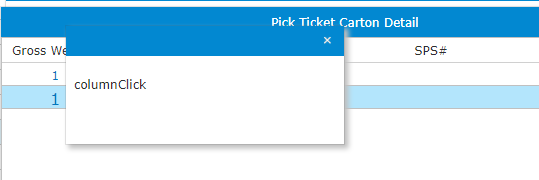
- shot.png (5.39 KiB) Viewed 20197 times
Re: VL-WEB What column clicked in list?
Posted: Thu Nov 14, 2019 8:25 am
by davidbalansa
I am using it on a #prim_list in VL Web without issue.
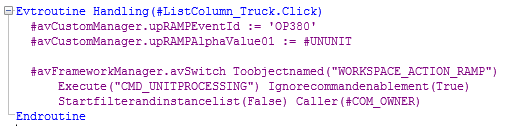
- Capture.PNG (8.6 KiB) Viewed 20195 times
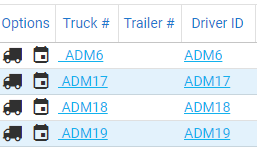
- Capture2.PNG (7.89 KiB) Viewed 20195 times
Re: VL-WEB What column clicked in list?
Posted: Thu Nov 14, 2019 8:29 am
by jyoung
That's interesting.
I've had to use a custom control for this.
The docs here
https://docs.lansa.com/14/en/lansa016/p ... column.htm don't show a "Click" event only a "ColumnClick". HOWEVER, the EXAMPLE does.

I've had to do some trickery where I put a custom control on the list, establish a dynamic reference to that control on the view and then on the List's ItemGotFocus set the reference in the view so that I could pick up the control's click event.
I don't have the specific code that does this at the moment, but I will try to dig it up.
Joe
Re: VL-WEB What column clicked in list?
Posted: Thu Nov 14, 2019 8:33 am
by atostaine
That was the way we had to do it in VL-WIN V13. We grabbed the RP in the row when it was clicked.
I don't want to do that now

I could change to a right click but yuck
Re: VL-WEB What column clicked in list?
Posted: Thu Nov 14, 2019 8:37 am
by jyoung
I just threw this together
Code: Select all
begin_com role(*EXTENDS #PRIM_WEB) Theme(#SYS_THEME<MaterialDesignBlue>)

define_com class(#PRIM_LIST) name(#List) ColumnHeaderHeight(48) ColumnLines(False) DisplayPosition(1) Height(360) Left(311) Parent(#COM_OWNER) RowHeight(48) TabPosition(1) Top(67) Width(500)
define_com class(#PRIM_LIST.String) name(#ListColumn1) ColumnWidth(246) DisplayPosition(1) Parent(#List) SortOnClick(True) Source(#STD_TEXTS)
define_com class(#PRIM_LIST.Label) name(#ListColumn2) Caption('PRIMARY') CaptionAlignment(Center) CellSizing(None) CellThemeDrawStyle('MediumTitle') DisplayPosition(2) Parent(#List)

evtroutine handling(#Com_owner.Initialize)

endroutine

evtroutine handling(#ListColumn2.Click)

endroutine

end_com
Sure enough, there is a click event now!
Re: VL-WEB What column clicked in list?
Posted: Thu Nov 14, 2019 8:39 am
by atostaine
dammit. I was using columnclick. David is using click.. I'll use it THANKS
Re: VL-WEB What column clicked in list?
Posted: Thu Nov 14, 2019 8:42 am
by jyoung
I remember having this exact issue and there not being (or not finding) a "Click" event for the column.
That would have made some things a heck of a lot easier.
Good to know for future work.
Re: VL-WEB What column clicked in list?
Posted: Thu Nov 14, 2019 11:31 am
by davidbalansa
Sorry Art,
I completely missed you specifying the ColumnClick event instead of Click event.
David
Re: VL-WEB What column clicked in list?
Posted: Thu Nov 14, 2019 11:47 am
by atostaine
Yeah me too. Thanks for the post!