Page 1 of 1
#PRIM_MD.list
Posted: Wed Jan 15, 2020 2:03 am
by Pratibha
Hello,
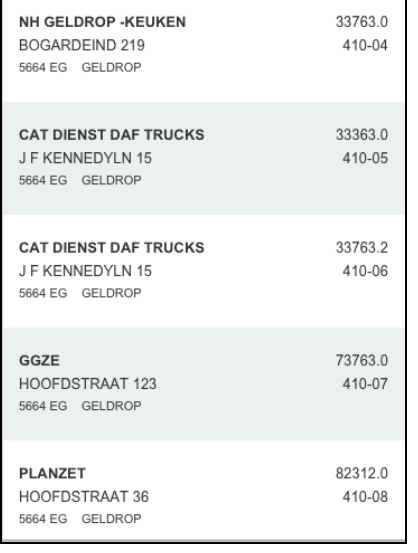
How is it possible to show alternate colors in the material design list. In the repository there is no option of alternatethemedrawstyle under style option by this component. How can I solve it ?
- screen1.PNG (46.34 KiB) Viewed 8581 times
Regards,
Pratibha
Re: #PRIM_MD.list
Posted: Wed Jan 15, 2020 2:23 am
by jyoung
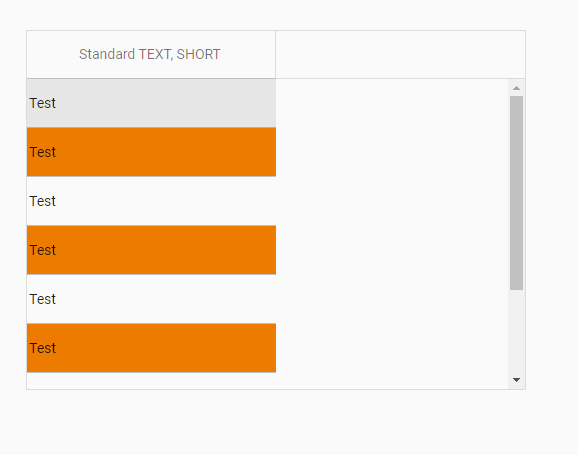
You need to set the AlternateItemThemeDrawStyle property on the List to a Theme drawstyle.
For example:
Create a Theme with a custom drawstyle. Here is a Theme named "JoesTestTheme" and a drawstyle named "AltRow".
Code: Select all
begin_com role(*EXTENDS #PRIM_THM) BaseTheme(MaterialDesignBlue)

define_com class(#PRIM_THM.DrawStyle) name(#AltRow) Style(#Style1)
define_com class(#PRIM_VS.Style) name(#Style1) BackgroundBrush(#Brush1)
define_com class(#PRIM_VS.SolidBrush) name(#Brush1) Color(ThemeAccentDark)

end_com
Apply that theme to the web page and set the List's AlternateItemThemeDrawStyle to the drawstyle
Code: Select all
begin_com role(*EXTENDS #PRIM_WEB) Theme(#JoesTestTheme)

define_com class(#PRIM_LIST) name(#List) ColumnHeaderHeight(48) ColumnLines(False) DisplayPosition(1) Height(360) Left(311) Parent(#COM_OWNER) RowHeight(48) TabPosition(1) Top(67) Width(500) AlternateItemThemeDrawStyle('AltRow')
define_com class(#PRIM_LIST.String) name(#ListColumn1) ColumnWidth(246) DisplayPosition(1) Parent(#List) SortOnClick(True) Source(#STD_TEXTS)

evtroutine handling(#Com_owner.Initialize)
define_com class(#PRIM_NMBR) name(#lIndex)

#lIndex := 1
dountil (#lIndex = 10)

#STD_TEXTS := "Test"
add_entry to_list(#List)

#lIndex += 1

enduntil
endroutine

end_com
- Capture.PNG (8.67 KiB) Viewed 8579 times
You don't have to create a custom drawstyle, I just did this for example's sake. You can set the drawstyle to any drawstyle in the Theme.
Hope this helps,
Joe
Re: #PRIM_MD.list
Posted: Wed Jan 15, 2020 2:47 am
by Pratibha
Hello Joe,
thanx for your reply but I m not ust PRIM_LIST component but rather using PRIM_MD.LIST component and it does not have the property AlternateItemThemeDrawStyle.
I would like to know how to implement AlternateItemThemeDrawStyle in PRIM_MD.LIST component.
Re: #PRIM_MD.list
Posted: Wed Jan 15, 2020 3:28 am
by jyoung
Sorry about that

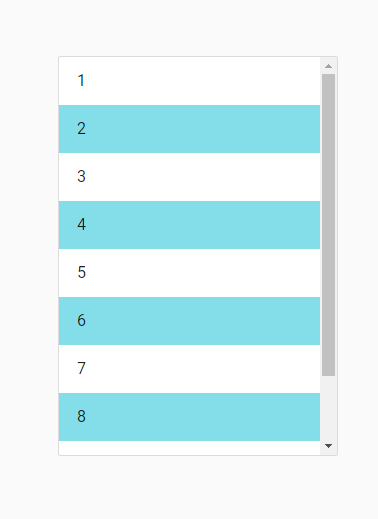
How about using a Style, although you have to calculate the mod yourself.
Code: Select all
begin_com role(*EXTENDS #PRIM_WEB) Theme(#JoesTestTheme)

define_com class(#PRIM_VS.Style) name(#Style1) BackgroundBrush(#Brush1)
define_com class(#PRIM_VS.SolidBrush) name(#Brush1) Color(128:222:234)

define_com class(#PRIM_TBLO) name(#LayoutList1)
define_com class(#PRIM_TBLO.Column) name(#LayoutList1Column1) DisplayPosition(1) Parent(#LayoutList1)
define_com class(#PRIM_TBLO.Row) name(#LayoutList1Row1) DisplayPosition(1) Parent(#LayoutList1)
define_com class(#PRIM_TBLO.Item) name(#LayoutList1Item1) Alignment(CenterLeft) Column(#LayoutList1Column1) Manage(#ListPrimaryText) MarginLeft(16) MarginRight(16) Parent(#LayoutList1) Row(#LayoutList1Row1) Sizing(ContentHeightFitToWidth)

define_com class(#PRIM_MD.List) name(#List1) DisplayPosition(1) LayoutManager(#LayoutList1) Left(154) Parent(#COM_OWNER) RowHeight(48) TabPosition(1) Top(135) ThemeDrawStyle('Card')
define_com class(#PRIM_MD.ListLabel) name(#ListPrimaryText) Caption('Single line item') DisplayPosition(1) Height(23) Left(16) Parent(#List1) TabPosition(1) ThemeDrawStyle('Heading3') Top(13) Width(246)

evtroutine handling(#Com_owner.Initialize)

begin_loop using(#STD_INT) to(10)

add_entry to_list(#List1)

#ListPrimaryText.CurrentItem.Caption := #STD_INT.AsString

if (#STD_INT.Mod( 2 ) = 0)

#List1.CurrentItem.Style <= #Style1

endif


end_loop
endroutine

end_com
- Capture2.PNG (5.2 KiB) Viewed 8574 times
Never have been a big fan of the changes they made to the themes cause now we have themes and styles and things like this adds to the confusion.

Joe
Re: #PRIM_MD.list
Posted: Wed Jan 15, 2020 7:22 pm
by Pratibha
Hello Joe,
Thank you so much for your help. It works now
