Page 1 of 1
Theme color on #PRIM_MD.Edit
Posted: Fri Jan 17, 2020 7:46 pm
by Pratibha
Hello,
I would like to implement the same color of the text and the input underline. How is it possible. Have tried with all possibilities of focusedstyle, mouseoverstyle, Themedrawstyle, Style. But unsuccessful. Can anyone please guide?
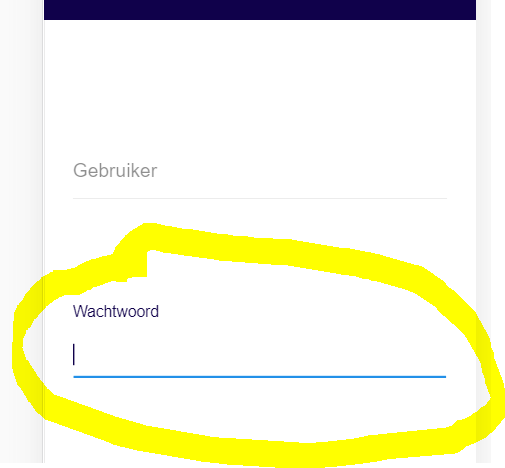
- screen1.PNG (7.01 KiB) Viewed 27399 times
Regards,
Pratibha
Re: Theme color on #PRIM_MD.Edit
Posted: Sat Jan 18, 2020 6:48 am
by dannyoorburg
Hi,
I think you might need this property
https://docs.lansa.com/14/en/lansa016/p ... ncolor.htm
Cheers,
Danny
Re: Theme color on #PRIM_MD.Edit
Posted: Wed Jan 22, 2020 8:07 pm
by Pratibha
Hello Danny,
Have tried is not working. it is at the time When the component is clicked or mouseover it changes color I want darkblue color in place of light blue.
How can I change the clicked and mouseover theme property of the input field.
Re: Theme color on #PRIM_MD.Edit
Posted: Thu Jan 23, 2020 5:58 am
by dannyoorburg
Isn't it just using another theme?
Or creating your own with the exact primary colour you're after?
Re: Theme color on #PRIM_MD.Edit
Posted: Fri Jan 24, 2020 8:44 am
by JamesDuignan
Hi Pratibha,
See the sample below. The from what you are asking so far it does appear the captioncolour property is what needs to be set.
If this does not give you what you are looking for, can you please send the definition of the edit field and more of a description about what you are wanting
Code: Select all
Define_Com Class(#PRIM_MD.Edit) Name(#Edit) Caption('Caption') Displayposition(2) Left(152) Parent(#Com_owner) Tabposition(2) Top(115) Captioncolor(Theme700) Style(#Style3)
Regards,
James