Page 1 of 2
VLF-One Visual Notification on Main Panel
Posted: Wed May 06, 2020 6:32 am
by mwilliams
I was wondering if it is possible to change the properties (mainly background color) of the tab for a slider panel? We have a notification rp in a slider that checks for new messages/events directed at a user and want a way to visually notify them with out interrupting them. Right now we show a message in the message bar at the bottom but we have it disappearing automatically so many times the user doesn't see it. I was thinking maybe we could change the color of the slider tab to indicate new messages. Another idea if possible would be to extend the slider out just a bit, kind of a peek option. Then maybe we could put a component to indicate new messages. I think a badge would be a great option but everything I've read says they are only on applications, business objects, and command handlers and we are looking for something that shows in the main panel. Is it possible to insert a badge say in the header area?
Does any of this sound possible?
Re: VLF-One Visual Notification on Main Panel
Posted: Wed May 06, 2020 10:51 am
by MarkD
Just to check we are talking about the same thing ...... your slider is a RP with ancestor VF_AC028O?
If that's the case then you should be able to apply a style to it background panel to change the background color.
The style should be defined in code and then applied to the background panel as it is being displayed.
Let me kow if you want an example.
Re: VLF-One Visual Notification on Main Panel
Posted: Thu May 07, 2020 1:58 am
by mwilliams
Hey Mark, yes our slider is a RP with ancestor VF_AC028O. And yes, it would be nice to have an example.
Thanks.
Re: VLF-One Visual Notification on Main Panel
Posted: Fri May 08, 2020 3:27 pm
by MarkD
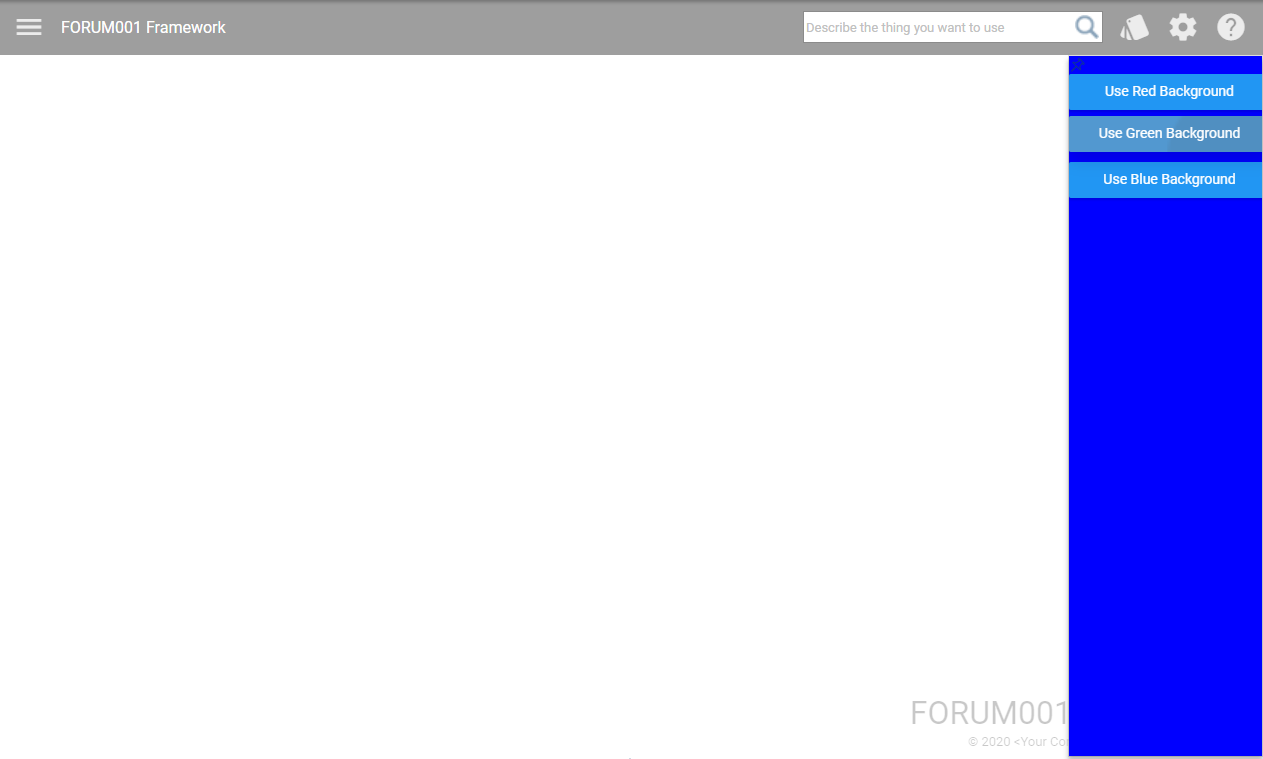
Here you go ....
Code: Select all
Begin_Com Role(*EXTENDS #VF_AC028O) Height(457) Width(201)

Define_Com Class(#PRIM_MD.RaisedButton) Name(#RedButton) Caption('Use Red Background') Displayposition(1) Left(0) Parent(#CustomPanelBody) Tabposition(1) Themedrawstyle('MediumTitle') Top(0) Width(201)
Define_Com Class(#PRIM_MD.RaisedButton) Name(#GreenButton) Caption('Use Green Background') Displayposition(2) Left(0) Parent(#CustomPanelBody) Tabposition(2) Themedrawstyle('MediumTitle') Top(42) Width(201)
Define_Com Class(#PRIM_MD.RaisedButton) Name(#BlueButton) Caption('Use Blue Background') Displayposition(3) Left(0) Parent(#CustomPanelBody) Tabposition(3) Themedrawstyle('MediumTitle') Top(88) Width(201)

* -------------------------------------------------------------------------
Define_Com Class(#Prim_vs.Style) Name(#RedBackGround) Normbackcolor(Red)
Define_Com Class(#Prim_vs.Style) Name(#GreenBackGround) Normbackcolor(Green)
Define_Com Class(#Prim_vs.Style) Name(#BlueBackGround) Normbackcolor(Blue)

Define_Com Class(*ANCESTOR) Name(#HeaderPanel) Width(201)
Define_Com Class(*ANCESTOR) Name(#CustomPanelBody) Height(439) Width(201)
Define_Com Class(*ANCESTOR) Name(#DockImage) Left(185)
Define_Com Class(*ANCESTOR) Name(#CloseImage) Left(169)

* -------------------------------------------------------------------------
Mthroutine Name(uInitialize) Options(*REDEFINE)
* Start with blue
Set Com(#COM_OWNER) Style(#BlueBackGround)
Endroutine

* -------------------------------------------------------------------------
Evtroutine Handling(#RedButton.Click #GreenButton.Click #BlueButton.Click) Com_Sender(#ClickedButton)
If (#ClickedButton *IsEqualTo #RedButton)
Set Com(#COM_OWNER) Style(#RedBackGround)
Return
Endif
If (#ClickedButton *IsEqualTo #GreenButton)
Set Com(#COM_OWNER) Style(#GreenBackGround)
Return
Endif
If (#ClickedButton *IsEqualTo #BlueButton)
Set Com(#COM_OWNER) Style(#BlueBackGround)
Return
Endif
Endroutine

End_Com
Should look like this when snapped in as right edge slider ..........
- Capture2.PNG (24.86 KiB) Viewed 6482360 times
Re: VLF-One Visual Notification on Main Panel
Posted: Fri May 08, 2020 3:30 pm
by MarkD
Regarding the other questions .....
I think you can make a slider display itself when it detects some event.
This means you could alter its width to become temporarily skinnier, and to also open and slide in and then close again on a timer.
You can certainly put a badge onto the slider's main panel.
Re: VLF-One Visual Notification on Main Panel
Posted: Sat May 09, 2020 3:07 am
by mwilliams
Hey Mark, Thanks for the reply. I think I tried doing something like you did in your code sample. I was able to change the background color but it doesn't seem to effect the slider tab when the slider is closed but I'll try again. Just to give a visual, here is what I'm trying to accomplish.

- slider tab.png (12.36 KiB) Viewed 6482349 times
I used the developer tools to temporarily change the tab color. Of course as soon as my mouse hovers over it, the background color changes.
I'm also going to play with trying to change the slider height temporarily. Just thought the tab option may be an easier option.
Re: VLF-One Visual Notification on Main Panel
Posted: Thu May 14, 2020 11:10 am
by MarkD
I think that might be the way to go - change the height and then cause the slider itself to slide into view, instead of trying to change the slider's tab color. You could start a timer so that the slider contracts back to a tab again after 2 seconds (say) unless the user clicks on it to view their messages.
Re: VLF-One Visual Notification on Main Panel
Posted: Thu May 14, 2020 11:14 am
by MarkD
See
https://docs.lansa.com/14/en/lansa048/i ... n_0040.htm for how to programtically display (float) and close a slider pane.
Re: VLF-One Visual Notification on Main Panel
Posted: Sat Aug 08, 2020 1:35 am
by dhunt
Hi Mark,
The link doesn't show how to programmatically display the pane. it just says that it can be done. Can you provide an example?
Re: VLF-One Visual Notification on Main Panel
Posted: Mon Aug 10, 2020 11:45 am
by MarkD
In your RP descended from ancestor #VF_AC028O you should be able to code this:
#Com_Owner.uFloatifClosed
It means that the associated slide in pane should be floated (i.e. displayed) if it is not already being shown.
Re: VLF-One Visual Notification on Main Panel
Posted: Thu Aug 13, 2020 8:32 am
by dhunt
Mark,
I tried using #COM_OWNER.uFloatifClosed and #Com_Owner.uCloseifFloating to programmatically display the top Slider. however i couldn't get it to work without using Signal Event(DockImageClicked).
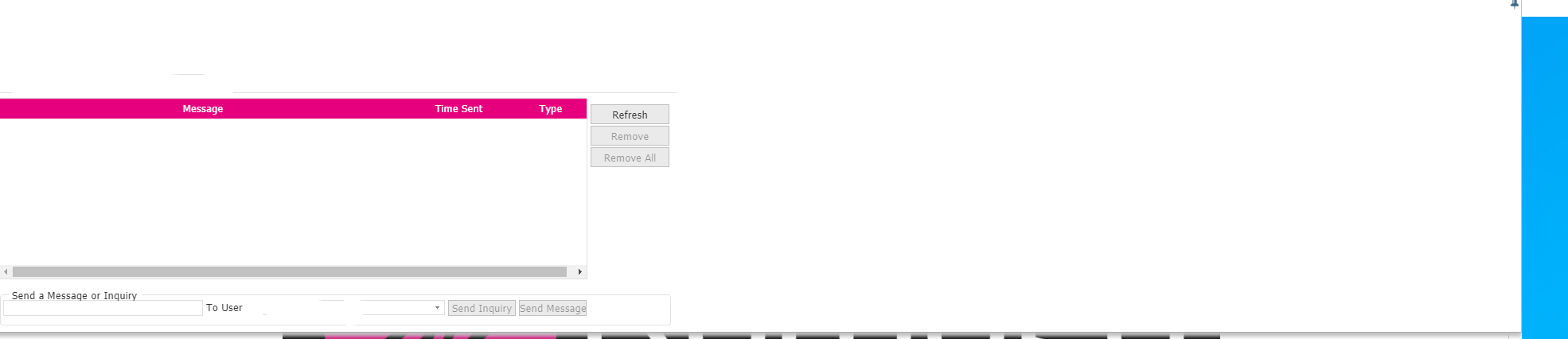
If i do that though and limit the height of the slider to say 50 and then try to change it back programmatically if they click on the slider it stays at 50 and not the original size of the top slider. I can manually move the docked slider height back to the original size with my mouse but i would like it to do that on its own after i click in the body of the slider. I tried to use #COM_OWNER.SizeTo Height(#ResetSliderHeight) Width(#COM_OWNER.Width)
where resetsliderheight is the original height, but that doesnt work. i also tried #COM_OWNER.Height := #ResetSliderHeight and it doesnt seem to affect it since its docked at that point and not floating.
Do you know what i should do?

- MicrosoftTeams-image.png (5.39 KiB) Viewed 6480476 times

- MicrosoftTeams-image (2).png (7.87 KiB) Viewed 6480476 times
- MicrosoftTeams-image (1).png (20.82 KiB) Viewed 6480476 times
Re: VLF-One Visual Notification on Main Panel
Posted: Fri Aug 14, 2020 11:55 am
by MarkD
I tried this top slide-in handler ...........
Code: Select all
Begin_Com Role(*EXTENDS #VF_AC028O) Height(113) Width(865)
Define_Com Class(#PRIM_ATLI) Name(#AttachItem1) Manage(#TemporaryMessage) Parent(#CustomPanelBodyLayoutManager) Attachment(Center) Marginbottom(8) Marginleft(8) Marginright(8) Margintop(8)
Define_Com Class(#Prim_MD.Label) Name(#TemporaryMessage) Displayposition(1) Parent(#CustomPanelBody) Tabposition(1) Height(79) Left(8) Top(8) Width(849) Style(#BigText) Captionalignment(Center) Caption('This is your custom top pane slider FORUM001_TopSlider. Delete this label and add your own content.') Wordwrap(True)
* -----------------------------------------------------------------------------------------------
Define_Com Class(#Prim_vs.Style) Name(#BigText) Fontsize(19) Fontunits(Pixel) Textcolor(18:69:114)

Define_Com Class(*ANCESTOR) Name(#CloseImage) Left(833)
Define_Com Class(*ANCESTOR) Name(#CustomPanelBody) Height(95) Width(865)
Define_Com Class(*ANCESTOR) Name(#DockImage) Left(849)
Define_Com Class(*ANCESTOR) Name(#HeaderPanel) Width(865)

* -------------------------------------------------------------------------
Evtroutine Handling(#COM_OWNER.avEvent) Withid(#WithId)

If (#WithId = ShowSlider)
#COM_OWNER.Height += 30
#TemporaryMessage := "Height set to " + #COM_OWNER.Height.AsString
#COM_OWNER.uFloatifClosed
Endif

Endroutine

End_Com
I triggered the 'ShowSlider' event externally by adding a button to a filter, with a click event handler like this:
Code: Select all
Evtroutine Handling(#SHOWSLIDER.Click)
#Com_Owner.avSignalEvent Withid(ShowSlider)
Endroutine
It seems to work as expected.
If the slider is not visible (floating) it appears.
Each time click the showslider button the slider gets 30 pixels higher.
Note: You need to set the height before invoking #COM_OWNER.uFloatifClosed.
Can you try this and see what result you get?
Re: VLF-One Visual Notification on Main Panel
Posted: Fri Aug 14, 2020 12:02 pm
by MarkD
If you want to change the height when the slide-in pane is already visible, or just made visible, try:
If (#Com_Owner.Parent *IsNot *null)
(#Com_Owner.Parent *As #PRIM_PANL).Height := 100
Endif
You need to do that after using #COM_OWNER.uFloatifClosed in this case.
This is because your #VF_AC028O RP is just a layout managed child panel, so to change its height you need to change its parent container's height, which causes it to stretch or shrink so as to fill the parent container.
Re: VLF-One Visual Notification on Main Panel
Posted: Sat Aug 15, 2020 6:19 am
by dhunt
what about on close? it doesnt seem to have the same effect when i change the height before closing, also i cant just have ufloatifclosed. i must have the dockclicked event too or it doesnt float. why is that?
Code: Select all
Evtroutine Handling(#DelayedFloat.Tick)
#DelayedFloat.Stop

#lblNewComMessage.Visible := True

#ResetSliderHeight := #COM_OWNER.Height

#SYS_WEB.Alert Caption('delaying float initializing')

#COM_OWNER.Height := #HEADERPANEL.Height

#COM_OWNER.uFloatifClosed
Signal Event(DockImageClicked)

If Cond(#Timer.IsStarted *EQ False)
#Timer.Stop
#Timer.Interval := 2000
#Timer.Start
Else
#Timer.Stop
#Timer.Interval := 0
Endif

Endroutine

* --------------------------------------------------------------------------
Evtroutine Handling(#Timer.Tick)
#Timer.Stop

#HEADERPANEL.Visible := False

If (#Com_Owner.Parent *IsNot *null)
(#Com_Owner.Parent *As #PRIM_PANL).Height := #ResetSliderHeight
Endif

#COM_OWNER.uCloseifFloating
Signal Event(CloseImageClicked)
Endroutine

* -------------------------------------------------------------------------
Evtroutine Handling(#HEADERPANEL.Click #NewMessages.Click #lblNewComMessage.Click)
#SYS_WEB.Alert Caption('header panel clicked')
#Timer.Stop
#DelayedFloat.Stop
#HEADERPANEL.Visible := False

(#Com_Owner.Parent *As #PRIM_PANL).Height := #ResetSliderHeight

Endroutine
Re: VLF-One Visual Notification on Main Panel
Posted: Sat Aug 15, 2020 10:56 am
by MarkD
Can you elaborate on what you want to happen?
e.g. It looks you want a method to programtically float the slide in pane, that also makes it higher/taller when displayed.
However, if the user manually displays the pane it needs to display in its original size.
Re: VLF-One Visual Notification on Main Panel
Posted: Sun Aug 16, 2020 7:44 am
by dhunt
I want a method(s) to programmatically float the slide in pane to a small size, undocked. However, if the user manually clicks on the pane it needs to display in its original size, undocked. Also, if the user does not click on the smaller floated size after a certain amount of time it disappears and if they go back to it later in the session it will be in the original size, floating.
Re: VLF-One Visual Notification on Main Panel
Posted: Tue Aug 18, 2020 10:37 am
by MarkD
Can you see if this does the basic of what you need ?
Note: If possible, It's probably best to use this code verbatim at first, so we both know what logic is being used.
Code: Select all
Begin_Com Role(*EXTENDS #VF_AC028O) Height(160) Width(865)
Define_Com Class(#PRIM_ATLI) Name(#AttachItem1) Manage(#TemporaryMessage) Parent(#CustomPanelBodyLayoutManager) Attachment(Center) Marginbottom(8) Marginleft(8) Marginright(8) Margintop(8)
Define_Com Class(#Prim_MD.Label) Name(#TemporaryMessage) Displayposition(1) Parent(#CustomPanelBody) Tabposition(1) Height(126) Left(8) Top(8) Width(849) Style(#BigText) Captionalignment(Center) Caption('This is your custom top pane slider FORUM001_TopSlider. Delete this label and add your own content.') Wordwrap(True)
* -----------------------------------------------------------------------------------------------
Define_Com Class(#Prim_vs.Style) Name(#BigText) Fontsize(19) Fontunits(Pixel) Textcolor(18:69:114)

Define_Com Class(#Std_Int) Name(#OriginalHeight)
Define_Com Class(#Std_Int) Name(#RequestedHeight)
Define_Com Class(#prim_timr) Name(#AutoCloseTimer) Interval(0)

Define_Com Class(*ANCESTOR) Name(#CloseImage) Left(833)
Define_Com Class(*ANCESTOR) Name(#HeaderPanel) Width(865)
Define_Com Class(*ANCESTOR) Name(#CustomPanelBody) Height(142) Width(865)
Define_Com Class(*ANCESTOR) Name(#DockImage) Left(849)

* -------------------------------------------------------------------------
Evtroutine Handling(#COM_OWNER.Initialize)
#OriginalHeight := #Com_Owner.Height
#RequestedHeight := #OriginalHeight
Endroutine

* -------------------------------------------------------------------------
Mthroutine Name(uTerminate) Options(*REDEFINE)
#AutoCloseTimer.Interval := 0 /* Cancel any pending auto close timer */
#COM_ANCESTOR.uTerminate
Endroutine

* -------------------------------------------------------------------------
Evtroutine Handling(#COM_OWNER.avEvent) Withid(#WithId)
If ((#WithId = ShowSlider) And (#COM_OWNER.Parent *Is *null)) /* Show event happened and not currently showing */
#RequestedHeight := #OriginalHeight / 2
#COM_OWNER.uFloatifClosed
#RequestedHeight := #OriginalHeight /* Reset to original value */
#AutoCloseTimer.Interval := 5000 /* Close in 5 seconds unless they click into the slider pane */
Endif
Endroutine

* -------------------------------------------------------------------------
Mthroutine Name(uNowFloating) Options(*REDEFINE)
(#Com_Owner.Parent *As #Prim_Panl).Height := #RequestedHeight
#TemporaryMessage := "Height set to " + (#Com_Owner.Parent *As #Prim_Panl).Height.AsString
#COM_ANCESTOR.uNowFloating
Endroutine

* -------------------------------------------------------------------------
Evtroutine Handling(#AutoCloseTimer.Tick)
#AutoCloseTimer.Interval := 0
#COM_OWNER.uCloseifFloating
Endroutine

* -------------------------------------------------------------------------
Evtroutine Handling(#COM_OWNER.Click)
#AutoCloseTimer.Interval := 0 /* Cancel any pending auto close timer */
Endroutine

End_Com
Re: VLF-One Visual Notification on Main Panel
Posted: Tue Aug 18, 2020 11:31 pm
by dhunt
The code does nothing as is. However, i think using some of what I was doing and your code might get the right outcome.
Re: VLF-One Visual Notification on Main Panel
Posted: Wed Aug 19, 2020 11:42 am
by MarkD
It should work if it's a top slider (only) and it has a push button somewhere in a filter or command handler to trigger the test programmatic display logic.
e.g.:
Code: Select all
Evtroutine Handling(#SHOWSLIDER.Click)
#Com_Owner.avSignalEvent Withid(ShowSlider)
Endroutine
Re: VLF-One Visual Notification on Main Panel
Posted: Mon Sep 14, 2020 1:42 am
by dhunt
I have got this to work however if i have an axes screen in the main panel it will not close the top slider. would anyone know why this might happen?