Page 1 of 1
Date Control value is previous day
Posted: Thu Jun 11, 2020 10:24 pm
by paularstall
Hi.
I'm having a strange problem trying to get the date value returned from the PRIM_MD.DateTime control.
When the users selects a date from the calendar it correctly displays on the screen, however when I try and assign the value to another field it always displays the previous days date.
I'm in the UK could this be a timezone issue?
User selects 8th June 2020
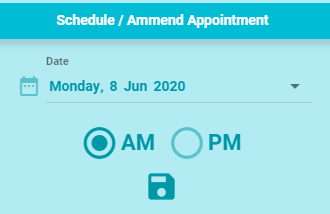
- DateSelect.PNG (7.36 KiB) Viewed 47091 times
After Clicking save I can see the value of the control using a console log
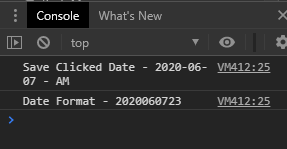
- ConsoleLog.PNG (5.08 KiB) Viewed 47091 times
The value is showing as 7th June 2020
Here's the relevant code
Code: Select all
Define_Com Class(#PRIM_MD.DateTime) Name(#ResponseDate) Caption('Date') Displayposition(2) Icon('date_range') Iconopacity(50) Left(253) Parent(#AnswerPanel) Tabposition(3) Width(300) Themedrawstyle('LightTitle') Top(46) Dateformat(Custom) Customdateformat('DDDD, D MMM YYYY')


Evtroutine Handling(#SaveResponse.Click)
#ApptDateFormat := #ResponseDate.value.AsDisplayString( CCYYMMDDHHMMSS )
#ApptDatex := #ResponseDate.Value
#SYS_WEB.console.log Text('Save Clicked Date - ' + #ApptDatex.AsString + ' - ' + #ApptSlot)
#SYS_WEB.console.log Text('Date Format - ' + #ApptDateFormat)
Endroutine
Any ideas what's going on here, and what I can do to fix it?
I'm at the point of forgetting the control altogether and just having the user type the date.
Cheers
Paul.
Re: Date Control value is previous day
Posted: Thu Jun 11, 2020 11:39 pm
by jyoung
I had the same issue some time ago and I raised an issue with support, this was before the Idera acquisition and the move to the new support system, however I think the solution was to use the STD_DATEX field instead of the PRIM_MD.DateTime.
I forget the exact details as to why, but it was something with how they were treating ISO dates (i think :S)
Might give STD_DATEX a try and see if you get the correct results.
Hope this helps,
Joe
Re: Date Control value is previous day
Posted: Fri Jun 12, 2020 12:28 am
by paularstall
Thanks Joe
I'll give that a try

Re: Date Control value is previous day
Posted: Fri Jun 12, 2020 12:40 am
by paularstall
Hi Joe.
Many thanks for that. It now works perfectly

Thanks
Paul.
Re: Date Control value is previous day
Posted: Tue Sep 15, 2020 1:06 pm
by andrewhiom
i'm in australia and have the same issue. this is what i'm doing to wedge the 'correct' date into a signed(8,0) field:
#ecdatprc := #dateProcessed.value.asLocalizedDateTime.date.asNumber( ccyymmdd )
a bit contorted, but it works.
Re: Date Control value is previous day
Posted: Wed Sep 16, 2020 9:20 am
by BrendanB
Andy,
the important part is
#dateProcessed.value.asLocalizedDateTime
the value returned from the datepicker is a UTC datetime... so when you get the 'date' if you dont specify to LocalizeDateTime, then you will get the UTC date (without the UTC adjustment).
so for example, sydney is +10 hours, so if you select a date (and dont select a time -- the time remains at midnight by default), then when you get the date you get 'the day before the one you picked'.
asLocalizedDateTime will adjust it by the UTC offset to get to the correctly selected date.
Brendan.
Re: Date Control value is previous day
Posted: Thu May 27, 2021 9:55 pm
by adale
andrewhiom wrote: Tue Sep 15, 2020 1:06 pm
i'm in australia and have the same issue. this is what i'm doing to wedge the 'correct' date into a signed(8,0) field:
#ecdatprc := #dateProcessed.value.asLocalizedDateTime.date.asNumber( ccyymmdd )
a bit contorted, but it works.
Thank you for this bit. It solved the exact issue I was currently working on.
Re: Date Control value is previous day
Posted: Tue Nov 08, 2022 2:00 am
by adale
I initially thought I had this issue solved, but I must still have something off with the weblet as it does not display the correct (or expected) input date.
Maybe someone here can point out what I have out of sorts.
Using the #PRIM_MD.DateTime weblet(#inputDate) to present a date input calendar, where the use can select a date in the past. I am wanting to initially default the calendar to yesterday (today - 1).
The values would appear to calculate correctly for the inputDate to be yesterday's date, but the weblet continues to show up with the date prior to the input date?
What am I missing?
Code where I am trying to load yesterday's date:
Code: Select all
EVTROUTINE Handling(#COM_OWNER.Prepare)
DEFINE Field(#DTTEST) Type(*Dec) Length(8) Decimals(0)

* Set weblet to yesterday's date
#STD_DATEX := #DATETIMEX.AsLocalizedDateTime.date.Adjust( -1 )

* Console - debug
#sys_web.Console.Log( ('STD_DATEX: ' + ' - ' + #STD_DATEX.AsDisplayString) )

* load input date to weblet
#inputDate := #STD_DATEX

* get input value as number
#DTTEST := #inputDate.Value.Date.AsNumber( CCYYMMDD )

* Console - debug
#sys_web.Console.Log( ('INPUTDATE: ' + ' - ' + #DTTEST.AsDisplayString) )

* load DTTEST as string for display in view
#txYesterdayDate.Caption := 'Date should be today -1 (' + #DTTEST.AsString + ' )'

* load STD_DATES as string for display in view
#txInputDateValue.Caption := 'InputDate value: ' + #STD_DATEX.AsString

ENDROUTINE
Images from my VL view.
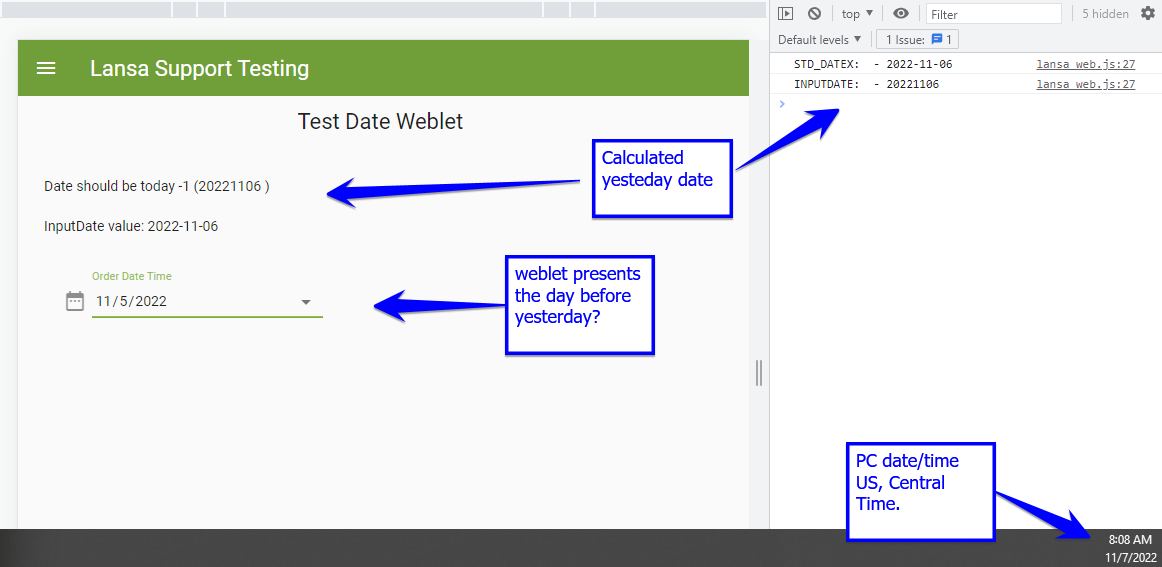
- Date_Weblet_view.png (75.46 KiB) Viewed 39571 times
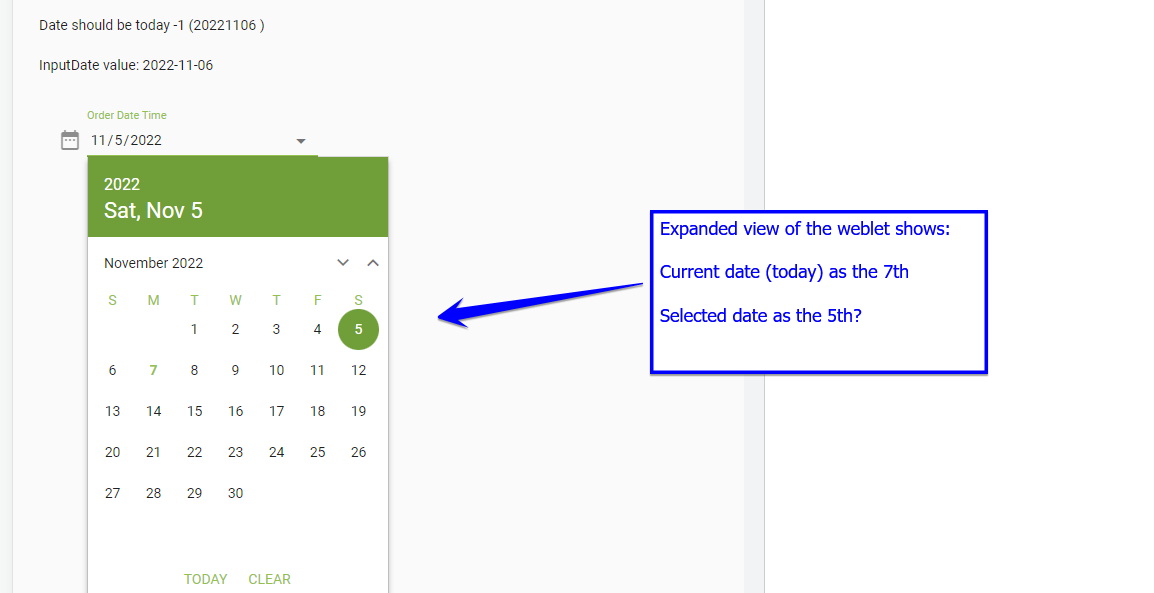
- Date_Weblet_expanded.png (44.43 KiB) Viewed 39571 times
Re: Date Control value is previous day
Posted: Tue May 30, 2023 5:32 am
by adale
My case is for VL Web use where I have data from legacy files.
From what I gather, the #PRIM_MD.DateTime control is specifically or intrinsically looking for the an incoming parm value to have both the date and the time values populated. If only providing a date, and no time, then the control assumes the time value to be midnight.
The #PRIM_MD.DateTime control is expecting the date and time to use as DisplayasUTC (or at lease I can't find an option to make this accept AsLocalizedDateTime.
We have legacy date fields that are 8.0 decimal value fields (CCYYMMDD), so no time value is included.
And since the incoming date parm is a decimal value field, I am unable to utilize the .AsLocalizedDateTime intrinsic directly with the field.
I have come up with two possible options, and would like to hear input from the forum on best use, and if I am missing something, or leaving myself open for an issue down the road.
Notes:
#cDate is the #PRIM_MD.DateTime control
* work field
DEFINE Field(#wk_date) Type(*Dec) Length(8) Decimals(0)
Code: Select all
EVTROUTINE Handling(#Com_owner.Initialize)

* work date field as a date in the past
#wk_date := 20220402

* Edit is a display / input field on the Web page
#Edit := #wk_date.AsDisplayString

* Option #1 - Adjust by 1:
* #cDATE.Value := #wk_date.AsDate( ccyymmdd ).Adjust( +1 )

* OR -

* Option #2 - Load into #DateTimeX field first, then use intrinsic
#DATETIMEX := #wk_date.AsDate( CCYYMMDD )
#cDate.Value := #DATETIMEX.AsUniversalDateTime

ENDROUTINE


EVTROUTINE Handling(#Button.Click)
* this worked: option #1
* #cDATE.Value := #Edit.Value.AsDate( ccyymmdd ).Adjust( +1 )

* OR

* this also works: option #2
#DATETIMEX := #Edit.Value.AsDate( CCYYMMDD )
#cDate.Value := #DATETIMEX.AsUniversalDateTime

ENDROUTINE
Re: Date Control value is previous day
Posted: Thu Jun 22, 2023 1:16 am
by adale
Based upon further discussion, option #2 seems the best method at this point in time, or until enhancement requests might be made available.
* ========== *
* Updated work for forum post:
* ========== *
* Set RDMLX datetime field with the value you wish to use/display in the weblet
#DATETIMEX := #Edit.Value.AsDate( CCYYMMDD )
* Set #PRIM_MD.DateTime weblet VALUE to the selected DateTime and force .AsUniversalDateTime
* in order to not auto adjust for localized datetime calc.
#cDate.Value := #DATETIMEX.AsUniversalDateTime
Re: Date Control value is previous day
Posted: Fri Jun 30, 2023 6:53 pm
by KEC
This document highlights usage and impacts of DateTime. It may give some extra insights
https://www.lansa.com/downloads/support/datetime.pdf