Page 1 of 1
Change cell style when mouse enters/leaves?
Posted: Thu Aug 06, 2020 5:20 am
by atostaine
Can I change the style of one cell when they mouseover in a PRIM_ LIST? I've played with columnmouseenter but I haven't been succesful getting the row the user is in.
Thanks
Re: Change cell style when mouse enters/leaves?
Posted: Thu Dec 03, 2020 5:52 am
by Dino
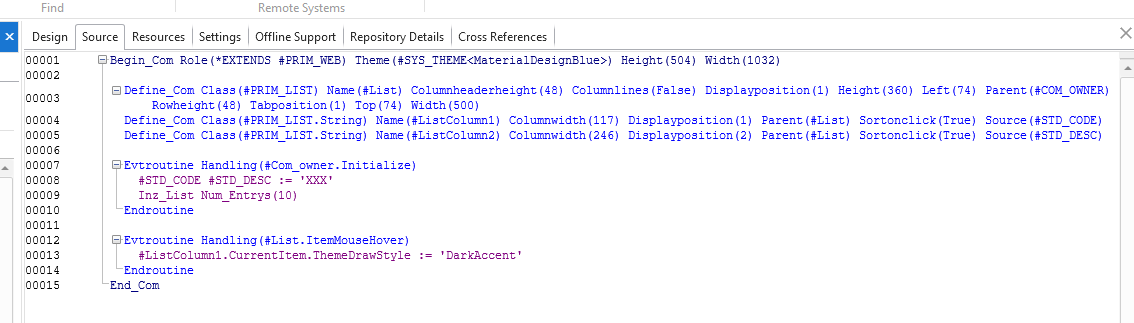
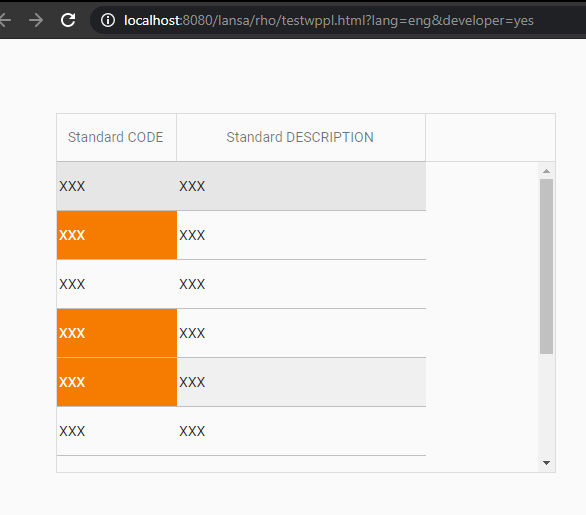
You can use the theme for the column:
- mouseover1.png (29.09 KiB) Viewed 3727 times
Code: Select all
Begin_Com Role(*EXTENDS #PRIM_WEB) Theme(#SYS_THEME<MaterialDesignBlue>) Height(504) Width(1032)

Define_Com Class(#PRIM_LIST) Name(#List) Columnheaderheight(48) Columnlines(False) Displayposition(1) Height(360) Left(74) Parent(#COM_OWNER) Rowheight(48) Tabposition(1) Top(74) Width(500)
Define_Com Class(#PRIM_LIST.String) Name(#ListColumn1) Columnwidth(117) Displayposition(1) Parent(#List) Sortonclick(True) Source(#STD_CODE)
Define_Com Class(#PRIM_LIST.String) Name(#ListColumn2) Columnwidth(246) Displayposition(2) Parent(#List) Sortonclick(True) Source(#STD_DESC)

Evtroutine Handling(#Com_owner.Initialize)
#STD_CODE #STD_DESC := 'XXX'
Inz_List Num_Entrys(10)
Endroutine

Evtroutine Handling(#List.ItemMouseHover)
#ListColumn1.CurrentItem.ThemeDrawStyle := 'DarkAccent'
Endroutine
End_Com
- mouseover2.png (16.25 KiB) Viewed 3727 times