Hi Megumi,
I think it depends on what type of template you are using.
I don't think formulas and things like that work, but you can have a template and use that as a starting point.
That is how we handle a couple different reports.
For example, I have three templates defined in a "templates" folder in Integrator.
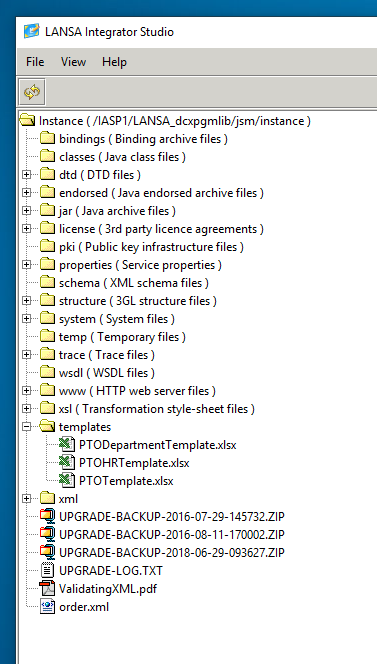
- templates.PNG (29.71 KiB) Viewed 16123 times
The "PTODepartmentTemplate" has some header cells defined.
You can use the "using" option outlined at
https://docs.lansa.com/14/en/lansa093/i ... 7_4050.htm
Then you can write in a specific cell using the "WRITE" command with the "R1C1" option outlined at
https://docs.lansa.com/14/en/lansa093/i ... 7_4085.htm
Here are a couple examples we use:
Create from the template
Code: Select all
mthroutine name(CreateFile)
define_map for(*OUTPUT) class(#PRIM_ALPH) name(#filePath)
define_map for(*RESULT) class(#wk_Status) name(#status)

define_com class(#PRIM_ALPH) name(#fileName)
define_com class(#PRIM_ALPH) name(#templatePath)
define_com class(#PRIM_DATE) name(#date)

#status := ER

if (*OSAPI = IBMI)
#templatePath := 'templates/PTODepartmentTemplate.xlsx'
else
#templatePath := 'templates\PTODepartmentTemplate.xlsx'
endif

#fileName := ('Department-PTO-Requests-&1-&2.xlsx').Substitute( #DepartmentId.AsString #WeekEndDate.AsString )
#filePath := *PART_DIR + #fileName

#JSMXCMD := ('CREATE USING(&1)').Substitute( #templatePath )
#SYS_APPLN.TraceMessageData( #JSMXCMD )
use builtin(JSMX_COMMAND) with_args(#JSMXHDLE #JSMXCMD) to_get(#JSMXSTS #JSMXMSG)
if (#COM_OWNER.CheckStatus( #JSMXSTS #JSMXMSG ) = ER)
return
endif

#status := OK
endroutine
Writing a header line with values in a specific cell (B4) and (B6) on the "Master" sheet.
Code: Select all
mthroutine name(AddHeader)
define_map for(*RESULT) class(#wk_Status) name(#status)

#status := ER

clr_list named(#ExcelData)

fetch fields(#DepartmentName) from_file(PTODepartment) with_key(#DepartmentId)
#wk_String1 := #DepartmentName

add_entry to_list(#ExcelData)

#JSMXCMD := 'WRITE SHEET(Master) R1C1(4,2)'
#SYS_APPLN.TraceMessageData( #JSMXCMD )
use builtin(JSMX_COMMAND) with_args(#JSMXHDLE #JSMXCMD) to_get(#JSMXSTS #JSMXMSG #ExcelData)
if (#COM_OWNER.CheckStatus( #JSMXSTS #JSMXMSG ) = ER)
return
endif

clr_list named(#ExcelData)
#wk_String1 := ("&1 thru &2").Substitute( #wk_StartDate.AsDate( CCYYMMDD ).AsDisplayString( MMsDDsCCYY ) #wk_EndDate.AsDate( CCYYMMDD ).AsDisplayString( MMsDDsCCYY ) )
add_entry to_list(#ExcelData)

#JSMXCMD := 'WRITE SHEET(Master) R1C1(4,6)'
#SYS_APPLN.TraceMessageData( #JSMXCMD )
use builtin(JSMX_COMMAND) with_args(#JSMXHDLE #JSMXCMD) to_get(#JSMXSTS #JSMXMSG #ExcelData)
if (#COM_OWNER.CheckStatus( #JSMXSTS #JSMXMSG ) = ER)
return
endif

#status := OK
endroutine
Hope this helps,
Joe
EDIT
When I read your post, I was like wait a minute I have done this.
I should have read it a bit closer. lol

Unfortunately, I have not seen a way to copy and create a new sheet.
