Page 1 of 1
Change background color of grid header / listview header
Posted: Tue Sep 01, 2020 11:14 pm
by Joop
Hi all,
I was wondering if it is at all possible to change the background color of a grid header / listview header in Visual Lansa? If so, can anyone tell me how to do that? I have applied a visual style (or style) but then the background of the whole grid/list view changes.
Re: Change background color of grid header / listview header
Posted: Wed Sep 02, 2020 1:01 am
by jyoung
For VLWEB and the PRIM_LIST control, you can set the ColumnStyle on the list.
Code: Select all
begin_com role(*EXTENDS #PRIM_WEB) LayoutManager(#Layout1)

define_com class(#PRIM_VS.Style) name(#Style1) BackgroundBrush(#Brush1)
define_com class(#PRIM_VS.SolidBrush) name(#Brush1) Color(0:150:136)

define_com class(#PRIM_TBLO) name(#Layout1)
define_com class(#PRIM_TBLO.Row) name(#Layout1Row1) DisplayPosition(1) Parent(#Layout1)
define_com class(#PRIM_TBLO.Column) name(#Layout1Column1) DisplayPosition(1) Parent(#Layout1)


define_com class(#PRIM_LIST) name(#List) ColumnHeaderHeight(48) ColumnLines(False) DisplayPosition(1) Height(360) Left(293) Parent(#COM_OWNER) RowHeight(48) TabPosition(1) Top(142) Width(500) ColumnStyle(#Style1)
define_com class(#PRIM_LIST.String) name(#ListColumn1) ColumnWidth(250) DisplayPosition(1) Parent(#List) SortOnClick(True) Source(#STD_TEXT)

evtroutine handling(#Com_owner.Initialize)
define_com class(#PRIM_NMBR) name(#lIndex)


#lIndex := 1
dowhile cond(#lIndex <= 10)
#STD_TEXT := #lIndex.AsString
add_entry to_list(#List)
#lIndex += 1
endwhile

endroutine

end_com
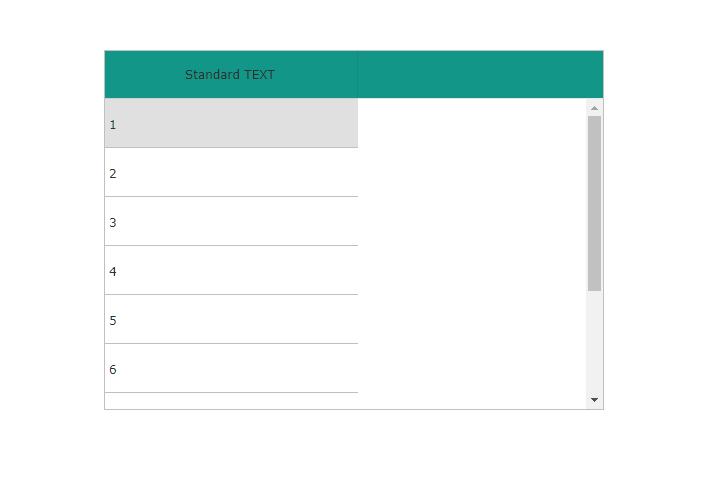
- Capture.PNG (6.19 KiB) Viewed 13264 times
Hope this helps,
Joe
Re: Change background color of grid header / listview header
Posted: Wed Sep 02, 2020 2:12 am
by Joop
Hi Joe,
Thanks, but I am programming for good ol' Windows

So I'm using a grid and list view in a reusable part.