Page 1 of 1
How to move mouse like the IDE
Posted: Thu Sep 24, 2020 12:28 pm
by atostaine
I have this form where a user can rearrange the order of the labels. If the user presses the up or down button how do I make the mouse pointer follow it? The IDE does it when working with Layout Rows. I can move the focus to each button but that doesn't move the pointer.
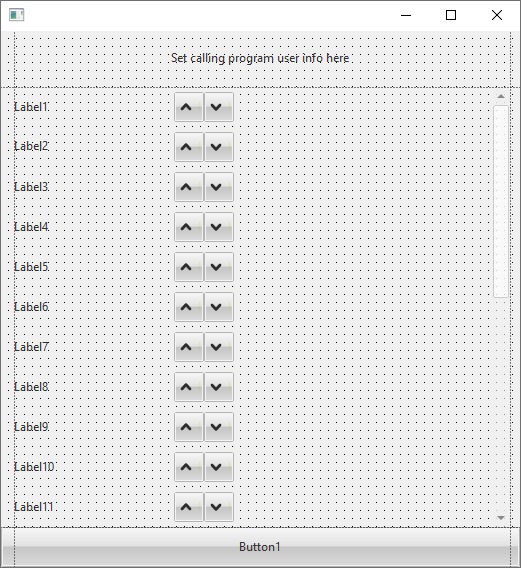
- fcolumns2.png (20.86 KiB) Viewed 39478 times
This is how the rows look. The mouse cursor will follow you if click up or down
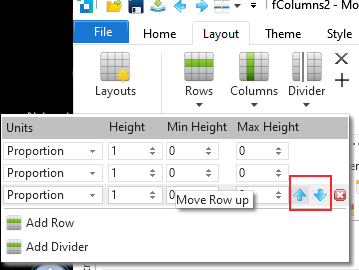
- rows.png (17.43 KiB) Viewed 39478 times
Thanks for any help
Re: How to move mouse like the IDE
Posted: Fri Sep 25, 2020 6:24 am
by davidbalansa
Hi Art
I know this doesn't help much, but might give some ideas. I found that you can get the mouse position using the #sys_mouse.HorPosition and #sys_mouse.VerPosition unfortunately you can't set these properties.
David
Re: How to move mouse like the IDE
Posted: Fri Sep 25, 2020 11:57 am
by atostaine
Thanks David. Everyone always says the IDE is written using LANSA but they still haven't convinced me. If I can get an answer to this that would help
Art
Re: How to move mouse like the IDE
Posted: Thu Oct 28, 2021 8:24 pm
by MarcusLancaster
Hi Art
Its been a while, but I wonder if you found a solution to this... I have a very similar requirement (moving entries up and down a list).
At V15 #sys_mouse hor/verposition are still read only.
Cheers for now.
Marcus.
Re: How to move mouse like the IDE
Posted: Fri Oct 29, 2021 12:36 am
by atostaine
No I abandoned that idea. Sorry.
Re: How to move mouse like the IDE
Posted: Fri Oct 29, 2021 1:20 am
by Dino
Why not to use drag and drop for that? much more simpler and popular this days.
There is an example provided in VL, form XDEMO_19 "Simple Drag and Drop"
this will be reduced to work with just one list:
Code: Select all
Function Options(*Direct)
Begin_Com Role(*EXTENDS #PRIM_FORM) Caption('Drag and Drop') Height(450) Left(246) Top(213) Width(779) ClientWidth(763) ClientHeight(411) Theme(#xDemoTheme)

Define_Com Class(#PRIM_TRVW) Name(#ListofLabels) ColumnButtonHeight(19) ComponentVersion(2) DisplayPosition(1) Height(378) KeyboardPositioning(SortColumn) Left(0) Parent(#COM_OWNER) TabPosition(1) Top(33) Width(380) LinesAtRoot(False) ViewStyle(UnLevelled) SelectionStyle(Multiple) FullRowSelect(True) DragStyle(Automatic) ColumnHeaders(False)
Define_Com Class(#PRIM_TVCL) Name(#TreeViewColumn) DisplayPosition(1) Level(1) Parent(#ListofLabels) Source(#xDemoCaption) Width(62) WidthType(Remainder)

Define_Com Class(#xDemoDragandDropImage) Name(#DragImage)

Evtroutine Handling(#Com_owner.CreateInstance)
Begin_Loop To(10)
#xDemoCaption := ("Left &1").Substitute( (#ListofLabels.Items.ItemCount + 1).AsString )
Add_Entry To_List(#ListofLabels)
End_Loop
Endroutine

Evtroutine Handling(#ListofLabels.StartDrag) Com_Sender(#Sender) Continue(#Continue) Payload(#Payload) DragList(#DragList)
#Payload <= #Com_owner.GetSelectedItems( #Sender )
#Continue := (#Payload *As #Prim_acol<#prim_tvit>).ItemCount > 0
#DragList.DragListStyle := Popup
#DragList.DragPopup <= #DragImage
#DragImage.DragCaption := (#Payload *As #Prim_acol<#prim_tvit>).ItemCount.AsString
#DragImage.DragImage <= #xImageFavorites32
Endroutine

Evtroutine Handling(#ListofLabels.DragOver) Com_Sender(#Sender) AcceptDrop(#Accept) Payload(#Payload) Source(#Source) ShowDropHilight(#DropHilight)
#DropHilight := True
#Accept := (#Payload *As #Prim_acol<#prim_tvit>).ItemCount > 0
Endroutine

Evtroutine Handling(#ListofLabels.DragDrop) Payload(#Payload) DragResult(#DragResult) Source(#Source)
#Com_owner.DoLeftDrop( #Source #ListofLabels.CurrentItem (#Payload *As #Prim_acol<#prim_tvit>) )
#DragResult := Accepted
Endroutine

Mthroutine Name(DoLeftDrop) Access(*Private)
Define_Map For(*Input) Class(#Prim_objt) Name(#Source) Pass(*By_Reference)
Define_Map For(*Input) Class(#Prim_tvit) Name(#DropItem) Pass(*By_Reference)
Define_Map For(*Input) Class(#Prim_acol<#prim_tvit>) Name(#Payload) Pass(*By_Reference)

For Each(#Item) In(#Payload)
If (#DropItem *Is *null)
#Item.Position := #ListofLabels.Items.ItemCount
Else
#Item.Position := #DropItem.Position
Endif
Endfor
Endroutine

Mthroutine Name(GetSelectedItems) Access(*Private)
Define_Map For(*Input) Class(#Prim_trvw) Name(#Tree) Pass(*By_Reference)
Define_Map For(*Result) Class(#Prim_acol<#prim_tvit>) Name(#Result) Pass(*By_Reference)

#Result <= *New #Prim_acol<#prim_tvit>
For Each(#Item) In(#Tree.Items)
Continue If(*Not #Item.Selected)
#Result.Insert( #Item )
Endfor
Endroutine
End_Com
Re: How to move mouse like the IDE
Posted: Fri Oct 29, 2021 1:59 am
by MarcusLancaster
Thanks for the code snip Dino. Yep Drag and Drop is certainly an option I've considered, and have used that technique in the past on several occasions, but much like Art I was looking at the layout manager tool in the IDE and was wondering how mouse positioning in that scenario was accomplished, and if there had been any progress since the original post. Was just curious really.
Re: How to move mouse like the IDE
Posted: Tue Nov 02, 2021 2:31 am
by Dino
This was a tricky question but fun. Seems that if you are using a grid, you cannot change the focus when you are focused in an item, triggering an event didn't helped either, so I just started a timer and the timer do the positioning in the other row afterwards. works pretty good.
if you use a tree or list instead of a grid, then the problem was handling the buttons events, didn't bother with that, just used the grid.
Code: Select all
Function Options(*Direct)
Begin_Com Role(*EXTENDS #PRIM_FORM) ClientWidth(644) ClientHeight(484) ComponentVersion(2) Left(836) Top(275)
Def_List Name(#savelist) Fields(#STD_TEXT) Type(*Working) Entrys(1)

Define_Com Class(#PRIM_GRID) Name(#Grid1) CaptionNoBlankLines(True) ColumnScroll(False) ComponentVersion(1) DisplayPosition(1) Left(31) Parent(#COM_OWNER) ShowSelection(True) ShowSelectionHilight(False) ShowSortArrow(True) TabPosition(1) Top(27) Height(398) Width(370) DragStyle(Automatic) ColumnButtonHeight(15) RowHeight(23) SelectionStyle(WholeRow)
Define_Com Class(#PRIM_GDCL) Name(#GridColumn1) DisplayPosition(1) Parent(#Grid1) Source(#STD_TEXT) Width(53)
Define_Com Class(#PRIM_GDCL) Name(#GridColumn2) DisplayPosition(2) Parent(#Grid1) Source(#butup) DisplayAppearance(Image) UsePicklist(True) EditAppearance(Image) CaptionType(ColumnHeadings) Width(12) ColumnAlign(Center) ReadOnly(False)
Define_Com Class(#PRIM_GDCL) Name(#GridColumn3) DisplayPosition(3) Parent(#Grid1) Source(#butdown) UsePicklist(True) CaptionType(ColumnHeadings) ColumnAlign(Center) Width(14) ReadOnly(False)

Define_Com Class(#PRIM_TIMR) Name(#Timer1) Startup(Manual) Interval(10)

Evtroutine Handling(#com_owner.CreateInstance)
#Grid1 := *DEFAULT
Begin_Loop To(10)
#STD_TEXT := ("Label &1").Substitute( (#Grid1.Items.ItemCount + 1).AsString )
Add_Entry To_List(#Grid1)
End_Loop
Endroutine

Evtroutine Handling(#GridColumn2.GotFocus) Options(*NOCLEARMESSAGES *NOCLEARERRORS)
Inz_List Named(#savelist)
#std_num := #Grid1.CurrentItem.Entry
If (#std_num > 1)
Dlt_Entry Number(#std_num) From_List(#Grid1)
Add_Entry To_List(#Grid1) After((#std_num - 2))
Endif
#std_num -= 1
#Timer1.Start
Endroutine

Evtroutine Handling(#GridColumn3.GotFocus) Options(*NOCLEARMESSAGES *NOCLEARERRORS)
Inz_List Named(#savelist)
#std_num := #Grid1.CurrentItem.Entry
If (#std_num < #Grid1.Entries)
Dlt_Entry Number(#std_num) From_List(#Grid1)
Add_Entry To_List(#Grid1) After(#std_num)
Endif
#std_num += 1
#Timer1.Start
Endroutine

Evtroutine Handling(#Timer1.Tick) Options(*NOCLEARMESSAGES *NOCLEARERRORS)
Get_Entry Number(#std_num) From_List(#Grid1)
#Grid1.CurrentItem.Focus #Grid1.CurrentItem.Selected #GridColumn1.Focus := True
#Timer1.Stop
Endroutine
End_Com
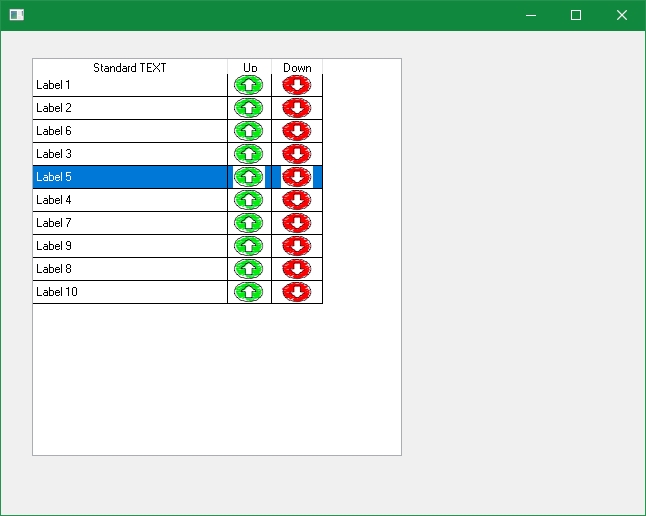
- upanddown.jpg (59.69 KiB) Viewed 37402 times
Re: How to move mouse like the IDE
Posted: Tue Nov 02, 2021 2:44 am
by atostaine
V14 latest EPC's my pointer isn't moving?
Re: How to move mouse like the IDE
Posted: Tue Nov 02, 2021 3:35 am
by Dino
my mistake, forgot about the initial question regarding to move the mouse pointer. I think there is an activex that can access that windows function to set the mouse position in screen (I remember playing with that using iot with mouse.h library), but at the end, if you move programmatically the mouse position in the screen (and not the physical mouse), the user could ran out of mouse pad or have to reposition his hand/mouse to adjust to the running pointer... besides all the potential security issues (not just move, but click etc).
maybe the correct solution here is to request an enhancement to have a property like "move mouse pointer to element when selected/focused" checkbox... still kind of strange thing to have when most applications today don't do that. most move just the cursor to the default first focused element in the screen, but not the mouse. I did notice that in the layout, prefer the drag a row better.
Re: How to move mouse like the IDE
Posted: Tue Nov 02, 2021 5:16 am
by atostaine
My question came about because of they way the ide does it. As I said before everyone at the old lansa would tell you the ide is written using lansa. There are certainly parts that are doable but so many things just aren’t possible.
Re: How to move mouse like the IDE
Posted: Wed Nov 03, 2021 7:23 pm
by Ingmar
Big parts of the IDE ARE written in LANSA. Not all though... Some bits are C++.
The magic moving mouse pointer was a bit of a strange hack from C++ that you can't do in RDML.
Very questionable UX though.... That you don't see it anywhere else should be telling.
Re: How to move mouse like the IDE
Posted: Thu Nov 04, 2021 2:14 am
by atostaine
Ingmar: Is the text editor written in LANSA?
Art