Page 1 of 1
view container height
Posted: Fri Jan 15, 2021 9:45 am
by wadhwani
When building a web page with an app bar, app drawer and view container, the height of the view container appears to be restricted to the height of the browser. When building a page can can work on desktop and mobile, in some cases I would like to have my view longer than height of phone screen so users can scroll down. I don't think I am able to do that. I can only make dialogs longer than screen height and allow user to scroll down.
Can anybody offer any ideas on how to make container height larger dynamically based on device = mobile? On the web page source code, even if you try and change the viewcontainer height to something large, after you hit save it goes back down to 719 in my case.
Any help would be greatly appreciated.
Thanks
Re: view container height
Posted: Mon Jan 18, 2021 2:02 pm
by Dino
Hi
Perhaps using a Panel will be a suitable solution. This will be my view using a panel and a few floating buttons distributed in an view 3000 pixels tall.
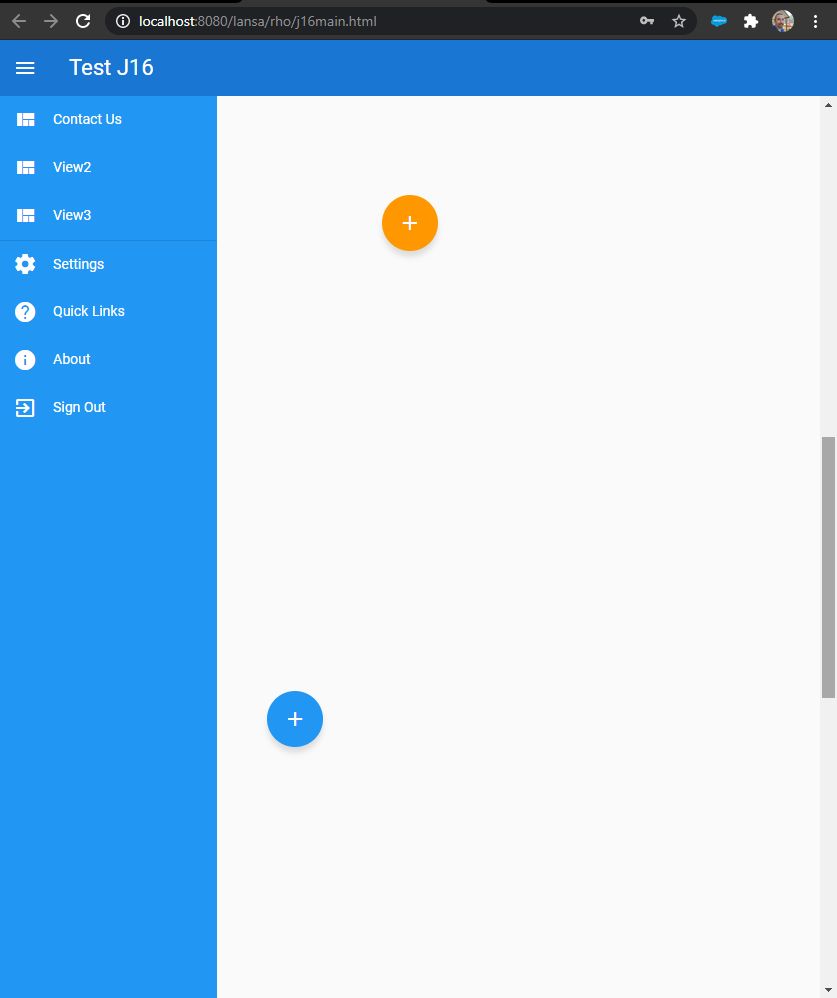
- j16.jpg (24.51 KiB) Viewed 16728 times
Note that I used HEIGHT(3000) for the View (or the BEGIN_COM line), added a Panel to the view and set to fit Both, and enabled the Horizontalscroll(True) Verticalscroll(True) in the panel. The floating controls (round buttons) i use, where added to the panel.
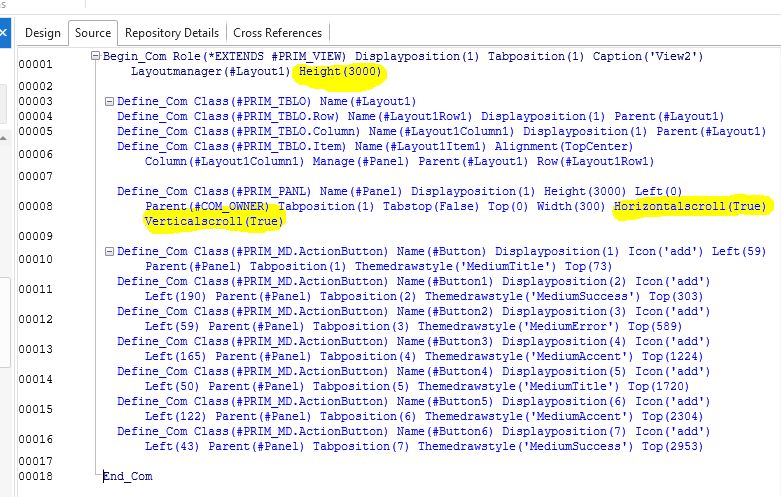
- j16source.jpg (128.44 KiB) Viewed 16728 times
Code: Select all
Begin_Com Role(*EXTENDS #PRIM_VIEW) Displayposition(1) Tabposition(1) Caption('View2') Layoutmanager(#Layout1) Height(3000)

Define_Com Class(#PRIM_TBLO) Name(#Layout1)
Define_Com Class(#PRIM_TBLO.Row) Name(#Layout1Row1) Displayposition(1) Parent(#Layout1)
Define_Com Class(#PRIM_TBLO.Column) Name(#Layout1Column1) Displayposition(1) Parent(#Layout1)
Define_Com Class(#PRIM_TBLO.Item) Name(#Layout1Item1) Alignment(TopCenter) Column(#Layout1Column1) Manage(#Panel) Parent(#Layout1) Row(#Layout1Row1)

Define_Com Class(#PRIM_PANL) Name(#Panel) Displayposition(1) Height(3000) Left(0) Parent(#COM_OWNER) Tabposition(1) Tabstop(False) Top(0) Width(300) Horizontalscroll(True) Verticalscroll(True)
Define_Com Class(#PRIM_MD.ActionButton) Name(#Button) Displayposition(1) Icon('add') Left(59) Parent(#Panel) Tabposition(1) Themedrawstyle('MediumTitle') Top(73)
Define_Com Class(#PRIM_MD.ActionButton) Name(#Button1) Displayposition(2) Icon('add') Left(190) Parent(#Panel) Tabposition(2) Themedrawstyle('MediumSuccess') Top(303)
Define_Com Class(#PRIM_MD.ActionButton) Name(#Button2) Displayposition(3) Icon('add') Left(59) Parent(#Panel) Tabposition(3) Themedrawstyle('MediumError') Top(589)
Define_Com Class(#PRIM_MD.ActionButton) Name(#Button3) Displayposition(4) Icon('add') Left(165) Parent(#Panel) Tabposition(4) Themedrawstyle('MediumAccent') Top(1224)
Define_Com Class(#PRIM_MD.ActionButton) Name(#Button4) Displayposition(5) Icon('add') Left(50) Parent(#Panel) Tabposition(5) Themedrawstyle('MediumTitle') Top(1720)
Define_Com Class(#PRIM_MD.ActionButton) Name(#Button5) Displayposition(6) Icon('add') Left(122) Parent(#Panel) Tabposition(6) Themedrawstyle('MediumAccent') Top(2304)
Define_Com Class(#PRIM_MD.ActionButton) Name(#Button6) Displayposition(7) Icon('add') Left(43) Parent(#Panel) Tabposition(7) Themedrawstyle('MediumSuccess') Top(2953)

End_Com
Re: view container height
Posted: Tue Jan 19, 2021 2:29 am
by wadhwani
Thanks Dino. Let me review and see if this works for me.
Re: view container height
Posted: Tue Jan 19, 2021 3:11 am
by wadhwani
One issue I see is that the AppDrawer seems to end at my screen height (1080). I am able to scroll down but the Appdrawer does not go all the way down. Any suggestions?
Re: view container height
Posted: Tue Jan 19, 2021 3:23 am
by Dino
So, do you want to be able to scroll in the AppDrawer, like to have 100 options in that AppDrawer, and not just in the views?
not really sure of understand the question... I added a lot more of MenuItems in the App Drawer, and I can scroll both in the VL interface as in the final application
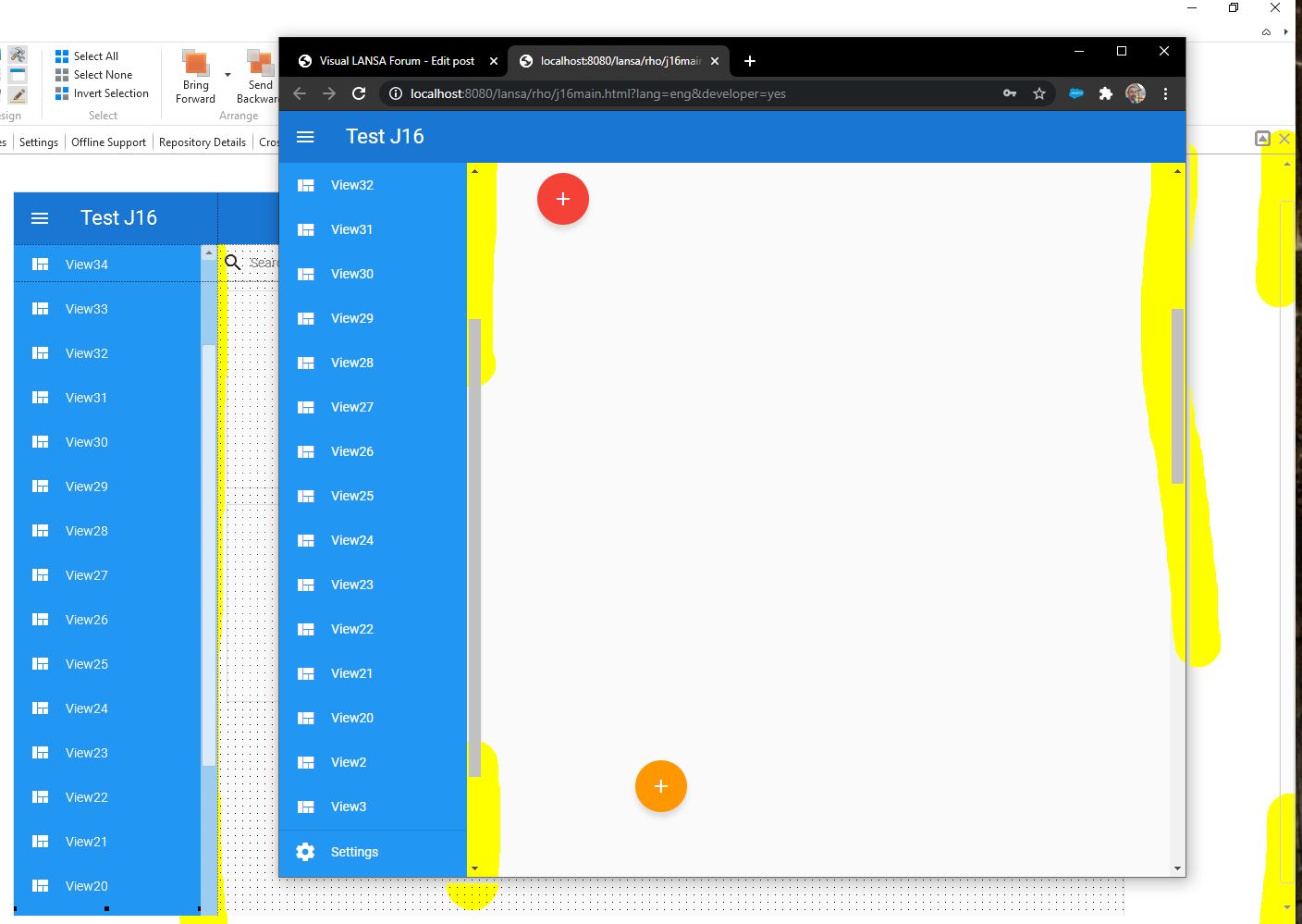
- j16scroll.jpg (123.43 KiB) Viewed 16716 times
Code: Select all
* Controls - App Drawer
Define_Com Class(#PRIM_MD.AppDrawer) Name(#AppDrawer) Displayposition(2) Parent(#COM_OWNER) Tabposition(2) Top(56) Height(744) Layoutmanager(#LayoutAppDrawer) Themedrawstyle('MediumTitle') Width(220)
Define_Com Class(#PRIM_MD.Menu) Name(#Menu) Displayposition(1) Height(744) Parent(#AppDrawer) Showselection(False) Tabposition(1) Verticalscroll(True) Width(220)
Define_Com Class(#PRIM_MD.MenuItem) Name(#MenuItemContact_Us) Caption('Contact Us') Displayposition(1) Left(0) Parent(#Menu) Tabposition(1) Tabstop(False) Top(0) Width(202) Height(48) Icon('view_quilt') View(#Contact_Us)
Define_Com Class(#PRIM_MD.MenuItem) Name(#MenuItemView2) Caption('View2') Displayposition(19) Left(0) Parent(#Menu) Tabposition(19) Tabstop(False) Top(864) Width(202) Height(48) Icon('view_quilt') View(#View2)
Define_Com Class(#PRIM_MD.MenuItem) Name(#MenuItemView3) Caption('View3') Displayposition(20) Left(0) Parent(#Menu) Tabposition(20) Tabstop(False) Top(912) Width(202) Height(48) Icon('view_quilt') View(#View3)
Define_Com Class(#PRIM_MD.MenuItem) Name(#MenuItemSettings) Caption('Settings') Displayposition(21) Left(0) Parent(#Menu) Tabposition(21) Tabstop(False) Top(960) Width(202) Height(48) Icon('settings') Themedrawstyle('TopDivider') View(#Settings)
Define_Com Class(#PRIM_MD.MenuItem) Name(#MenuItemSignOut) Caption('Sign Out') Displayposition(24) Left(0) Parent(#Menu) Tabposition(24) Tabstop(False) Top(1104) Width(202) Height(48) Icon('exit_to_app')
Define_Com Class(#PRIM_MD.MenuItem) Name(#MenuItemQuickLinks) Caption('Quick Links') Displayposition(22) Left(0) Parent(#Menu) Tabposition(22) Tabstop(False) Top(1008) Width(202) Height(48) Icon('help') View(#QuickLinks)
Define_Com Class(#PRIM_MD.MenuItem) Name(#MenuItemAbout) Caption('About') Displayposition(23) Left(0) Parent(#Menu) Tabposition(23) Tabstop(False) Top(1056) Width(202) Height(48) Icon('info') Dialog(#About)
Define_Com Class(#PRIM_MD.MenuItem) Name(#MenuItemView20) Caption('View20') Displayposition(18) Left(0) Parent(#Menu) Tabposition(18) Tabstop(False) Top(816) Width(202) Height(48) Icon('view_quilt') View(#View2)
Define_Com Class(#PRIM_MD.MenuItem) Name(#MenuItemView21) Caption('View21') Displayposition(17) Left(0) Parent(#Menu) Tabposition(17) Tabstop(False) Top(768) Width(202) Height(48) Icon('view_quilt') View(#View2)
Define_Com Class(#PRIM_MD.MenuItem) Name(#MenuItemView22) Caption('View22') Displayposition(16) Left(0) Parent(#Menu) Tabposition(16) Tabstop(False) Top(720) Width(202) Height(48) Icon('view_quilt') View(#View2)
Define_Com Class(#PRIM_MD.MenuItem) Name(#MenuItemView23) Caption('View23') Displayposition(15) Left(0) Parent(#Menu) Tabposition(15) Tabstop(False) Top(672) Width(202) Height(48) Icon('view_quilt') View(#View2)
Define_Com Class(#PRIM_MD.MenuItem) Name(#MenuItemView24) Caption('View24') Displayposition(14) Left(0) Parent(#Menu) Tabposition(14) Tabstop(False) Top(624) Width(202) Height(48) Icon('view_quilt') View(#View2)
Define_Com Class(#PRIM_MD.MenuItem) Name(#MenuItemView25) Caption('View25') Displayposition(13) Left(0) Parent(#Menu) Tabposition(13) Tabstop(False) Top(576) Width(202) Height(48) Icon('view_quilt') View(#View2)
Define_Com Class(#PRIM_MD.MenuItem) Name(#MenuItemView26) Caption('View26') Displayposition(12) Left(0) Parent(#Menu) Tabposition(12) Tabstop(False) Top(528) Width(202) Height(48) Icon('view_quilt') View(#View2)
Define_Com Class(#PRIM_MD.MenuItem) Name(#MenuItemView27) Caption('View27') Displayposition(11) Left(0) Parent(#Menu) Tabposition(11) Tabstop(False) Top(480) Width(202) Height(48) Icon('view_quilt') View(#View2)
Define_Com Class(#PRIM_MD.MenuItem) Name(#MenuItemView28) Caption('View28') Displayposition(10) Left(0) Parent(#Menu) Tabposition(10) Tabstop(False) Top(432) Width(202) Height(48) Icon('view_quilt') View(#View2)
Define_Com Class(#PRIM_MD.MenuItem) Name(#MenuItemView29) Caption('View29') Displayposition(9) Left(0) Parent(#Menu) Tabposition(9) Tabstop(False) Top(384) Width(202) Height(48) Icon('view_quilt') View(#View2)
Define_Com Class(#PRIM_MD.MenuItem) Name(#MenuItemView30) Caption('View30') Displayposition(8) Left(0) Parent(#Menu) Tabposition(8) Tabstop(False) Top(336) Width(202) Height(48) Icon('view_quilt') View(#View2)
Define_Com Class(#PRIM_MD.MenuItem) Name(#MenuItemView31) Caption('View31') Displayposition(7) Left(0) Parent(#Menu) Tabposition(7) Tabstop(False) Top(288) Width(202) Height(48) Icon('view_quilt') View(#View2)
Define_Com Class(#PRIM_MD.MenuItem) Name(#MenuItemView32) Caption('View32') Displayposition(6) Left(0) Parent(#Menu) Tabposition(6) Tabstop(False) Top(240) Width(202) Height(48) Icon('view_quilt') View(#View2)
Define_Com Class(#PRIM_MD.MenuItem) Name(#MenuItemView33) Caption('View33') Displayposition(5) Left(0) Parent(#Menu) Tabposition(5) Tabstop(False) Top(192) Width(202) Height(48) Icon('view_quilt') View(#View2)
Define_Com Class(#PRIM_MD.MenuItem) Name(#MenuItemView34) Caption('View34') Displayposition(4) Left(0) Parent(#Menu) Tabposition(4) Tabstop(False) Top(144) Width(202) Height(48) Icon('view_quilt') View(#View2)
Define_Com Class(#PRIM_MD.MenuItem) Name(#MenuItemView35) Caption('View35') Displayposition(3) Left(0) Parent(#Menu) Tabposition(3) Tabstop(False) Top(96) Width(202) Height(48) Icon('view_quilt') View(#View2)
Define_Com Class(#PRIM_MD.MenuItem) Name(#MenuItemView36) Caption('View36') Displayposition(2) Left(0) Parent(#Menu) Tabposition(2) Tabstop(False) Top(48) Width(202) Height(48) Icon('view_quilt') View(#View2)
Re: view container height
Posted: Tue Jan 19, 2021 6:37 am
by wadhwani
On your screen shot sample, you show the appdrawer goes all they way down to the length of the view window. In my case, the appdrawer ends at 1080 height and is blank from that point to the bottom of the scroll page container length. Hope that make sense. In the web page design, the appdrawer is set to fit height of row3.
Re: view container height
Posted: Tue Jan 19, 2021 7:19 am
by Dino
In the webpage I actually have the Appdrawer at 744
Code: Select all
Define_Com Class(#PRIM_MD.AppDrawer) Name(#AppDrawer) Displayposition(2) Parent(#COM_OWNER) Tabposition(2) Top(56) Height(744) Layoutmanager(#LayoutAppDrawer) Themedrawstyle('MediumTitle') Width(220)
and its adjusted automatically by the layout.
Code: Select all
Define_Com Class(#PRIM_TBLO.Item) Name(#LayoutMainItem2) Column(#LayoutMainColumn1) Manage(#AppDrawer) Parent(#LayoutMain) Row(#LayoutMainRow2) Sizing(FitToHeight) Rowspan(2)
Maybe you can find another difference, comparing my code with your code.
See attached here a quick export of this example, that was created originally by the wizard at v15 epc150020.
Re: view container height
Posted: Wed Jan 20, 2021 8:34 am
by wadhwani
Something odd here. I imported your version and compared to mine. In my view, the panel does not show vertical scrollbar even though it it is checked on property. I used your view in my web page and everything is fine. Why would vertical scroll not show on my panel (even in design view)?
Re: view container height
Posted: Wed Jan 20, 2021 9:26 am
by wadhwani
Found the issue. Scroll bar only shows when you place the last action button far enough down the panel where bottom overlflows part 3000 px height you specify as height of panel. Don't know if that is the way it is supposed to work.
Re: view container height
Posted: Wed Jan 20, 2021 10:05 am
by Dino
interesting! glad you find it and can now make it work.