Page 1 of 1
VLWEB and Autofill
Posted: Mon May 03, 2021 9:44 am
by jimwatterson
On some devices (depending upon settings) we are seeing input fields being automatically pre-filled by the browser, including user ids, email addresses and mobile phone numbers. The users have asked us to stop this but there is no setting in VLWEB that allows us to control this. LANSA support have no ideas. In a Webevent function we would use autocomplete='off". Apparently not all browsers respect this setting but as it appears to work in Chrome that has to be much better than nothing.
It seems to me that we can't be the first to encounter this issue. Anybody out there got any ideas?
Re: VLWEB and Autofill
Posted: Mon May 03, 2021 12:26 pm
by BrendanB
Jim,
This can be accomplished via a widget. (Widget should be a 'Control' widget, place it on the page and set to Visible(False).
Widget needs a method 'TurnOff' :
Code: Select all
  //
  // TurnOff - Turn Off Autocomplete on Inputs
  //
  PROTOTYPE.TurnOff = function()
  {

      let tagArr = document.getElementsByTagName("input");

      for (let i = 0; i < tagArr.length; i++) {
        tagArr[i].autocomplete = 'off';
      }

  }
in your view (you will need to add the widget to each view you wish to 'turn off autocomplete') have a boolean for '#prepared' and '#ACInitialised'
Code: Select all
Define_Com Class(#AutoCompleteOff) Name(#AutoCompleteOff)  Parent(#COM_OWNER)  Visible(False)

Define_Com Class(#PRIM_BOLN) Name(#ACInitialised)
Define_Com Class(#PRIM_BOLN) Name(#Prepared)
At the end of the Prepare event routine put:
Code: Select all
Evtroutine Handling(#COM_OWNER.Prepare)

* Normal Prepare logic for View.....

* put these 2 lines at the end

#Prepared := True
#COM_SELF.TurnOffAutoComplete

Endroutine
and add:
Code: Select all
Evtroutine Handling(#AutoCompleteOff.Initialize)

#ACInitialised := True

#COM_SELF.TurnOffAutoComplete

Endroutine

Mthroutine Name(TurnOffAutoComplete)

If (#ACInitialised *And #Prepared)

#AutoCompleteOff.TurnOff

Endif

Endroutine
That should set it off on a per-view basis. (remember, the HTML is built each time you show a view, meaning this code needs to run each time you show it).
This can be extended for other input types (although i am unsure what the exact input types we use are).
Brendan.
Re: VLWEB and Autofill
Posted: Fri Oct 21, 2022 3:46 am
by adale
Brendan,
I am following your instructions, and have created the widget with the method code segment you provided (widget name is IX_AutoCompleteOff). Compiled and checked in.
In the last EvtRoutine (#AutoCompleteOff.Initialize), I get the error:
"Feature name TurnOff is not a member of the component type IX_AutoCompleteOff" ?
Here is my widget source. Did I do something wrong in here by just adding it to the end?
Code: Select all
//----------------------------------------------------------
// PROVIDE A SINGLE JAVASCRIPT FUNCTION TO DEFINE THE WIDGET
//----------------------------------------------------------

// the function code segment was copied from developer forum - post VLWEB and Autofill (BrendanB).


function( PROTOTYPE, WIDGET )
{
  //--------------------------------------------------------
  // WIDGET-INTERFACE FUNCTIONS (CALLED FROM THE VL-RUNTIME)
  //--------------------------------------------------------

  //
  // 'onCreateInstance' - gets called when LANSA creates an instance of the widget.
  //
  PROTOTYPE.onCreateInstance = function()
  {
    // Provide code to initialize the instance, FOR EXAMPLE
    this.Caption = 'Turn OFF Autocomplete';
  }

  //
  // 'onRealizeControl' - gets called when LANSA creates a visual representation of the widget.
  //
  // Parameters:
  //
  // - parentDiv : the div that's been created as a container for this control.
  //
  PROTOTYPE.onRealizeControl = function( parentDiv )
  {
    // Provide the code to visualize the widget, FOR EXAMPLE...
    parentDiv.appendChild( document.createTextNode( this.Caption ) );
  }

  //

  //
  // 'onSizeChanged - gets called when the widget changes size.
  //
  PROTOTYPE.onSizeChanged = function()
  {
     // The widget might need to redraw itself.
  }

  //-------------------------------
  // WIDGET-PROPERTY IMPLEMENTATION
  //-------------------------------

  //-----------------------------
  // WIDGET-METHOD IMPLEMENTATION
  //-----------------------------

  // TurnOff - Turn Off Autocomplete on Inputs
  //
  PROTOTYPE.TurnOff = function()
  {

      let tagArr = document.getElementsByTagName("input");

      for (let i = 0; i < tagArr.length; i++) {
        tagArr[i].autocomplete = 'off';
      }

  }


  // Done
  return WIDGET.Completed;
}
Re: VLWEB and Autofill
Posted: Fri Oct 21, 2022 9:02 am
by BrendanB
Arlyn,
Did you create the method on the Widget 'Definition' tab? It is entirely possible to create methods in the 'Implementation' that do not have an entry in the Definition -- these are then 'private' methods that your widget might use internally...
so make sure the 'Definition' Tab of the Widget looks like:
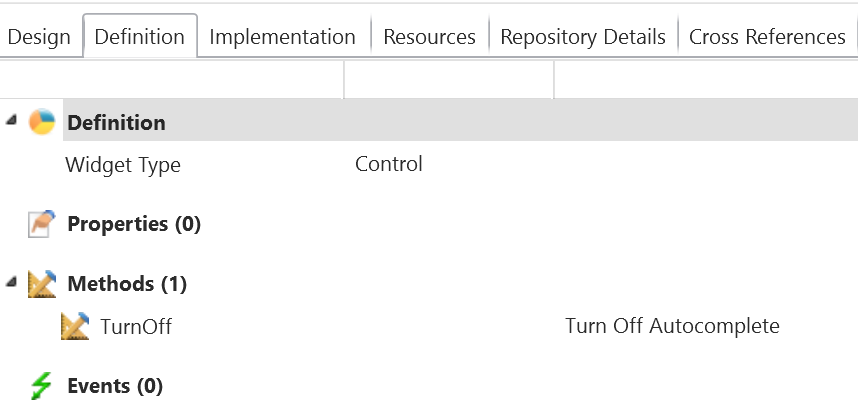
- widget_def.png (23.17 KiB) Viewed 8106 times
Then you will find that the error you are getting disappears (after you have compiled the widget with that definition change).
B.
Re: VLWEB and Autofill
Posted: Sat Oct 22, 2022 12:44 am
by adale
That got it!
I am still very new to widgets and do not know all the ins & outs yet.
Thanks.