Page 1 of 1
VL-Web V15: How to specifying the extension in the file picker
Posted: Fri May 28, 2021 3:32 pm
by Rieko Saitoh
Hi all,
I am creating an application that uploads a CSV file using a file picker.
In the file picker, the extension is displayed as "All files".
Is it possible to specify the extension ".csv"?
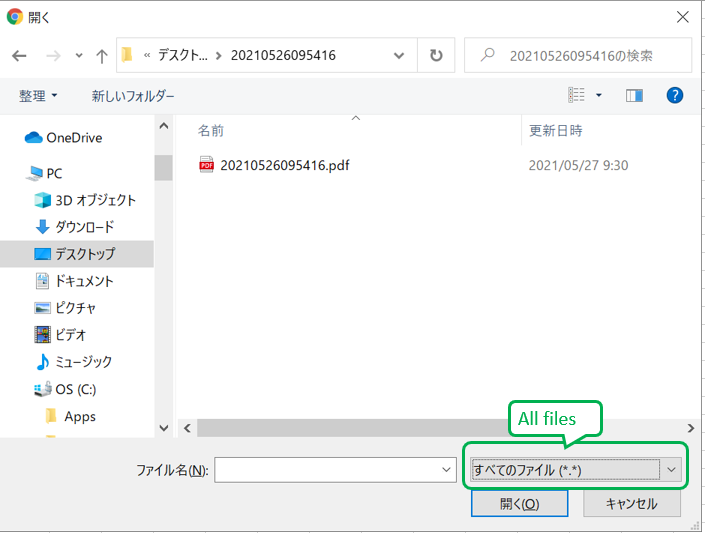
- filepicker.png (56.76 KiB) Viewed 12826 times
Thank you.
Best regards,
Rieko Saitoh
LANSA japan
Re: VL-Web V15: How to specifying the extension in the file picker
Posted: Thu Jun 03, 2021 3:07 pm
by dominique
Yes it's possible
Code: Select all
Define_Com Class(#PRIM_APPL.ICommonDialogFileOpen) Name(#openFileDlg) reference(*dynamic)
Define Field(#Result) Type(*BOOLEAN)
Define Field(#ResultFile) Type(*String)


#sys_appln.CreateFileOpenDialog Result(#openFileDlg)
#openFileDlg.AddFilter( '*.csv' '*.csv' )
#openFileDlg.InitialDir := *TEMP_DIR
....

#openFileDlg.Show Okpressed(#Result) Formowner(#Com_owner)
If (#Result)
#ResultFile := #openFileDlg.File
Endif
Re: VL-Web V15: How to specifying the extension in the file picker
Posted: Fri Jun 04, 2021 12:58 pm
by Rieko Saitoh
Hi dominique,
Thank you for your reply.
I would to do this in a VL-Web application, but the method "CreateFileOpenDialog" doesn't seem to work on the web.
The advice you gave is valid for desktop applications. I will use it as a reference.
Thank you for your support.
Best regards,
Rieko Saitoh
LANSA japan
Re: VL-Web V15: How to specifying the extension in the file picker
Posted: Tue Jun 08, 2021 2:09 pm
by dominique
Hi Rieko
The web filepicker is easy to handle.
Have a look into xDemoWebUploadProgress for a Web Filepicker.
Code: Select all
Define_Com Class(#PRIM_WEB.FilePicker) Name(#FilePicker) Caption('Select a File To Upload') Displayposition(1) Ellipses(Word) Height(60) Left(8) Parent(#COM_OWNER) Tabposition(2) Tabstop(False) Top(8) Verticalalignment(Center) Width(969) Alignment(Center) Themedrawstyle('Heading1') Style(#Style1)
if you want to calculate the file size you can use something like this
Code: Select all
Mthroutine Name(CheckFile)
Define_Map For(*INPUT) Class(#PRIM_WEB.File) Name(#I_File File) Pass(*BY_REFERENCE)
Define_Map For(*Result) Class(#PRIM_ALPH) Name(#O_Result Result)

Define #iFileName *string
Define #iFileSize *string

#iFileName := #I_File.Name
#iFileSize := ("&1Kb").Substitute( (#I_File.FileSize / 1024).Round( Up 2 ).AsString )
#xDemoblob := #I_File.Blob


If ((#I_File.FileSize / 1024).Round( Up 2 ) > 6000)
#O_Result  := "file is too big"
Endif
#O_Result  := "Ok"
Endroutine
That sould help you.
Good luck
Regards
Dominique
Re: VL-Web V15: How to specifying the extension in the file picker
Posted: Wed Mar 16, 2022 1:27 am
by adale
I am trying to work from the example stated by Dominique, with the xDemoWebUploadProgress, and am not quite following how to add the .AddFilter to limit the Windows Open File dialog to *.csv files.
This is in a VL Web view (V15, epc 150040), and the server routine has this property routine code:
++++++++++++++++++++++++++++++++
* Get File OPEN Dialog
PTYROUTINE Name(GetFileOpenDialog)
DEFINE_MAP For(*Output) Class(#Prim_appl.ICommonDialogFileOpen) Name(#Property) Pass(*By_Reference)
IF (#FileOpenDialog *Is *Null)
#FileOpenDialog <= #sys_appln.CreateFileOpenDialog
* How to add the CSV filter?
* .AddFilter( 'CSV files' '*.csv' )
ENDIF
#Property <= #FileOpenDialog
ENDROUTINE
++++++++++++++++++++++++++++++++++++
The documentation for .AddFilter show it in a method routine, but I am unclear on how to get from the Ptyroutine to the Mthroutine, or how to define this step.
If someone can point me in the right direction, it is greatly appreciated.
Arlyn
Re: VL-Web V15: How to specifying the extension in the file picker
Posted: Wed Mar 16, 2022 10:15 am
by BrendanB
you cannot use the Windows Open File Dialog from a Server Routine. only from a Windows FORM.
in your VLweb View you can use a Filepicker control
Code: Select all
Define_Com Class(#PRIM_WEB.FilePicker) Name(#FilePicker) DisplayPosition(2) Ellipses(Word) Height(56) Left(8) Parent(#COM_OWNER) TabPosition(1) TabStop(False) Top(6) VerticalAlignment(Center) Width(169) Caption('Select File') MarginLeft(8) ThemeDrawStyle('PushButton')

Evtroutine Handling(#FilePicker.FileSelected) File(#File)

if (#File.MimeType.LowerCase.Contains('csv'))
#Filename := #File.Name
#CSVfile.FileName := #File.Blob
else
* SHOW AN ERROR MESSAGE
endif
Endroutine
However the VLweb Filepicker control does not *currently* have a way to set a filter. (Perhaps lodge an Enhancement Request with support).
you can have a widget that does:
Code: Select all
document.querySelectorAll('input[type=file]')[0].accept = '.csv'
which will modify it to SUGGEST *.csv files (noting that there is an option for the user to change it to *.* (All Files). NOTE: not all the required widget code is shown... i would suggest if you do create a widget - 1. ensure you can pass the accept value to it. 2. ensure that your view has finished 'rendering' before you call the method.
So you *MUST* validate the MimeType to ensure it is valid to what you want.
However, be aware that some Browsers will merely check the file extension to determine the mime-type, and some will check the contents of the file... (ie. it is variable) so this may not always work either.