Page 1 of 1
How to change default listener port for MSI deployment
Posted: Tue Oct 26, 2021 1:05 am
by HMJust
I want to do an install on a Windows machine with a deployment package made in v.15

I would like to be able to set the default listener port, either in the package settings or in a command line parameter for msiexec. Does anyone know how that is done?
Re: How to change default listener port for MSI deployment
Posted: Tue Oct 26, 2021 5:24 pm
by HMJust
I found it in the documentation, but not where I'd expect to find it. The parameter is called HOSTROUTEPORTNUMBER
So I'll use a command line like
msiexec /i V15_A_v1.0.0_en-us.msi APPA=X:\LANSA8954 HOSTROUTEPORTNUMBER=8954
Re: How to change default listener port for MSI deployment
Posted: Wed Oct 27, 2021 10:23 am
by Dino
When you create a deployment package, you indicate the port to use as a client, and as a server, clicking in the Communication Manager icon at the deployment package level:
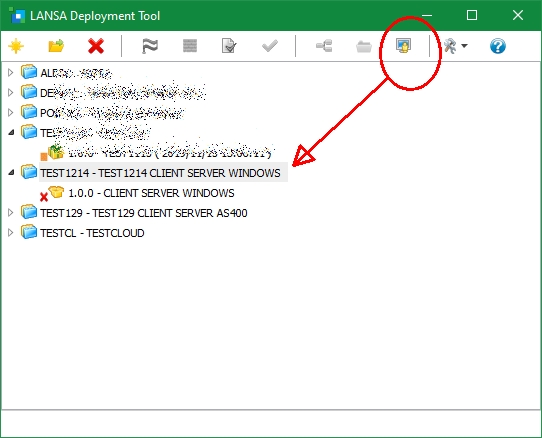
- deploy0.jpg (75.38 KiB) Viewed 5427 times
then first, you indicate which one you want to use as a client:
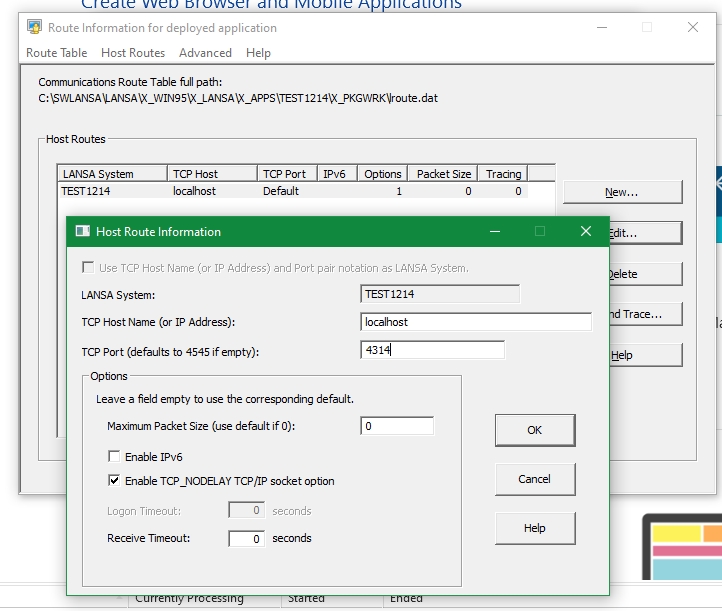
- deploy1.jpg (145.46 KiB) Viewed 5427 times
then which one as a server in the Advanced / Listener option for the listener service:
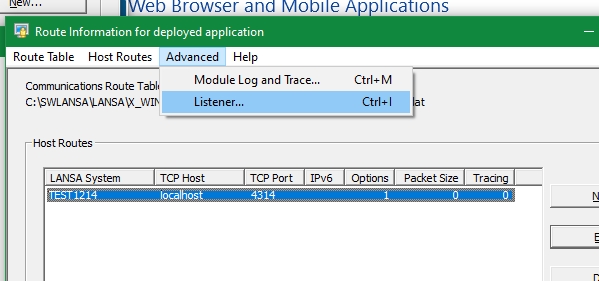
- deploy2.jpg (68.73 KiB) Viewed 5427 times

off course, in this example, I am deploying something that will be running in the server, hence, it have the server and client part. if you only deploying the client, you only need the first part, etc.