Page 1 of 1
JSON reading a response
Posted: Tue Feb 15, 2022 2:35 am
by Joerg Hamacher
Hello everybody,
I have to send an request to a Web API via JSON and to work with the response data. I manage to send the request successfully but I do not know how to read the response.
First steps I do are:
Define_Com Class(#XPRIM_RandomAccessJsonReader) Name(#Reader)
Define_Com Class(#XPRIM_HttpRequest) Name(#HTTP_Request)
...
#Reader.SetSourceHttpResponse Httpresponse(#HTTP_Request.Response)
...
But now I do not how to go further. This is the JSON response I receive:
{"line":1,"identifier":"1615300","status_code":204}
{"line":2,"identifier":"SMH0815","status_code":204}
{"line":3,"identifier":"SMHARTIKEL01","status_code":204}
The entries for every line have to separated and saved in separate data base fields.
Can anybody tell me how to read this JSON response?
Many thanks in advance,
Joerg
Re: JSON reading a response
Posted: Tue Feb 15, 2022 10:38 am
by Dino
Hi,
Is that the complete json response?
I would expect something more standard presented as an array, like this:
Code: Select all
{"invoice":[
{"line":1,"identifier":"1615300","status_code":204},
{"line":2,"identifier":"SMH0815","status_code":204},
{"line":3,"identifier":"SMHARTIKEL01","status_code":204}
]}
in which case after defining this extra elements:
Code: Select all
Define_Com Class(#XPRIM_RandomAccessJsonReader) Name(#Reader)
Define_Com Class(#XPRIM_ErrorInfo) Name(#ErrorInfo)
Define_Com Class(#PRIM_BOLN) Name(#Found)
Def_List Name(#listresult) Fields(#std_num #std_name #std_idno) Type(*Working) Entrys(*Max)
this code will work:
Code: Select all
#Result := #Request.Response.IsSuccessfulRequest
If (#Result)
#Reader.SetSourceHttpResponse HttpResponse(#Request.Response) ErrorInfo(#ErrorInfo)

#std_num := 1
#Reader.BeginArrayWithName Name('invoice') Found(#Found)
Begin_Loop
#Reader.BeginObjectAtIndex Index(#STD_NUM) Found(#Found)
Leave If(#Found.IsFalse)

#std_num := #Reader.ReadNumberWithPath( "line" )
#std_name := #Reader.ReadStringWithPath( "identifier" ).AsNativeString
#STD_IDNO := #Reader.ReadNumberWithPath( "status_code" )
Add_Entry To_List(#listresult)

#std_num += 1

#Reader.EndObject
End_Loop
#Reader.EndArray

Else
#Response := "Error is: " + #Request.Response.ErrorMessage.AsNativeString
Endif
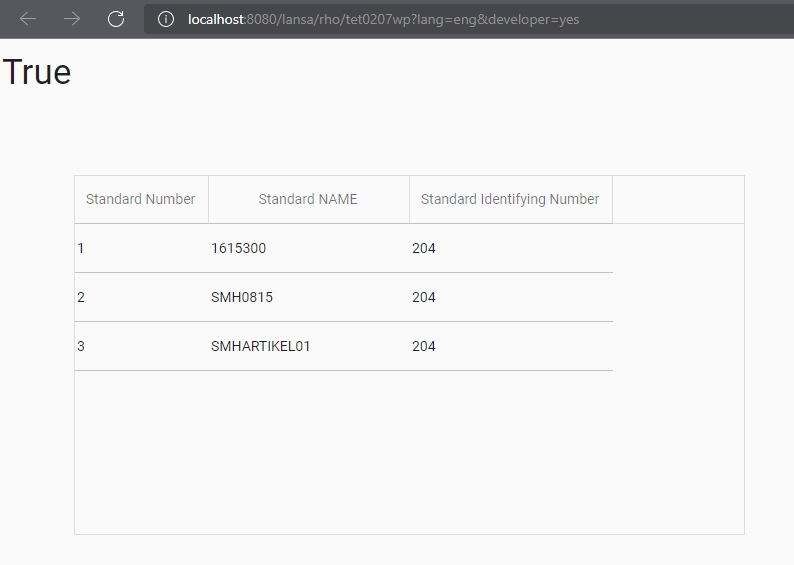
- jsonp1.jpg (42.75 KiB) Viewed 7976 times
Re: JSON reading a response
Posted: Tue Feb 15, 2022 8:03 pm
by Joerg Hamacher
Hi Dino,
no, that's really all I receive. No name is delivered.
Can I simply code something like this:
#Reader.BeginArrayWithName Name('') Found(#Found)?
Best regards,
Joerg
Re: JSON reading a response
Posted: Wed Feb 16, 2022 2:50 am
by Dino
The problem there, is that according to this web site:
https://jsononline.net/json-checker
that is not correctly formed json, so, I cannot process it as a json object, or json array, it is more like a few strings (3) each one is in json format.
for that, I would receive the response, then read it like this, mixing old string handling and json processing...
maybe somebody will chime with a better way to do it:
Code: Select all
#Result := #Request.Response.IsSuccessfulRequest
If (#Result)
* #Reader.SetSourceHttpResponse HttpResponse(#Request.Response) ErrorInfo(#ErrorInfo)
#Response := #Request.Response.AsString

#STD_NUML := 1

Begin_Loop
#STD_NUML := #Response.PositionOf( '{', #STD_NUML )
Leave If(#STD_NUML = 0)

#STD_INT := #Response.PositionOf( '}', #STD_NUML )
#STD_NVARC := #Response.Substring( #STD_NUML, (#STD_INT - #STD_NUML + 1) )

#Reader.SetSourceString String(#STD_NVARC) ErrorInfo(#ErrorInfo)
#std_num := #Reader.ReadNumberWithPath( "line" )
#std_name := #Reader.ReadStringWithPath( "identifier" ).AsNativeString
#STD_IDNO := #Reader.ReadNumberWithPath( "status_code" )
Add_Entry To_List(#listresult)

#STD_NUML := #STD_INT + 1
End_Loop

Else
#Response := "Error is: " + #Request.Response.ErrorMessage.AsNativeString
Endif
Re: JSON reading a response
Posted: Wed Feb 16, 2022 9:50 pm
by Joerg Hamacher
Hi Dino,
many thanks again for this solution.
I asked the other company for creating a correct JSON file - but received no reaction so far.
The handling you showed me will definitely be of great help if they reject my request.
Best regards,
Joerg