Page 1 of 1
Pass List between Dialogs on Web
Posted: Tue May 17, 2022 9:10 pm
by cesarrafael
Hi All,
Sorry for the noob question, but i' mstruggling with this....
How do I pass a list of values on an event (say itemSaved) between dialogs on a web environment? I can pass it by reference, however i'm not being able to get the values on the receiving dialog! What I'm trying to achieve is realy quite simple, have a list view on a dialog, select some values, pass those list values to the calling dialog.... Define_Evt doesn't have a list_map...
Many thanks for your help.
Re: Pass List between Dialogs on Web
Posted: Wed May 18, 2022 5:02 am
by Dino
Hi,
use a collection, for example like indicated here:
viewtopic.php?f=3&t=2432&p=7030&hilit=collection#p7030
Re: Pass List between Dialogs on Web
Posted: Thu May 19, 2022 11:44 pm
by Dino
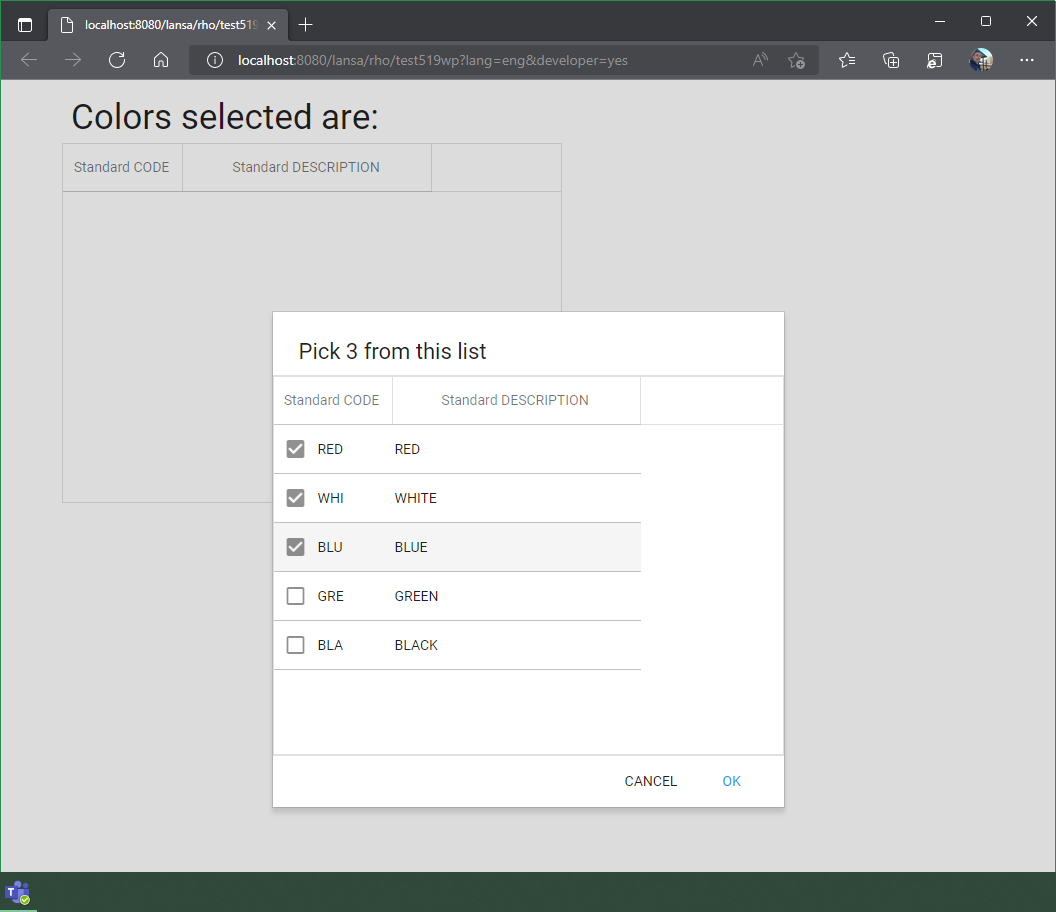
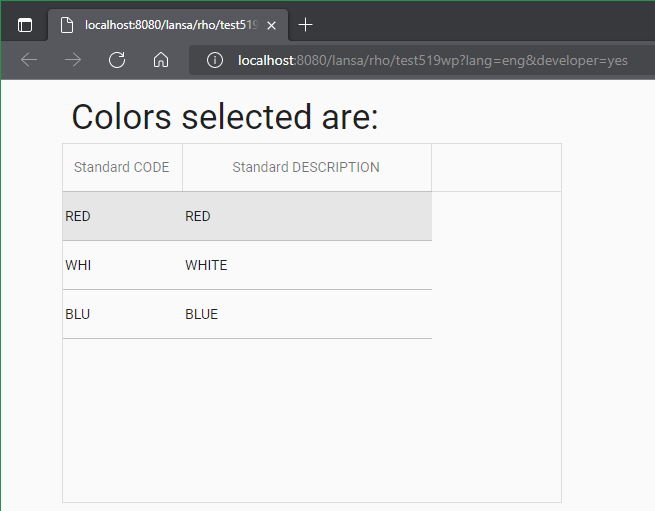
Not really sure from your question where the second dialog fits, if called from the first dialog, or from the web page, so i just did a typical web page using a dialog, receiving a list as part of the signal.
- dialog10.png (46.69 KiB) Viewed 7323 times
This is the web page:
Code: Select all
Begin_Com Role(*EXTENDS #PRIM_WEB) Theme(#SYS_THEME<MaterialDesignBlue>)

Define_Com Class(#test519d1) Name(#test519d1)
Define_Com Class(#test519d2) Name(#test519d2)
Define_Com Class(#PRIM_LIST) Name(#List) ColumnHeaderHeight(48) ColumnLines(False) DisplayPosition(1) Height(360) Left(61) Parent(#COM_OWNER) RowHeight(48) TabPosition(1) Top(63) Width(500)
Define_Com Class(#PRIM_LIST.String) Name(#ListColumn1) ColumnWidth(117) DisplayPosition(1) Parent(#List) SortOnClick(True) Source(#STD_CODE)
Define_Com Class(#PRIM_LIST.String) Name(#ListColumn2) ColumnWidth(246) DisplayPosition(2) Parent(#List) SortOnClick(True) Source(#STD_DESC)
Define_Com Class(#PRIM_MD.Label) Name(#Text) Caption('Colors selected are:') DisplayPosition(2) Height(45) Left(68) Parent(#COM_OWNER) TabPosition(2) ThemeDrawStyle('Title') Top(14) Width(789)

Evtroutine Handling(#Com_owner.Initialize)
#test519d1.Show
Endroutine

Evtroutine Handling(#test519d1.OkClicked) SelectedColors(#ABCList)
Selectlist Named(#ABCList)
Add_Entry To_List(#List)
Endselect
Endroutine
End_Com
and this is the dialog #TEST519D1 , which responds signaling an event and returning a list:
Code: Select all
Begin_Com Role(*EXTENDS #PRIM_DLG) Height(497) Width(513)
Define_Com Class(#PRIM_MD.Label) Name(#Title) Caption('Pick 3 from this list') DisplayPosition(3) Left(0) Parent(#COM_OWNER) TabPosition(3) Top(0) Height(64) Width(511) CaptionAlignment(TopLeft) Ellipses(False) WordWrap(True) ThemeDrawStyle('BottomDivider+Heading1') PaddingLeft(24) PaddingRight(24) PaddingTop(24)
Define_Com Class(#PRIM_PANL) Name(#OptionsPanel) DisplayPosition(4) Left(0) Parent(#COM_OWNER) TabPosition(4) TabStop(False) Top(64) Height(379) Width(511) VerticalScroll(True)
Define_Com Class(#PRIM_PANL) Name(#Divider) DisplayPosition(5) Left(0) Parent(#COM_OWNER) TabPosition(5) TabStop(False) ThemeDrawStyle('TopDivider') Top(443) Height(5) Width(511)
Define_Com Class(#PRIM_MD.FlatButton) Name(#ButtonOk) Caption('OK') DisplayPosition(1) Left(423) Parent(#COM_OWNER) TabPosition(2) TabStop(False) ThemeDrawStyle('ForegroundMediumPrimary') Top(451) Width(72)
Define_Com Class(#PRIM_MD.FlatButton) Name(#ButtonCancel) Caption('CANCEL') DisplayPosition(2) Left(342) Parent(#COM_OWNER) TabPosition(1) TabStop(False) Top(451) PaddingLeft(8) PaddingRight(8) Width(73)

Define_Com Class(#PRIM_LIST) Name(#List) ColumnHeaderHeight(48) ColumnLines(False) DisplayPosition(1) Height(379) Left(0) Parent(#OptionsPanel) RowHeight(48) TabPosition(1) Top(0) Width(511) CheckBoxes(True)
Define_Com Class(#PRIM_LIST.String) Name(#ListColumn1) ColumnWidth(116) DisplayPosition(1) Parent(#List) SortOnClick(True) Source(#STD_CODE)
Define_Com Class(#PRIM_LIST.String) Name(#ListColumn2) ColumnWidth(245) DisplayPosition(2) Parent(#List) SortOnClick(True) Source(#STD_DESC)

* Collection of items to be handled as a list
Define_Com Class(#Prim_acol<#test519rp>) Name(#ABCList)

Define_Evt Name(CancelClicked)
Define_Evt Name(OkClicked)
Define_Map For(*Input) Class(#Prim_acol<#test519rp>) Name(#SelectedColors) Pass(*By_Reference)

Evtroutine Handling(#COM_OWNER.CreateInstance)
Clr_List Named(#List)
#std_code #std_desc := "RED"
Add_Entry
#std_code #std_desc := "WHITE"
Add_Entry
#std_code #std_desc := "BLUE"
Add_Entry
#std_code #std_desc := "GREEN"
Add_Entry
#std_code #std_desc := "BLACK"
Add_Entry
Endroutine

Evtroutine Handling(#COM_OWNER.Initialize)
Endroutine

Evtroutine Handling(#ButtonOk.Click)
Selectlist Named(#List)
If (#List.CurrentItem.Checked = Checked)
Add_Entry To_List(#ABCList)
Endif
Endselect
Signal Event(OkClicked) SelectedColors(#ABCList)
#COM_OWNER.Close
Endroutine

Evtroutine Handling(#ButtonCancel.Click)
Signal Event(CancelClicked)
#COM_OWNER.Close
Endroutine
End_Com
and lets no forget the "object" reusable part #TEST519RP that contains the controls we are passing thru:
Code: Select all
Begin_Com Role(*EXTENDS #PRIM_OBJT *listFields #OneItem)
Group_By Name(#OneItem) Fields(#STD_CODE #STD_DESC)
End_Com
- dialog11.png (19.8 KiB) Viewed 7323 times
Re: Pass List between Dialogs on Web
Posted: Fri May 27, 2022 7:03 pm
by cesarrafael
Many thanks, DIno, for your quick and concise answer! It works like a charm

Cheers!