Page 1 of 1
Keyboard behaviour VL mobile app
Posted: Wed Jun 29, 2022 1:33 am
by René Houba
We created a VL Web app in LANSA V15:
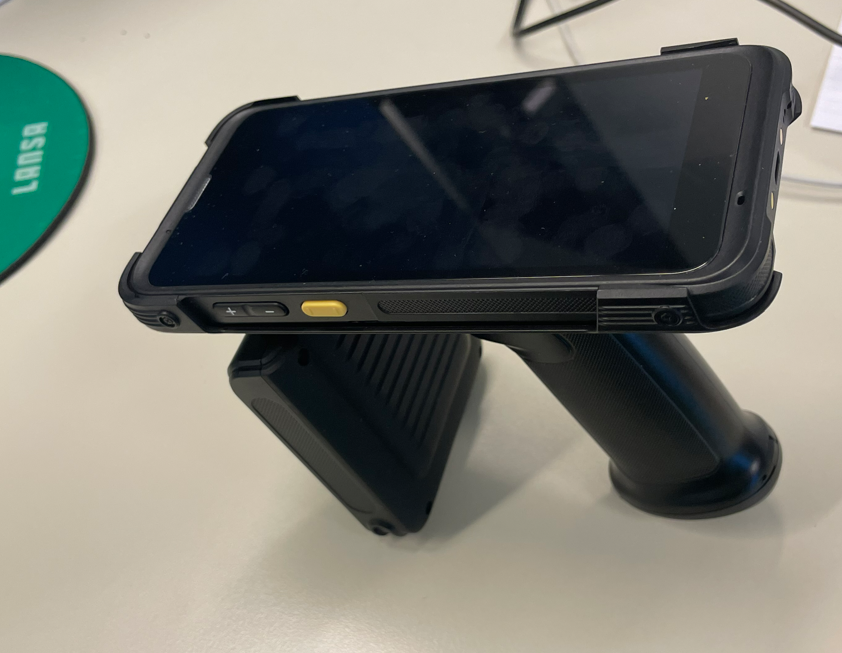
- 1. Scanner.PNG (820.22 KiB) Viewed 17635 times
We show a list using the primitive #PRIM_LIST, because the end user can change list values. We activated the ShowPages property to true so the enduser can scroll in case of too many entries for one page:
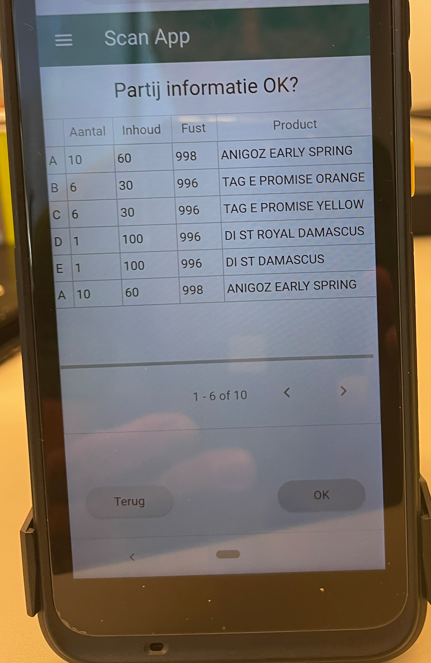
- 2. PRIM_LIST with property ShowPages = True.PNG (525.13 KiB) Viewed 17635 times
The problem is that if the user decides to change a list value, the keyboard takes almost half of the screen and this can result in not showing the list entry that needs to be changed:
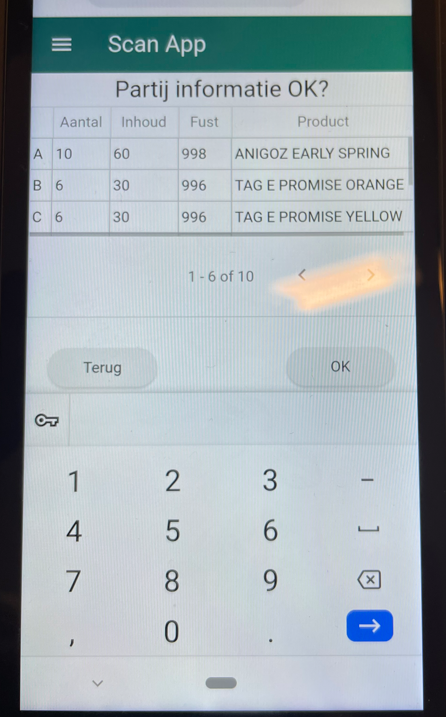
- 3. Change value in list = ShowPages = True.PNG (625.56 KiB) Viewed 17635 times
It seems that I can only include 3 images, so next see next message here to see the rest......
Re: Keyboard behaviour VL mobile app
Posted: Wed Jun 29, 2022 1:39 am
by René Houba
So....
So when I select an entry in the list I change the ShowPages property to False, so all 6 entries are still visible:
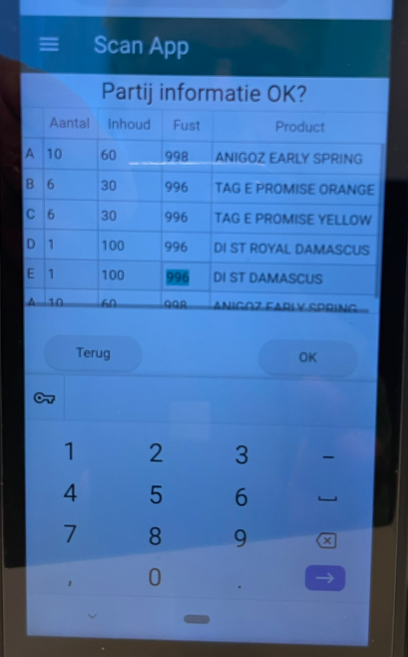
- 4. Change value in list = ShowPages = False.PNG (442.2 KiB) Viewed 17634 times
The problem now is, that when I have change the entry value, I can remove the keyboard, and I want to visualize the ShowPages again (set this property back to True). But removing the keyboard on this device does not trigger any VL event, so I see my total list again without the posibility to scroll to the next page:
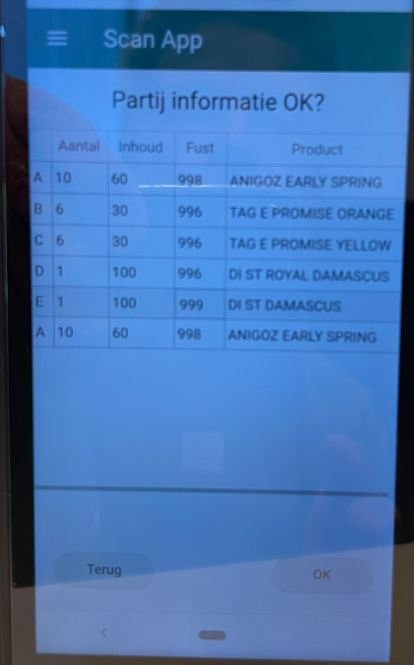
- 5. Remove keyboard and want to set ShowPages to True again.PNG (445.42 KiB) Viewed 17634 times
Does someone know if it is possible to trigger the disablement of the devices keyboard, so I can set property ShowPages back to True?
Re: Keyboard behaviour VL mobile app
Posted: Wed Jun 29, 2022 3:09 am
by atostaine
1. Are they clicking somewhere else to close the keyboard? Can you use getfocus on those elements?
2. Are they expected to enter a certain number of characters in the value that they are changing so you can do a keypress and when they type 10 characters you can do what you need?
3. Timer, but you can't really know how long it's going to take to enter the value.
4. Timer on keypress, if it takes more than x seconds between keypresses, assume they are done?
Re: Keyboard behaviour VL mobile app
Posted: Wed Jun 29, 2022 11:22 pm
by René Houba
Hi Art,
1. No, change change a value in the list (touchscreen) and use on the keyboard the little down key to disable the keyboard on the devise.
2. No. For each line they can change 3 numeric values.
3. Is not an option indeed

.
4. Not an option as well
Kind regards,
René
Re: Keyboard behaviour VL mobile app
Posted: Thu Jun 30, 2022 8:28 am
by BrendanB
Hi Art,
a suggestion:
1. change the list row items to READ ONLY
2. on list.itemClick show a dialog that has the Product number and the fields to change with cancel/done buttons - you can also include NEXT/PREVIOUS so that you can move to the next item without going to the list.
3. when the dialog is closed, you can update the entry in the list (without needing to do anything else).
this has the advantages:
1. the dialog only has a few on screen fields, so the keyboard size will not be an issue
2. you are not needing to determine if the keyboard is shown.
3. allows the user to confirm or abandon their changes
4. allows for the list to take the full screen. (if you update the list when the dialog is closed, you may be able to do this 'in memory' rather than going back to the server to repopulate the list.
Note: it doesnt *have* to be a dialog, it could be another view (if dialog, use Fullscreen as the position).
Re: Keyboard behaviour VL mobile app
Posted: Thu Jun 30, 2022 4:14 pm
by René Houba
Hi Brendan,
Good suggestion, did not think about that yet.
Thanks,
René
Re: Keyboard behaviour VL mobile app
Posted: Wed Jul 06, 2022 1:36 am
by René Houba
Changed this into:
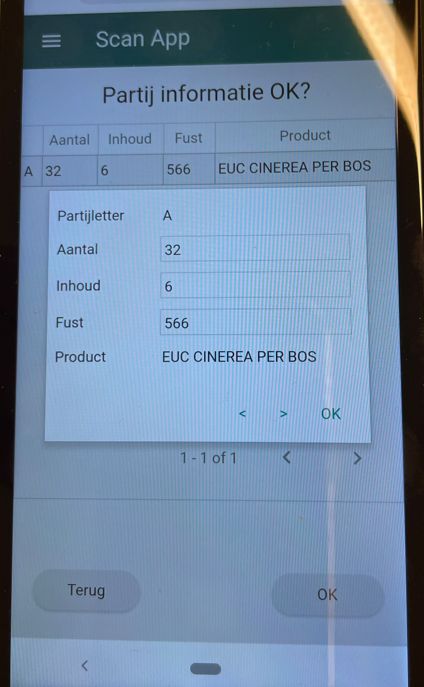
- Dialog1.PNG (656.12 KiB) Viewed 17567 times
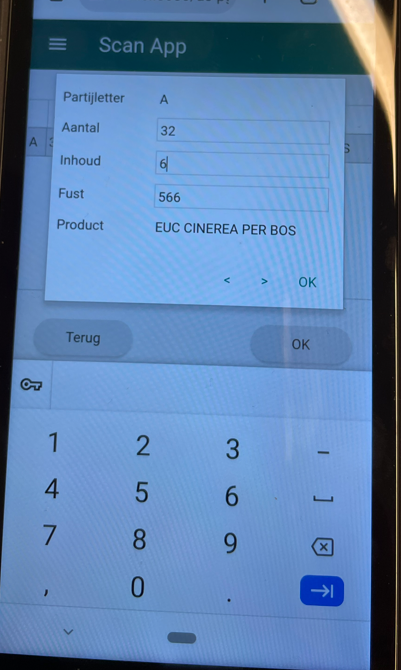
- Dialog2.PNG (523.99 KiB) Viewed 17567 times